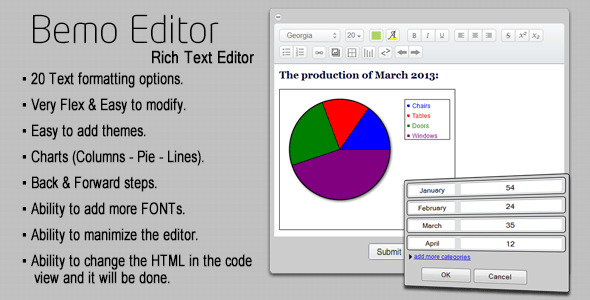
For content creators, web developers, and site administrators who demand more than a basic text box, the Bemo Editor presents a sophisticated solution. This isn’t just another rich text editor; it is a versatile writing platform that uniquely integrates dynamic chart creation directly into your content workflow. When you need to present data alongside formatted text—whether for reports, educational materials, or blog posts—this tool eliminates the need for external graphing software or manual image uploads. The ability to add custom fonts, tweak underlying HTML, and streamline the editing process makes it a powerful asset for anyone building content-heavy websites. Below, we break down exactly what this editor offers, who benefits most, and whether it is the right fit for your next project.
Key Features
- 20 Text Formatting Options: Go beyond bold and italic. With two dozen formatting controls at your fingertips, you can create headers, blockquotes, lists, alignment styles, and more. This gives you the granular control needed to produce visually rich, professional-grade content without touching a single line of code.
- Integrated Chart Builder (Columns, Pie, Lines): The standout feature is the ability to insert interactive or static charts directly into your editor. Whether you need a column chart for sales data, a pie chart for budget breakdowns, or a line graph for trend analysis, Bemo Editor handles it natively. This eliminates the hassle of creating charts in a separate tool and embedding them as images.
- Undo & Redo (Back & Forward Buttons): Content creation involves experimentation. The dedicated undo and redo buttons allow you to revert changes or reapply them with a single click, providing a safety net as you edit complex layouts.
- Custom Font Integration: Tired of being limited to default system fonts? This editor allows you to add more fonts to the dropdown menu. You can integrate brand-specific typefaces or Google Fonts to ensure your content matches your site’s design language perfectly.
- Code View & HTML Modification: For advanced users, the editor provides a “code view” toggle. You can switch to raw HTML, make precise adjustments to markup, and see those changes reflected instantly in the visual editor. This is crucial for custom CSS classes, embedding scripts, or fixing rendering issues.
- Minimizable Interface: The editor can be collapsed or minimized, saving screen real estate on cluttered admin panels or front-end submission forms. This simple but thoughtful feature enhances the user experience significantly.
- Highly Customizable Styling: You are not locked into a generic look. The plugin is built to be “easy to style,” meaning you can override default CSS to match the editor’s buttons, toolbars, and dropdowns to your theme’s aesthetic.
Who Is This For? Use Cases
Content Authors and Bloggers
If you write long-form articles that include statistical data, survey results, or financial breakdowns, Bemo Editor is your new best friend. Instead of creating a chart in Excel, exporting it as a PNG, and then uploading it to your media library, you can craft a pie chart or line graph directly within your post editor. This saves time, keeps your workflow uninterrupted, and allows for quick data updates without recreating images.
Web Developers Building Custom Admin Panels
Developers who are building custom WordPress plugins or themes often need a reliable, lightweight text editor for their admin dashboards. Bemo Editor’s ability to modify the HTML output means you can sanitize data the way you want. The code view feature also allows you to strip out unwanted tags or add custom data attributes, making it an excellent choice for advanced custom fields (ACF) integrations.
Educators and Course Creators
Online learning platforms require clarity. When creating lesson content that includes performance metrics, enrollment numbers, or quiz result breakdowns, inserting a column chart makes the data digestible. The easy-to-modify nature of the editor ensures non-technical instructors can format text and insert visuals without needing a developer. The font expansion feature also helps match the editor’s output to the brand identity of the educational institution.
Business Owners and Marketing Teams
Creating polished landing pages, case studies, or internal reports often demands a balance between text and data visualization. With 20 formatting options, you can craft compelling headlines and call-to-actions, while the chart builder handles the hard numbers. The ability to minimize the editor is particularly useful for teams using front-end editors on member dashboards, keeping the interface clean and professional.
Technical Details & Compatibility
While the provided description does not list specific version numbers or update dates, we can infer the editor’s technical posture from its feature set. The Bemo Editor is designed as a JavaScript-based rich text editor, likely utilizing a library like TinyMCE or Quill under the hood. Its functionality suggests compatibility with modern web standards. The chart generation feature implies reliance on HTML5 Canvas or SVG rendering, ensuring cross-browser support for Chrome, Firefox, Safari, and Edge. The plugin is “well documented,” which indicates that even users with intermediate technical skills can integrate it into their WordPress or custom PHP projects. Given the nature of editors purchased from marketplaces like CodeCanyon, you can expect it to integrate seamlessly with standard WordPress hooks, though it may also function as a standalone library for non-WordPress platforms.
Pros and Cons
Pros
- Unique Chart Functionality: Combines text editing and data visualization in one tool, reducing dependency on external graph makers.
- Highly Flexible: Supports custom fonts, HTML editing, and extensive styling overrides, allowing for deep personalization.
- User-Friendly UX: Features like undo/redo and the minimize button show attention to daily workflow needs.
- Comprehensive Formatting: 20 formatting options cover almost all standard text styling requirements without bloat.
- Well Documented: Good documentation reduces the learning curve for integration and customization.
Cons
- No Mention of Real-Time Collaboration: Unlike some modern editors (e.g., Google Docs style), this is likely a single-user interface—not ideal for team co-editing.
- Limited Chart Types: Currently supports only columns, pie, and lines. Users needing scatter plots, area charts, or heatmaps may need additional tools.
- Potential Weight: The combined logic for text editing and chart rendering might be heavier than a simple text editor, potentially affecting load times on slower servers if not optimized.
- Dependency on Third-Party Libraries: The editor’s performance depends on the underlying libraries it leverages, which may require updates for security or compatibility.
Frequently Asked Questions
Does Bemo Editor work with the latest version of WordPress?
Yes, assuming the editor is built on standard JavaScript libraries compatible with modern WordPress versions. Since it is a rich text editor plugin typically found on CodeCanyon, it is designed to integrate via the wp_editor() function or as a replacement for the default TinyMCE editor. Always check the product’s changelog for specific version compatibility, but its feature set of HTML editing and chart insertion aligns with current content management standards.
Can I use Bemo Editor on a front-end user submission form?
Absolutely. The editor is built with flexibility in mind, including the ability to minimize the interface and customize its styling. You can integrate it into front-end forms using standard JavaScript initialization. The code view feature can be disabled via settings if you want to restrict what users can edit. Its documented nature should provide clear instructions for embedding it in custom post submission plugins.
Does the chart feature require an external API or Internet connection?
No. The chart generation for columns, pie, and lines is handled entirely client-side within the browser using JavaScript and HTML5. You do not need an external API key or a live internet connection to render the charts. This makes it ideal for local development environments, intranet applications, or sites with strict privacy policies where data cannot be sent to third-party servers.
Final Verdict
The Bemo Editor occupies a unique niche in the crowded market of rich text editors. It successfully bridges the gap between a standard WYSIWYG tool and a basic data visualization dashboard. For the price point typical of CodeCanyon plugins, you are getting a solution that solves a specific pain point: creating data-driven content without switching between applications. The inclusion of custom fonts and HTML modification ensures that it does not sacrifice depth for the sake of its charting gimmick. It is honest about its capabilities—offering three chart types rather than promising a bloated suite of features it cannot deliver on. The documentation reinforces its credibility as a professional release. If your workflow regularly involves explaining numbers with text, this editor will pay for itself in saved time and reduced frustration. Don’t settle for basic text boxes when you can have an editor that writes, formats, and visualizes data all at once. Check the current sales count and author reputation on the marketplace, and if the fit is right, add this tool to your arsenal today.