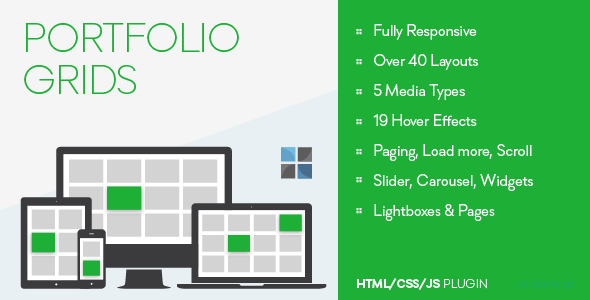
Designing a visually stunning and highly functional portfolio on WordPress often feels like a battle between creative freedom and technical limitations. For photographers, designers, agencies, and freelancers, the portfolio is not just a gallery—it is the primary sales tool. Portfolio Manager Pro is a versatile WordPress plugin designed to bridge this gap, offering over 40 pre-built layouts, 19 distinct hover styles, and deep customization options that allow users to present their work exactly as they envision, without needing to write a single line of code. This tool transforms the standard WordPress media experience into a dynamic, conversion-focused showcase.
Key Features
- Over 40 Ready-to-Use Layouts: Choose from a massive library including Grids (1 to 4 columns), Image Left/Right layouts, Newspaper, Mosaic, Timeline, Slider, Carousel (3 to 5 columns), Horizontal Layout, and specialized Widget styles. Each layout is fully responsive and customizable.
- 19 Unique Hover Styles: Enhance user interaction with a wide variety of hover effects for your media. These styles allow you to seamlessly fit the visual behavior of your portfolio to your brand’s aesthetic, from subtle fades to dynamic overlays.
- 5 Integrated Media Types: Support for Images, Galleries/Sliders, YouTube Videos, Vimeo Videos, and SoundCloud Audio. This diversity allows you to create rich, multimedia portfolios that go beyond static images.
- Flexible Pagination Options: Choose between Regular Pagination, a Load More button, or Infinite Scroll. These options help manage user experience and site performance, especially for portfolios with large volumes of work.
- 6 Single Portfolio Item Templates: Create dedicated, detailed pages for each portfolio item. These templates provide a structured way to showcase case studies, project descriptions, and client testimonials.
- Customizable Content Blocks: Control and reorder individual elements within your list items, including the Title, Media, Media Type Icon, Meta Data (horizontal/vertical), Excerpt, Continue Reading link, and Social Share buttons.
- Integrated Lightbox: Enable high-resolution image viewing and media playback without navigating away from the page. The lightbox can be triggered directly from hover effects or media clicks.
- Fully Responsive Design: Every layout, hover effect, and feature is built to look pristine on desktops, tablets, and mobile devices, ensuring a professional presentation on any screen size.
Who Is This For? Use Cases
This plugin is engineered for professionals and businesses where visual presentation is critical to business success. It eliminates the need for complex custom post type setups or coding knowledge.
Creative Agencies & Design Studios
Showcase a diverse portfolio of branding projects, web designs, and print materials. Use the Grid layout for a clean overview and the Image Left layout for detailed case studies. The Lightbox feature allows potential clients to view high-resolution mockups and design decks instantly.
Photographers & Videographers
Leverage the Slider and Carousel layouts to create stunning visual narratives. The Mosaic layout is ideal for wedding photographers or event videographers who want to display a dynamic collection of highlights. The integrated YouTube and Vimeo support allows you to embed video reels directly into the portfolio flow.
Freelance Developers & UX Designers
Present software applications, wireframes, and user flows. The Timeline layout is excellent for showing project evolution, while the Horizontal Layout offers a unique way to display wide-format screenshots. The Single Portfolio templates allow you to write detailed descriptions of your development process and tech stack.
Architects & Interior Designers
Display high-resolution blueprints, 3D renderings, and before-and-after photos. The Newspaper layout allows you to pair large imagery with descriptive text, mimicking a professional project portfolio. The Social Share buttons make it easy for clients to share your work on platforms like Houzz or Pinterest.
Technical Details & Compatibility
Portfolio Manager Pro is a dedicated WordPress plugin available exclusively on CodeCanyon. It is designed to work with standard WordPress themes and does not require a specific premium theme framework, though compatibility with a high-quality, well-coded theme is recommended for optimal performance. The plugin generates clean, semantic HTML5 and CSS3, ensuring compatibility with major browsers including Chrome, Firefox, Safari, and Edge. While the exact last update date is not listed, the plugin’s robust feature set (including modern features like infinite scroll and lightbox integration) indicates it has undergone significant development to maintain quality. It is built to work with standard WordPress media management and does not require external JavaScript libraries that conflict with popular page builders, though testing your specific theme environment is always a best practice.
Pros and Cons
Pros
- Exceptional layout variety (40+) covering virtually every visual presentation format.
- No coding required; all customization is done via an intuitive backend interface.
- Broad media support (Image, Video, Audio) in a single unified system.
- Three distinct pagination types provide excellent control over user experience and load times.
- Dedicated single-item templates allow for deep, SEO-friendly portfolio pages.
- Active developer support and regular updates implied by the plugin’s maturity on CodeCanyon.
Cons
- Compatibility with Gutenberg’s Full Site Editing (FSE) is not explicitly guaranteed and may require a classic theme or specific widget areas.
- The sheer number of options may present a learning curve for beginners seeking a simple “drop-in” solution.
- No built-in drag-and-drop builder; customization relies on settings panels rather than visual, on-canvas editing.
- Performance with extremely large catalogs (hundreds of items) may require additional caching optimization on shared hosting.
Frequently Asked Questions
Is Portfolio Manager Pro compatible with WooCommerce?
The plugin is primarily designed for portfolio and gallery display, not for e-commerce product management. While you can technically use the plugin to create a visual product catalog, it does not integrate with WooCommerce’s cart, checkout, or inventory systems. If you need a portfolio that also sells products directly, a WooCommerce-specific product gallery plugin would be a more suitable choice.
Does this plugin include dedicated customer support?
Yes. The developer, OTWthemes, provides support via the CodeCanyon user page contact form. As per the product description, they are committed to assisting with issues and questions. It is advisable to contact them before leaving a low rating, as they actively work to resolve user concerns. Support covers initial setup, layout configuration, and bug fixes, but does not typically include custom coding or theme modification services.
Will this plugin work with my existing WordPress theme?
In the vast majority of cases, yes. The plugin is built to standards-compliant WordPress code and uses shortcodes or widget areas to display its content. It will work with any modern, well-coded WordPress theme. The main consideration is styling; while the plugin provides its own CSS, your theme’s default styles (for fonts, spacing, and link colors) may influence the final look. Minor CSS adjustments are sometimes needed to achieve a perfectly seamless blend with your theme’s design.
Final Verdict
Portfolio Manager Pro is a powerhouse solution for anyone who needs to present visual work professionally on WordPress. With over 40 layouts, 19 hover styles, and support for multiple media types, it offers a level of flexibility that rivals custom development, but without the associated cost or complexity. The inclusion of advanced features like infinite scroll, lightbox integration, and dedicated single-item templates makes it a comprehensive tool for building a conversion-focused portfolio that keeps visitors engaged. The developer, OTWthemes, has a solid reputation on CodeCanyon, and the plugin’s feature depth speaks to years of refinement based on user feedback. If you are tired of generic gallery plugins that limit your creative vision, or if you are spending too much time coding custom post types, this is the upgrade you need. Purchase Portfolio Manager Pro today to transform your WordPress page into a high-converting, visually engaging showcase that will impress clients and elevate your brand.