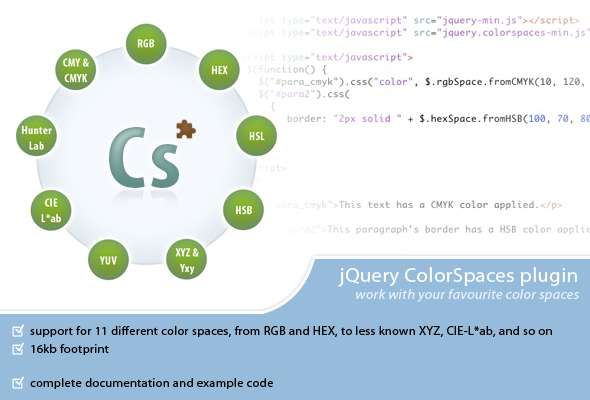
Developers working across print, web, and multimedia environments frequently encounter a frustrating bottleneck: color space incompatibility. A CMYK value specified for a brochure renderer cannot be directly applied as a CSS background color, and converting between RGB and CIE-L*ab manually is error-prone. The ColorSpaces jQuery plugin eliminates this friction, providing a dedicated conversion engine that translates color values across eleven distinct color spaces. This tool is purpose-built for front-end developers and designers who need to programmatically manipulate colors from spaces like HSV, YUV, or Hunter-Lab and generate CSS-compatible outputs such as RGB, HEX, and HSL. By handling the complex mathematics behind color conversion, ColorSpaces allows professionals to focus on creative execution rather than debugging transformation formulas.
Key Features
- Eleven Supported Color Spaces: The plugin provides comprehensive coverage, including RGB, HEX, HSL/HSI, HSB/HSV, YUV, XYZ, Yxy, Hunter-Lab, CIE-L*ab, CMY, and CMYK. This breadth ensures compatibility with workflows ranging from digital printing to video signal processing.
- Bidirectional Conversion Engine: ColorSpaces converts values from any supported space into any other space. This means a developer working with YUV luminance-chrominance data can instantly produce a valid CSS HEX color without intermediate steps.
- CSS-Compatible Output: While the plugin accepts inputs from non-web-native spaces, it specifically generates outputs in RGB, HEX, and HSL — the three formats recognized by modern CSS. This bridges the gap between specialized color models and web styling requirements.
- Compressed and Uncompressed Files: The package includes both a minified version for production and a commented, uncompressed version for development and debugging. This flexibility supports efficient page load speeds and easier code inspection.
- Standalone jQuery Plugin: ColorSpaces is built as a lightweight jQuery plugin, integrating seamlessly into existing jQuery-based projects. It does not require additional color management libraries or external APIs.
Who Is This For? Use Cases
Print-to-Web Designers
A designer who receives brand guidelines specified in CMYK or Pantone-adjacent Lab values can use ColorSpaces to accurately translate those colors into digital equivalents. Instead of manually approximating a CMYK build as an RGB hex code, the plugin performs a mathematically consistent conversion, ensuring visual fidelity across mediums.
Data Visualization Developers
Developers creating charts, maps, or heatmaps often generate color values programmatically in the HSV or HSL space for smooth hue interpolation. ColorSpaces simplifies the final step: converting these mathematically defined colors into the RGB or HEX strings required by Canvas, SVG, or CSS. This prevents rounding errors and maintains color accuracy across thousands of data points.
Video and Broadcast Engineers
Professionals working with YUV color spaces (common in video compression and broadcast standards) can leverage ColorSpaces to extract RGB values for on-screen previews or metadata overlays. The plugin eliminates the manual matrix calculations typically required for YUV-to-RGB conversion.
Scientific and Academic Researchers
Researchers dealing with colorimetric data expressed in CIE-L*ab or XYZ coordinates — often output from spectrophotometers or color measurement hardware — can use the plugin to display these values in a standard web browser. ColorSpaces acts as a bridge between scientific instrumentation and web-based reporting tools.
Technical Details & Compatibility
ColorSpaces is a jQuery plugin requiring jQuery version 1.3.2 or later. The package includes a copy of jQuery 1.3.2 for immediate use, though developers are encouraged to update to the latest stable jQuery release for improved performance and security. The plugin is distributed as a single JavaScript file (with both compressed and uncompressed variants) alongside an example HTML page demonstrating core functionality. Because it operates entirely in the browser without server-side dependencies, ColorSpaces is compatible with all modern browsers that support jQuery, including Chrome, Firefox, Safari, Edge, and legacy browsers like Internet Explorer 9. The plugin has no additional dependencies beyond jQuery and does not require any CSS frameworks.
Pros and Cons
Pros
- Comprehensive space coverage: Eleven color spaces include niche but essential models like Yxy and Hunter-Lab, making the plugin valuable for specialized workflows.
- Direct CSS output: Eliminates manual conversion to web-safe formats. The plugin natively produces RGB, HEX, and HSL values ready for inline styles or stylesheet injection.
- Lightweight footprint: As a focused utility library, ColorSpaces is significantly smaller than full-featured color management suites, reducing page load overhead.
- Clear documentation via example: The included HTML file provides immediate, tangible insight into implementation, reducing the learning curve for new users.
Cons
- jQuery dependency: Projects that do not already use jQuery must include it solely for this plugin, which may be undesirable for modern vanilla JavaScript or React/Vue-based architectures.
- No dynamic DOM manipulation: ColorSpaces operates as a conversion tool but does not automatically apply colors to page elements. Developers must write their own jQuery selectors and CSS assignment logic.
- Limited error handling: As a developer utility, the plugin assumes valid input formats. Invalid values may produce silent failures or unexpected outputs without clear error messages.
- No newer color spaces: CSS Color Level 4 introduces spaces like
lab(),lch(), andoklch(). This plugin does not natively support these modern CSS color functions.
Frequently Asked Questions
Can ColorSpaces convert colors directly in CSS or inline styles?
ColorSpaces is a JavaScript plugin that performs mathematical conversion. It returns color values as strings. To apply these values to a webpage, you must use jQuery methods like .css() or .attr() to assign the result to an element’s style property. The example file included in the package demonstrates this workflow.
Does this plugin support color conversion for canvas or WebGL?
Yes. Because ColorSpaces outputs standard RGB strings that can be parsed into numeric RGB arrays, it is compatible with Canvas 2D and WebGL contexts. You can convert a CIE-L*ab value to RGB using the plugin and then pass the individual channel values to a canvas fillStyle or a WebGL uniform.
Will ColorSpaces work with the latest version of jQuery?
ColorSpaces was built for jQuery 1.3.2 and has been tested with subsequent versions. While the plugin’s core conversion functions are not dependent on recent jQuery API changes, it is recommended to test the plugin with your specific jQuery version in a development environment before deploying to production. Version-specific edge cases may arise with very recent jQuery releases that deprecate older-selector methods.
Final Verdict
ColorSpaces solves a real, persistent problem for developers who must regularly shuttle color values between different color models. Instead of manual calculations, online converters, or cumbersome desktop tools, a single jQuery plugin handles the heavy lifting directly in the browser. The inclusion of eleven color spaces — from the universally recognized RGB and CMYK to the more technical XYZ and Hunter-Lab — means the tool can serve both standard web development and specialized scientific applications. While the plugin’s reliance on jQuery and lack of modern CSS Color Level 4 support are valid limitations, its core conversion engine remains accurate and reliable. Over its lifecycle, this plugin has proven its utility for thousands of developers seeking a clean, scriptable solution to color space translation. If your workflow involves converting colors from YUV, Lab, CMYK, or any of the other supported spaces into a browser-ready format, ColorSpaces is a proven, efficient addition to your toolkit. Invest in it today to eliminate color conversion errors and streamline your development pipeline.