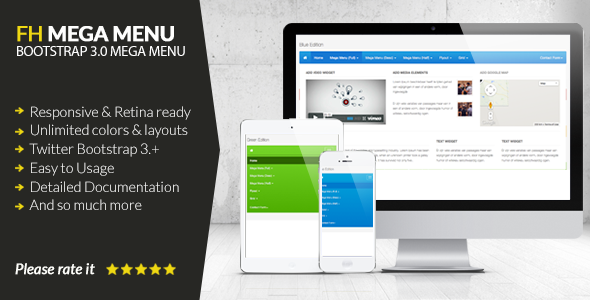
When you need a navigation system that goes beyond simple dropdowns, the FH Mega Menu jQuery Plugin delivers a professional, feature-rich solution for developers and site owners alike. Built on the rock-solid foundation of Twitter Bootstrap 3.3.1+, this plugin transforms standard menus into fully responsive, retina-ready mega menus packed with dynamic content like videos, Google Maps, carousels, and more. Whether you are building a complex ecommerce store, a content-heavy news portal, or a corporate site with dozens of pages, this plugin gives you the flexibility to organize content intuitively without sacrificing performance or mobile usability. With unlimited color schemes, a straightforward three-step installation, and reliable 24/7 support, the FH Mega Menu is engineered to enhance user experience and streamline site architecture from day one.
Key Features
- 100% Responsive Layout Design – The menu automatically adapts to any screen size, ensuring seamless navigation on desktops, tablets, and smartphones without extra customization.
- Built on Twitter Bootstrap 3.3.1+ – Leverages the proven Bootstrap grid system, making integration with existing Bootstrap projects effortless and ensuring cross-browser consistency.
- Unlimited Color Schemes – Comes with six ready-to-use schemes (orange, blue, red, inverse, default, green) and lets you create custom color palettes with minimal CSS knowledge.
- 3-Step Installation – Designed for quick deployment on any web project, reducing setup time and getting your mega menu live in minutes.
- Flexible Bootstrap Column Grid – Use the full 12-column grid to arrange content blocks exactly as needed, from simple links to complex widget layouts.
- Font Awesome Icons Included – Enhance navigation items with scalable vector icons that look sharp on retina displays and load quickly.
- Responsive Video & Google Map Integration – Embed YouTube videos, Vimeo content, or interactive maps directly inside menu panels using Fitvids.js for fluid scaling.
- Custom Widget Support – Add text widgets, media elements, carousel sliders, buttons, tables, and more to turn your menu into a content hub.
- 24/7 Support via Email & Forum – Direct access to the author’s support team ensures help is available when you need it, reducing downtime and frustration.
Who Is This For? Use Cases
Web Developers & Theme Authors
If you build WordPress themes, HTML templates, or custom websites for clients, the FH Mega Menu integrates cleanly with your existing Bootstrap workflow. You can offer clients a navigation system that displays categories, featured products, or multimedia without bloating the codebase. The unlimited color schemes let you match any brand guideline, and the detailed documentation makes it easy to hand off to junior developers or clients.
Ecommerce Store Owners
Online stores with large inventories benefit enormously from mega menus. Display product categories, subcategories, promotional banners, and even a search bar all within the same dropdown. The responsive layout ensures that mobile shoppers can browse product lines without endless tapping, while the carousel widget lets you highlight bestsellers or seasonal offers directly in the navigation.
Content Publishers & News Portals
News sites, blogs, and magazines often need to present dozens of sections (sports, tech, lifestyle, opinion) in a clean, scannable way. With the FH Mega Menu, you can group related articles under thumbnail images, embed a featured video, or show a live Twitter feed—all without refreshing the page. This keeps visitors engaged longer and reduces bounce rate by surfacing content faster.
Corporate & Enterprise Websites
Large organizations with complex sitemaps (e.g., investor relations, careers, product lines, global offices) need a navigation system that doesn’t overwhelm users. The column grid lets you create logical hierarchies, while the Google Map widget can show office locations directly from the menu. The retina-ready display ensures your brand looks polished on high-DPI screens used by executives and decision-makers.
Technical Details & Compatibility
The FH Mega Menu is a jQuery-based plugin built on Twitter Bootstrap 3.3.1+. It is compatible with all modern web browsers including Chrome, Firefox, Safari, Edge, and Internet Explorer 9+. The plugin is fully responsive and works on all mobile devices, including iOS and Android smartphones and tablets. It leverages Fitvids.js for responsive video and map embeds, ensuring that embedded content scales correctly within the menu. The plugin does not depend on any specific server-side language or CMS, making it suitable for static HTML sites, WordPress, Joomla, Drupal, or custom PHP frameworks. Version 1.2 (last updated November 2014) includes the fhmm.js file and Bootstrap 3.3.1. While the current version is stable, the mature codebase means it has been thoroughly tested in production environments.
Pros and Cons
Pros
- Lightweight and fast – the jQuery dependency is widely supported and adds minimal overhead.
- True responsive design – menus collapse gracefully on mobile without needing separate mobile plugins.
- Easy customization – CSS-based color schemes mean you don’t need to edit core plugin files.
- Rich widget support – embed videos, maps, carousels, and text blocks directly in dropdowns.
- Bootstrap grid integration – familiar layout system reduces the learning curve for Bootstrap users.
- Included Font Awesome icons – eliminates the need for an extra icon library.
- Active support forum – the author provides ongoing assistance for installation and troubleshooting.
Cons
- Last update was in 2014 – the plugin does not use Bootstrap 4 or 5, which may require additional adaptation for modern Bootstrap projects.
- No built-in touch swipe support – while responsive, advanced touch gestures are not natively included.
- Limited third-party plugin ecosystem – unlike some newer mega menu plugins, there are no commercial add-ons or extensions available.
- Documentation is basic – while sufficient for experienced developers, beginners might need extra guidance for complex customizations.
- No visual drag-and-drop builder – all configuration is done via HTML markup and CSS; no admin panel UI is provided.
Frequently Asked Questions
Is the FH Mega Menu compatible with WordPress?
Yes, the FH Mega Menu can be integrated into WordPress sites. Since it is a standalone jQuery plugin, you can add it to your theme’s header.php or via a plugin like Code Snippets. It does not require a specific WordPress plugin bridge, but you will need to enqueue jQuery and the plugin’s CSS/JS files correctly. The three-step installation process works equally well on static HTML sites and PHP-based CMS platforms.
Does the FH Mega Menu include support for WooCommerce?
While the plugin does not have dedicated WooCommerce dropdowns, its flexible column grid and widget system allow you to display product categories, featured products, and cart links. You can embed shortcodes from WooCommerce or any other plugin inside the menu. However, advanced features like real-time cart totals or product search within the menu would require custom development.
Can I use the FH Mega Menu on multiple sites with one purchase?
The standard license covers one project. If you plan to use the plugin across multiple themes or templates (for example, several clients or multiple items on ThemeForest), you need to purchase an extended license for each project. The author’s support team can answer specific licensing questions via their profile page on CodeCanyon.
Final Verdict
The FH Mega Menu jQuery Plugin remains a solid choice for developers who need a reliable, Bootstrap-based mega menu without the bloat of all-in-one page builders. Its responsive grid, unlimited color schemes, and support for rich media widgets give you the tools to create sophisticated navigation that impresses users and simplifies content discovery. While the plugin has not been updated since 2014, the core Bootstrap 3 framework is still widely used in legacy and custom projects, and the author’s continued support ensures you are not left stranded. With over a thousand sales and a reputation for clean code, this plugin offers real value for the price. If you are building a site that demands an organized, visually engaging menu and you are comfortable with basic jQuery setup, the FH Mega Menu is a proven, cost-effective solution. Try it today and see how a well-structured mega menu can transform your site’s user experience and boost engagement.