Running a modern retail, wholesale, or hospitality business demands more than just a cash register. You need a centralized system that manages inventory, tracks finances, processes sales, and handles invoicing without missing a beat. The Ultimate POS – Best ERP, Stock Management, Point of Sale & Invoicing application is a comprehensive PHP-based solution designed to unify these critical operations into a single, powerful dashboard. Built by the experienced team at thewebfosters, this tool has been refined over four years and is trusted by thousands of businesses globally. It is engineered for owners who are serious about scaling their operations and moving beyond fragmented spreadsheets or basic billing software.
This application goes far beyond a simple point-of-sale script. It functions as a full-fledged Enterprise Resource Planning (ERP) system, giving you granular control over multiple business locations, complex product variations, and detailed financial reporting. Whether you run a single retail shop, manage a multi-branch restaurant chain, or operate a wholesale distribution network, this script provides the infrastructure to grow without switching platforms. With its promise of lifetime free updates and support for offline operation, it is built for longevity and reliability.
Key Features
The strength of this system lies in its depth. It is not just a tool for billing; it is a complete operational backbone. Here are the core features that make it a standout choice for business management:
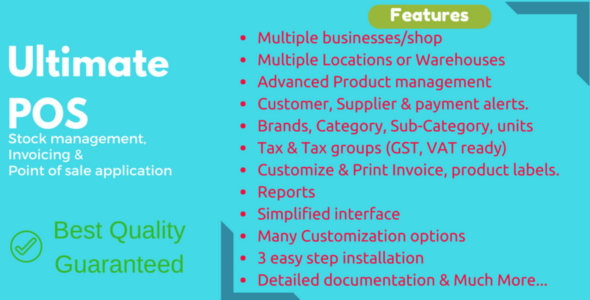
- Multi-Business & Location Management: You can set up multiple businesses and unlimited storefronts or warehouses under one installation. Each location maintains its own separate inventory, purchase history, and accounting data, allowing you to manage diverse operations from a single admin panel.
- Advanced Product & Inventory Control: Manage single or variable products with ease. The system supports brands, categories, sub-categories, and multiple units (e.g., buy in bulk, sell in pieces). It also auto-generates SKU numbers, tracks stock levels with low-stock alerts, and even calculates selling prices based on your desired profit margin.
- Streamlined Purchase & Sell Workflow: Create purchases and sales for different locations, manage due payments with automated reminders, and handle discounts and taxes seamlessly. The Ajax-based POS screen is fast, reducing billing time and improving the customer experience at the counter.
- Comprehensive User & Role Management: Assign specific permissions to employees. Predefined roles like Admin and Cashier get you started quickly, but you can create custom roles to control what each user sees and does, ensuring data security and accountability.
- Robust Reporting Suite: Make data-driven decisions with detailed reports on purchases, sales, taxes (including GST/VAT), expenses, stock levels, and customer activity. The system also tracks trending products and sales representative performance, giving you a 360-degree view of your business health.
- Flexible Tax & Currency Support: The tax engine is fully customizable, allowing you to define GST, VAT, or group taxes like CGST + SGST. It supports all currencies, making it viable for international operations.
- Restaurant & Service Features: For hospitality businesses, the system includes table management, service staff assignment, kitchen order displays, and product modifiers. This makes it suitable for restaurants, salons, and service centers, not just retail.
Who Is This For? Use Cases
This software is versatile enough to adapt to several business models. If you find yourself juggling multiple software tools or manual spreadsheets, this application is likely a significant upgrade for your workflow.
Retail Store Owners and Shop Managers
For independent retailers, this tool eliminates the need for separate inventory and billing software. You can track stock in real time, manage purchase orders from suppliers, and use the barcode scanner support to speed up checkout. The ability to work offline is a critical advantage, ensuring you never lose a sale due to internet downtime. The customer management features also let you track credit balances and purchase history, which is essential for stores that offer credit to loyal customers.
Restaurant and Café Operators
The hospitality-specific features are a major selling point here. You can allocate tables, assign waiters or service staff to orders, and send orders directly to the kitchen display. The “modifiers” feature allows customers to customize their orders (e.g., extra cheese), and the system calculates the price adjustment automatically. This streamlines the entire ordering process, reduces errors in the kitchen, and speeds up table turnover.
Wholesale and Distribution Businesses
If you handle bulk inventory and B2B clients, the multi-location feature is invaluable. You can manage separate warehouses, track stock transfers between them, and set different price groups (e.g., retail vs. wholesale pricing). The purchase management system handles complex supplier transactions, while the detailed stock reports help you forecast demand and avoid overstocking.
Multi-Branch Enterprises
Owners of multiple stores often struggle with consolidation. This script solves that by letting you manage all branches from one central admin account. You can compare performance across locations, view location-wise profit and loss, and maintain centralized control over pricing and product catalogs while keeping inventory data separate for each branch.
Technical Details & Compatibility
Before purchasing any script, it is crucial to ensure it fits your technical environment. This application is a self-hosted PHP script, meaning you have full control over your data and server.
- Server Requirements: The software requires PHP 7.2 or higher and a MySQL database. This ensures compatibility with most standard shared hosting or VPS plans available today.
- Hardware Compatibility: It is designed to work with barcode scanners and thermal receipt printers that support ESC/POS commands. This allows for hardwired, fast printing of receipts and labels.
- Offline Functionality: One of the most requested features is the ability to operate without a constant internet connection. This script supports offline mode, ensuring your sales floor keeps moving even if your ISP has an outage.
- Updates & Support: The developer offers lifetime free updates. The item is continuously maintained, with a robust changelog showing regular improvements and new features. Support is handled through a dedicated ticket system on the developer’s website, separate from the marketplace comments.
Pros and Cons
To give you a balanced view, here is an honest breakdown of the advantages and potential drawbacks of this system.
Pros
- Comprehensive Feature Set: It covers nearly every aspect of business management—inventory, sales, purchasing, accounting, and reporting—eliminating the need for multiple software subscriptions.
- Multi-Location & Multi-Business Support: Few scripts at this price point offer the ability to manage multiple distinct businesses and locations with separate data sets.
- Lifetime Free Updates: The developer has a track record of 200+ releases, and you get all future updates at no extra cost. This protects your investment over the long term.
- Offline Capability: The ability to continue selling during internet outages is a critical reliability feature that many competitors lack.
- Strong Social Proof: With 6,945 sales and a history of active development, this is a battle-tested solution used by over 4,000 businesses worldwide.
Cons
- Higher Initial Price Point: At $79.00, this is more expensive than basic POS scripts. However, the price reflects the ERP-level functionality and the maturity of the codebase.
- Self-Hosting Required: You must manage your own server, database, and backups. This requires a basic level of technical knowledge or access to a developer.
- Learning Curve: Due to the sheer number of features and settings, new users may need time to configure the system to their specific workflow. The documentation is thorough but extensive.
Frequently Asked Questions
Is Ultimate POS compatible with GST/VAT tax systems like those in India?
Yes, the tax system is fully customizable. You can define GST, VAT, and group taxes such as a combination of CGST + SGST. The system allows you to select these taxes during purchases and sales, and it generates a detailed tax report showing input and output tax credits for specific periods. This makes it compliant with the invoicing needs of businesses in India and other countries with complex tax structures.
Does this POS system work with thermal printers and barcode scanners?
Absolutely. The software is designed to integrate with standard hardware used in retail environments. It supports receipt or thermal printers that use ESC/POS commands, allowing you to print receipts, invoices, and barcode labels directly from the POS screen. Barcode scanners are supported for quick product lookup and checkout, which significantly speeds up the sales process.
Will I have to pay for future updates or a monthly subscription?
No. When you purchase the script, you receive lifetime free updates. The developer has released over 200 versions since the initial launch, continuously adding features and fixing bugs. There is no recurring fee for the core software, and you do not need to pay to upgrade to the latest version. This is a one-time investment for a perpetual license.
Final Verdict
In a crowded market of POS scripts, the Ultimate POS – Best ERP, Stock Management, Point of Sale & Invoicing application distinguishes itself through sheer depth and maturity. This is not a lightweight plugin; it is a serious operational tool developed by thewebfosters over years of real-world feedback. The inclusion of multi-location support, a granular role system, and a comprehensive reporting suite places it in a category above simple cashier scripts. While the price is higher than budget alternatives, the value proposition is clear: you are paying for a system that replaces several other tools, grows with your business, and offers the security of lifetime updates.
With thousands of sales and a strong history of updates, this script offers a reliable foundation for your business operations. If you are ready to move beyond manual bookkeeping and disconnected systems, this application provides the centralized control you need to make informed decisions and drive profitability.
Don’t settle for software that limits your growth. Take control of your inventory, streamline your billing, and gain the insights you need to scale. Purchase Ultimate POS today and join the thousands of business owners who have already modernized their operations with this powerful ERP and point of sale solution.