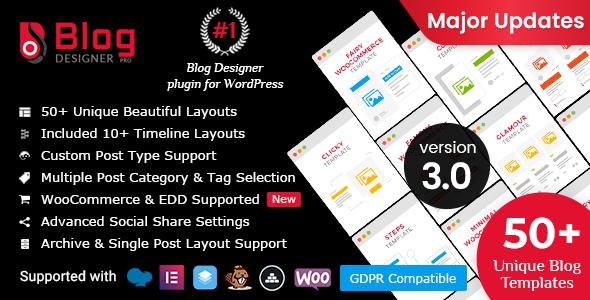
WordPress blogs often suffer from a fundamental design problem: they rely on the same default template for every post, every archive, and every category. This creates a monotonous reading experience that fails to capture attention or guide visitors toward further engagement. Blog Designer PRO for WordPress, developed by solwin, solves this by offering a comprehensive toolkit to transform standard blog pages into visually striking, highly customized layouts without requiring a single line of code. With over 6,745 sales on CodeCanyon, this plugin has become a trusted solution for website owners, developers, and agencies looking to break free from generic blog styling. It provides 50 distinct blog templates, 46 single post layouts, and 50 archive designs, giving you granular control over how every piece of content appears on your site.
This article explores the plugin’s core features, ideal use cases, technical specifications, and overall value proposition to help you determine if it is the right fit for your WordPress project.
Key Features
Blog Designer PRO is not just a simple template switcher. It is a robust design engine that offers deep customization options across multiple layout categories. Here are the standout features that define its functionality:
- 50 Pre-Designed Blog Templates: The plugin includes a diverse library of templates categorized into Grid Layout, Box View Layout, Masonry Layout, Full Width Layout, Newspaper Layout, Timeline Layout, Story Layout, and Slider Layout. Each template has its own default style, which you can use as-is or modify to match your brand.
- 50 Archive Layouts: Beyond the main blog page, you can assign unique designs to category, tag, author, and date archive pages. This ensures that your taxonomy pages are just as engaging as your homepage feed.
- 46 Single Post Layouts: The single article view is often neglected, but this plugin provides dozens of layouts for individual posts, allowing you to present your content in a polished and professional manner.
- Fully Responsive and Cross-Browser Compatible: Every template is built to be fluid on smartphones, tablets, and desktops. The plugin is tested for compatibility with Firefox, Chrome, Opera, and Safari, ensuring a consistent experience across all major browsers.
- Timeline & Story Layouts: These specialized layouts are perfect for showcasing company histories, event summaries, or step-by-step tutorials. Options include Cool Horizontal Timeline, Easy Timeline, Masonry Timeline, and Steps Timeline, which offer a visually engaging way to display chronological content.
- Custom Post Type Support: You are not limited to standard posts. The plugin can apply its templates to any custom post type, making it versatile for portfolios, testimonials, or team member directories.
- Import & Export Functionality: You can save your favorite layout configurations and transfer them to other websites. This is a significant time-saver for developers managing multiple client sites.
- Advanced Pagination Options: Choose from four pagination styles: No Pagination, Paged, Load More, and Load on Page Scroll. This allows you to control how users navigate through your content.
- Inbuilt Social Share Buttons: Each post can display social share buttons with share counts, including support for WhatsApp, Pinterest, and email. This eliminates the need for a separate social sharing plugin.
- Google Font Support: Access over 800 Google Fonts to fine-tune the typography of your blog, ensuring it aligns with your website’s overall design language.
- Post Like Feature: Boost user engagement by allowing visitors to “like” posts directly from the blog listing page.
- Category/Tag Filtering: Display posts from specific categories or tags, or exclude selected ones from the loop. This gives you precise control over the content that appears in each layout.
- Developer-Friendly Hooks: The plugin includes actions and filters that allow developers to modify output or extend functionality without altering the core files.
- Custom CSS Support: For those who want to go a step further, a custom CSS field lets you override default styles to achieve a truly unique look.
Who Is This For? Use Cases
Blog Designer PRO is a versatile tool that serves a wide range of WordPress users. Its flexibility makes it suitable for simple personal blogs and complex corporate websites alike. Below are the primary scenarios where this plugin delivers the most value.
Bloggers and Content Creators
For individual bloggers, the plugin removes the barrier of design. You can select a template that matches your niche—be it fashion, technology, or lifestyle—and immediately upgrade the look of your site. The ability to change fonts, colors, and layouts without touching code means you can refresh your blog’s appearance whenever you want. The responsive blog layout ensures that your content looks great whether your audience is reading on a phone or a desktop monitor.
Business and Corporate Websites
Companies can use the plugin to present news, updates, and thought leadership articles in a professional format. The timeline blog layout is particularly useful for showcasing a company’s growth milestones, product launch histories, or step-by-step project timelines. Instead of a simple text list, you can create an interactive visual journey that tells your brand’s story effectively.
Developers and Theme Authors
If you build WordPress themes for clients or sell them on marketplaces like ThemeForest, integrating Blog Designer PRO can add significant value. The plugin offers an extended license option that allows you to bundle it with your themes. This provides your users with a powerful feature set while saving you the time of developing a custom blog layout system from scratch. The one-click single post layout override feature is also a boon for developers who need to create bespoke designs for specific client requirements.
E-commerce and Portfolio Sites
Online stores and portfolio websites can leverage the plugin to display products, case studies, or project showcases using the Grid Layout or Slider Layout options. The plugin supports WooCommerce, including archive and single product pages, allowing you to maintain a consistent design language across your entire storefront. For creatives, the grid and masonry layouts are ideal for presenting a visual portfolio in an organized, attractive manner.
Technical Details & Compatibility
Understanding the technical requirements is crucial before making a purchase. Blog Designer PRO is built to work seamlessly with modern WordPress setups.
- WordPress Compatibility: The plugin is regularly updated to support the latest WordPress versions. As of the latest changelog entry, it is compatible with WordPress 6.8.2.
- PHP Version Support: It has been tested and made compatible with PHP versions up to 8.4, ensuring smooth performance on current server environments.
- WooCommerce Integration: The plugin supports WooCommerce versions up to 9.1.x, with dedicated layouts for shop archive pages and single product pages.
- Page Builder Compatibility: It works with popular page builders including Elementor, Beaver Builder, SiteOrigin Panels, and Visual Composer, allowing you to embed blog layouts within custom-designed pages.
- Translation Ready: The plugin follows WordPress I18n standards and includes .pot files for easy translation into any language. It also supports RTL (right-to-left) languages.
- Third-Party Plugin Support: It offers integration with Advanced Custom Fields, Easy Digital Downloads, and Co-Authors Plus, extending its functionality for specialized use cases.
- Multisite Support: The plugin functions correctly on WordPress multisite networks, including image resize and layout import/export features.
- Last Update: The most recent update was released on September 3rd, 2025, demonstrating active maintenance and a commitment to resolving security issues and bugs.
Pros and Cons
No plugin is perfect. Here is an honest assessment of the strengths and potential drawbacks of Blog Designer PRO to help you make an informed decision.
Pros
- Extensive Template Library: With 50 blog layouts, 46 single post layouts, and 50 archive layouts, you have an enormous variety of design options at your disposal. This breadth is a major advantage over simpler blog styling plugins.
- No Coding Required: The plugin is designed for beginners and experts alike. You can achieve professional-looking results through an intuitive admin panel without writing any HTML, CSS, or PHP.
- Regular Updates: The developer, solwin, consistently releases updates to maintain compatibility with the latest WordPress and PHP versions, as well as to address security vulnerabilities and design issues.
- Performance-Focused Features: The ability to import/export layouts, duplicate templates, and use custom CSS makes it a powerful tool for developers who need to work efficiently across multiple projects.
- Built-in Social Sharing: The inclusion of social share buttons with share counts and WhatsApp support removes the need for additional plugins, reducing plugin bloat and potential conflicts.
- Proven Track Record: With over 6,745 sales, the plugin has a substantial user base, which speaks to its reliability and popularity within the WordPress community.
Cons
- Learning Curve for Advanced Features: While basic usage is straightforward, mastering all the settings—such as custom post type integration, archive-specific layouts, and filter options—may take some time for new users.
- Price Point: At $59.00, it is more expensive than many free or lower-cost blog layout plugins. However, the depth of features and the number of included templates often justify the investment for professional use.
- Potential Overwhelm: The sheer number of templates and options could be overwhelming for someone who just wants a quick, simple fix for their blog’s appearance. The default settings help, but exploring all possibilities requires a time commitment.
- Demo Content Not Included: The preview images and videos used in the demos are not part of the plugin package. You will need to source your own images and media for your live site.
Frequently Asked Questions
Is Blog Designer PRO compatible with WooCommerce?
Yes, Blog Designer PRO includes specific support for WooCommerce. The plugin provides dedicated archive and single product page layouts, allowing you to style your online store’s product listings and product detail pages. It has been tested for compatibility with WooCommerce versions up to 9.1.x, ensuring a stable integration with your e-commerce setup.
Does Blog Designer PRO work with page builders like Elementor?
Yes, the plugin is compatible with several major page builders, including Elementor, Beaver Builder, SiteOrigin Panels, and Visual Composer. You can use the Blog Designer widget or shortcode to embed your customized blog layouts directly into pages built with these tools, giving you even greater flexibility in how you structure your website.
Can I use Blog Designer PRO with custom post types?
Absolutely. One of the plugin’s key features is its support for custom post types. You can apply any of the 50 blog templates, 50 archive layouts, and 46 single post layouts to your custom post types. This makes it an excellent choice for displaying portfolios, testimonials, team members, or any other custom content type you may have registered on your site.
Final Verdict
Blog Designer PRO for WordPress stands out as a comprehensive solution for anyone serious about improving the visual appeal of their blog. Its extensive library of templates, deep customization options, and regular updates from solwin make it a reliable and forward-thinking investment. The plugin effectively bridges the gap between a basic blog and a professionally designed content hub. Whether you are a solo blogger looking to stand out, a business aiming to present a polished corporate narrative, or a developer seeking to add value to your client projects, this plugin offers the tools to achieve your goals. The active changelog, with recent compatibility updates for WordPress 6.8.2 and PHP 8.4, signals a developer who is committed to quality and security. While the $59.00 price tag may give some pause, the sheer volume of features—including 50 templates, social sharing, timeline layouts, and import/export capabilities—provides substantial value for the cost. For a one-time purchase that can transform every aspect of your blog’s design, Blog Designer PRO is a compelling choice. If you are ready to move beyond default styling and create a blog that captivates your audience, it is time to give this plugin a try.