Key Features
This collection of HTML5 Modern Shopping Animated Banners, crafted with Google Web Designer, provides a powerful and flexible solution for digital advertisers, e-commerce managers, and creative agencies. It streamlines the creation of high-impact, responsive advertisements that capture attention across multiple platforms. Below are the core attributes that define this product.
- Super Fast and Easy Customization: The banners are built for efficiency. Using the familiar interface of Google Web Designer, you can rapidly swap out text, images, and colors without needing to touch a single line of complex code. This drastically reduces production time from hours to minutes.
- Google Web Fonts Used: Typography is critical for brand consistency and readability. These banners leverage Google Web Fonts, enabling you to maintain your brand’s unique typographic identity across all campaigns without worrying about font licensing or cross-platform rendering issues.
- Created and Fully Editable with Google Web Designer: The entire project is built natively in Google Web Designer. This means you receive the complete, editable source files. You are not locked into a proprietary system; you have full control to modify animations, event triggers, and components as your campaign needs evolve.
- Compatible with Adwords and Doubleclick: Adherence to industry standards is a non-negotiable for performance advertisers. These banners are pre-configured for seamless upload and compliance with Google Ads (AdWords) and Campaign Manager 360 (DoubleClick), eliminating the frustrating compatibility checks that can delay campaign launches.
- Pixel-Perfect Cross-Browser Compatible: A broken banner is a wasted investment. Rigorous testing ensures these assets render flawlessly across all major browsers—Chrome, Firefox, Safari, and Edge—guaranteeing a consistent brand experience for every user, regardless of their browsing environment.
Who Is This For? Use Cases
This versatile set of animated banners is engineered to solve specific, high-stakes advertising challenges. It is not a one-size-fits-all solution; it is a precision tool for several key professional roles.
E-Commerce Store Owners & Digital Marketing Managers
If you manage an online store and struggle to produce fresh, visually appealing ad creatives for seasonal sales (like Black Friday, Christmas, or a spring clearance), this is your solution. Instead of paying a designer for a custom banner every week, you can use the template’s core animation and quickly swap in new product images and promotional copy. The pre-built actions and timing in the HTML5 Modern Shopping Animated Banners are specifically designed to highlight product features and special offers, driving click-through rates for time-sensitive promotions.
Freelance Web Designers & Creative Agencies
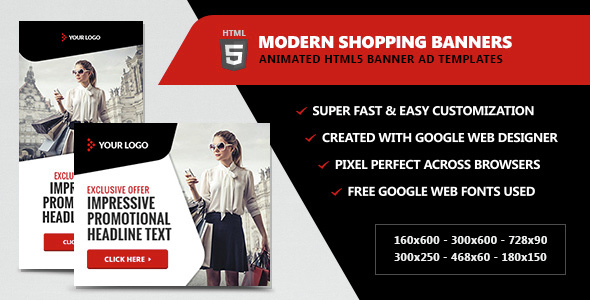
Speed and consistency win accounts. For freelancers and agencies who handle multiple clients across different verticals, these banners are a game-changer. You can purchase one set and customize it to match the branding of a fashion brand, a tech startup, or a home goods retailer. The included 6 popular sizes (160×600, 300×250, 728×90, 468×60, 300×600, 180×150) cover the most common ad inventory slots, allowing you to deliver a complete campaign package to your client without starting from scratch for each dimension.
Small Business Owners Running DIY Campaigns
Business owners who wear many hats often find professional advertising platforms intimidating. This product lowers the barrier to entry. With the detailed instruction file and the user-friendly Google Web Designer interface, someone with basic computer skills can create professional-grade animated HTML5 ads. This empowers small businesses to compete visually with larger competitors in local search and display advertising.
Technical Details & Compatibility
Understanding the technical backbone of a digital asset is crucial for predicting long-term viability and performance. This product is built on a modern, standards-compliant foundation.
- Primary Tool: Google Web Designer (free to download). All source files (.GWD) are fully editable within this environment.
- File Types Provided: You will receive both generic (single-file) and Google spec (component-based) source files, giving you flexibility in how you deploy the ads.
- Ad Dimensions: The package includes six of the most universally required IAB-standard sizes: Leaderboard (728×90), Medium Rectangle (300×250), Skyscraper (160×600), Wide Skyscraper (300×600), Square (180×150), and Banner (468×60).
- Browser and Device Support: Fully compatible with all modern desktop and mobile browsers. The HTML5 output ensures smooth animation on touch devices and tablets, a critical requirement for mobile advertising.
- Platform Compatibility: Pre-validated for direct upload to Google Ads and Campaign Manager 360. No additional code manipulation is required to meet their creative specs.
- Update Signals: While a specific update date is not provided, the use of current Google Web Designer standards and Google Web Fonts signals that this is a modern, actively maintained asset. The included free item updates policy ensures you will receive future revisions to maintain compatibility with platform changes.
Pros and Cons
Pros
- Drastic Time Savings: The primary advantage is speed. You can produce a fully animated, multi-size ad campaign in under an hour, compared to 4-8 hours of coding from scratch.
- Industry Standard Compliance: Being pre-validated for Google Ads and DoubleClick eliminates the most common technical headache in display advertising.
- Ease of Use: No advanced JavaScript or animation skills are required, making it accessible to a wide range of users, from beginners to experts.
- Complete Source Control: You own the editable files. You are not bound to a subscription service or a cloud-based editor. You can save, version, and modify your local copies indefinitely.
- Future-Proof with Google Web Designer: Because it uses the official Google tool for HTML5 advertising, you are aligned with the industry’s leading standard, ensuring long-term relevance and support.
Cons
- Requires Google Web Designer Knowledge: While the tool is free and relatively intuitive, users who have never used it will face a small learning curve. The included instruction file helps, but it is not a full tutorial on the software itself.
- Stock Images Not Included: The professional demo images are for display purposes only. You must supply your own product or lifestyle photography, which can incur additional costs from sites like iStock or PhotoDune.
- Limited Animation Complexity: These are template-based animations. If you need highly complex, motion-graphic-driven experiences (like those made with After Effects to HTML5 converters), this may feel restrictive. It excels at clean, modern, e-commerce-style animation, not cinematic storytelling.
Frequently Asked Questions
Do I need any coding knowledge to edit these HTML5 banners?
No. The entire customization process is visual within Google Web Designer. You can change text, images, and colors by simply clicking on elements and using the properties panel. All animations and timelines are pre-built. If you can use basic software like PowerPoint or Canva, you can successfully edit these banners.
Can I use these banners on social media platforms like Facebook or Instagram?
While these banners are primarily designed for display advertising networks like Google Ads and DoubleClick, the HTML5 output can be used for other platforms. However, for social media advertising (especially Instagram and Facebook Stories), static or video formats are often preferred. This product is best optimized for standard web display slots like banners and skyscrapers found on websites, apps, and YouTube mastheads.
What happens if a future update to Google Web Designer breaks my banner file?
The product includes free item updates, which means the author will provide revised source files if a major platform update requires it. Additionally, because you have the full source files, you can always open them in an older version of Google Web Designer if needed. The use of standard components ensures high backward compatibility.
Final Verdict
The HTML5 Modern Shopping Animated Banners represent a smart, cost-effective investment for anyone serious about display advertising. It bridges the gap between expensive, custom-coded creatives and low-quality, static images. The value proposition is clear: you gain immediate access to a professional, multi-size campaign kit that saves hours of development time and eliminates costly platform compliance errors. For the price of a single custom banner from a freelance designer, you receive a full suite of versatile, editable templates built on the industry’s gold standard tool, Google Web Designer.
Whether you are launching a flash sale, promoting a new product line, or managing ad creatives for multiple clients, this product delivers the speed, reliability, and professional polish required to stand out in a crowded digital landscape. Do not waste another afternoon wrestling with code or paying for expensive custom work. Take control of your advertising creative workflow today. Add this HTML5 banner pack to your toolkit and start creating high-converting, professional ads in minutes.