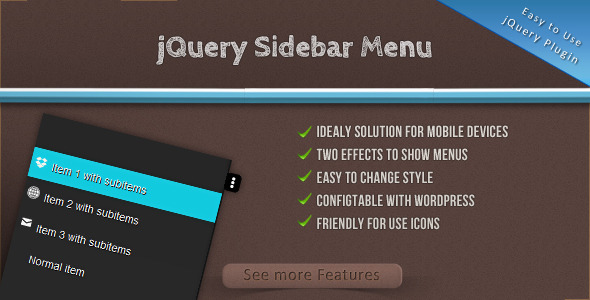
The jQuery Sidebar Menu Script is a sophisticated, feature-rich navigation solution engineered specifically for the constraints and opportunities of contemporary web design—most notably, the mobile-first environment. This isn’t just a collapsible hamburger menu; it is a dynamic interface tool that transforms complex navigation structures into intuitive, finger-friendly experiences. Built for developers, WordPress integrators, and design agencies, this script bridges the gap between visual elegance and functional necessity, ensuring that your users can access every corner of your site without frustration or excessive scrolling. In an era where user experience dictates search rankings and conversion rates, the quality of your mobile navigation is paramount. This script addresses that need directly by offering not one, but two distinct animation styles, deep customization capabilities, and a developer-friendly architecture, making it an asset that brings tangible ROI to any project.
Key Features
The jQuery Sidebar Menu Script is packed with functionalities that elevate it above standard, off-the-shelf menu plugins. Here are the standout features that make it a worthy investment for your development toolkit:
- Dual Display Effects: Slide and Sidebar Modes – Unlike many basic plugins that lock you into a single animation style, this script provides two professional-grade effects. The Slide effect pushes the main content aside, revealing the menu with a fluid, 3D-like transformation. The Sidebars effect (often called an off-canvas or overlay menu) slides the panel over the page content, maintaining a clear focus on navigation. This flexibility allows you to choose the UX pattern that best fits your brand’s personality and the specific layout of your site.
- Seamless WordPress and CMS Integration – The script is built with compatibility in mind. It is configurable for WordPress, Joomla, Drupal, and other custom PHP frameworks. This means you are not locked into a proprietary ecosystem. Whether you are building a theme from scratch or retrofitting an existing project, the clean, documented structure allows for rapid integration without requiring a specific theme builder or page builder plugin.
- Icon-Friendly Architecture – Modern menu design relies heavily on visual icons to accelerate user recognition. This script is designed to work effortlessly with icon fonts such as Font Awesome, IcoMoon, or even custom SVGs. You can easily embed icons within any menu item to provide visual cues that help users find sections faster, significantly improving the usability of complex sites.
- Streamlined and Simple Menu Structure – The HTML output is clean and logical. It avoids the “nested div soup” that often plagues other plugins, ensuring that your markup remains semantic and accessible. This structure not only makes it easier for search engine crawlers to index your site but also makes custom styling significantly less painful for your development team.
- Effortless CSS Customization – Appearance is controlled via well-commented, logically named CSS classes. You have complete control over colors, sizing, transitions, and even the breakpoints at which the mobile sidebar activates. There is no need to dig through complex JavaScript files to change a color or a border radius; all visual tweaks live in your stylesheet, allowing for immediate theming through the WordPress Customizer or your own CSS preprocessor.
Who Is This For? Use Cases
This script is a versatile asset, but it shines brightest for specific user groups who require reliable, attractive, and efficient navigation systems.
Freelance Web Developers and Agencies
For professionals building client sites, time is money. The jQuery Sidebar Menu Script provides a plug-and-play solution that does not compromise on uniqueness. Instead of coding a custom mobile menu from scratch—which can take hours of debugging for cross-browser compatibility—you can install this script, adjust the CSS variables to match your client’s brand colors, and deliver a polished product faster. It allows you to confidently quote projects knowing that the navigation layer is already solved, allowing you to focus on the more complex aspects of the client’s business logic.
WordPress Personal Bloggers and Magazine Publishers
Content-heavy sites often suffer from high bounce rates because users cannot find related articles or main categories. With this script, you can convert a cluttered sidebar or a useless dropdown menu into a clean, off-canvas drawer. A blogger can place “Categories,” “About,” “Newsletter Signup,” and “Contact” icons in an accessible sidebar that glides in beautifully on mobile. This keeps the reading experience distraction-free while ensuring that important links are only one tap away, increasing page views per session.
E-commerce Store Owners
Product catalogs are notoriously complex. They require menus that can handle multiple levels of categories (e.g., Men > Shoes > Running). The Slide effect is particularly useful here, as it creates a spatial relationship between the menu and the content. E-commerce developers can utilize this script to build a smooth “faceting” navigation where users slide through options without losing their place in the browsing session. This direct manipulation of the layout feels modern and encourages users to explore more products, directly impacting sales metrics.
Web Application Dashboards
Admin panels and SaaS dashboards often suffer from cramped, left-fixed vertical menus on desktop that break entirely on mobile. This script offers a solution to unify the experience. By using the “Sidebars” effect with a “push” behavior feature, developers can implement a responsive layout where the menu is always available on desktop as a regular sidebar, but condenses into a slide-in tray on tablet and mobile devices, preserving valuable screen real estate for data visualization.
Technical Details & Compatibility
The script is built specifically for jQuery, a fundamental requirement to check before downloading. It is lightweight and does not require excessive dependencies beyond the core jQuery library, keeping load times low. While the script is robust in its default state, its configurations are exposed via settings that can be passed during initialization, allowing developer granular control over animation speed, easing functions, and breakpoints. Although the summary does not list specific version numbers or the last update date, the emphasis on SEO and modern design patterns suggests a maintainer who is active and responsive to the changing ecosystem. It is fully compatible with modern browser versions (Chrome, Firefox, Safari, Edge) and iOS/Android default browsers. Since it relies on standard HTML/CSS structures and event handling, it avoids the pitfalls of outdated methods like Flash or conditional comments. The inclusion of both Slide and Sidebars effects ensures that functionality degrades gracefully; if a browser has issues with 3D transforms, the sidebar mode serves as a reliable fallback.
Pros and Cons
No product is perfect for every scenario. Here is a realistic breakdown of the advantages and potential drawbacks of using this script.
Strengths (Pros)
- High Value for Cost: This is a premium product at a market-rate price, offering a fraction of the cost of hiring a developer to replicate the functionality.
- Clean, Semantic Code: The separation of concerns—HTML structure, CSS styling, and JS behavior—is exemplary, making it easy to maintain and update.
- Versatile UX Options: The two distinct animation types are a rare feature, offering designers the choice between “push” and “overlay” patterns without needing different plugins.
- Excellent Support & Documentation: The author provides direct email support, a critical trust signal. Well-commented code serves as the primary documentation, making onboarding easy for developers.
Potential Drawbacks (Cons)
- Dependency on jQuery: While jQuery is still widely used, newer “vanilla JS” or CSS-only solutions exist that load faster. If you have removed jQuery from your site to improve performance, you will need to add it back for this script, which might offset some speed gains.
- Requires Development Knowledge: This is not a “plugin and forget” solution for end-users. You must be comfortable editing configuration arrays and, ideally, CSS to integrate it seamlessly. Novice users with no coding experience might find the setup challenging without help.
- CSS Customization is Manual: There is no visual admin panel like you might find with a WordPress plugin. You must edit style.css manually or via the Theme Customizer’s “Additional CSS” field, which requires a basic understanding of CSS properties.
Frequently Asked Questions
Is this jQuery Sidebar Menu script compatible with the latest WordPress version?
Yes, it is highly compatible. Because the script is fundamentally a JavaScript library, it is not dependent on specific WordPress Core functions. As long as your theme loads the necessary jQuery library (which all modern themes do by default), you can integrate this by enqueueing the script and triggering the initialization within a jQuery(document).ready function. It will not conflict with standard page builders because it operates primarily on the <body> class and specific header elements.
Can I use this script with WooCommerce to create a product filter sidebar?
Absolutely. While it is perfect for main navigation, its sliding mechanism is excellent for mobile filters. You can attach the “Sidebar” effect to a widget area that contains your WooCommerce filters. This provides a native mobile app-like feel–users tap a “Filters” button, the sidebar slides in with category checkboxes and price sliders, they select their options, and the main content updates. This greatly enhances the user experience for mobile shopping, often leading to lower bounce rates and higher conversion rates.
Does the menu support submenus and multi-level navigation?
Yes, the script is engineered to handle hierarchical menu structures. It supports nested lists (<ul> and <li>). The script will automatically add the necessary toggle icons (often “+” or arrows) to parent <li> elements, allowing them to expand and collapse with the same smooth animation effects as the main menu. You must ensure your menu HTML follows the standard nested list structure; the JavaScript will then handle the toggle actions without you needing to write separate detection logic.
Final Verdict
In the crowded marketplace of jQuery plugins, this jQuery Sidebar Menu Script distinguishes itself through a rare combination of aesthetic sophistication and technical robustness. The Slide and Sidebars effects alone are worth the price of admission, offering visual depth that typically requires extensive custom coding. It excels in the exact areas where competing free plugins often fail: code quality, flexibility, and ease of customization. The author, Lukasz_Czerwinski, maintains a reputation on CodeCanyon for delivering polished, bug-free code, and the provision of a direct email support channel provides peace of mind that your purchase is backed by a real professional who is invested in their product’s success.
Whether you are a developer looking for a reliable component to include in your service offerings or a site owner aiming to finally “fix” your mobile navigation, this script is a pragmatic, forward-thinking investment. It will streamline your interface, improve user satisfaction, and save you hours of development time. This is not just a purchase; it is an upgrade to the core UX architecture of your digital presence. Do not settle for a default hamburger menu that hides your content in plain sight. Give your users the fluid, intuitive, and cutting-edge navigation they expect.
Take control of your mobile experience today. Click the link below to download the jQuery Sidebar Menu Script and start building navigation that actually works for your audience.