Form validation is often the silent killer of conversions. A user abandons a checkout, a signup, or a contact form not because they don’t want your product, but because the form itself is hostile, confusing, or riddled with errors that are only revealed after a frustrating page reload. Multivalidator solves this by bringing a frictionless, ajax-driven validation experience directly to the front-end, equipped with behavioral insights that go beyond simple “required field” checks. This is not just a utility script; it is a complete user experience toolkit designed to protect your data integrity while making your forms feel responsive and intelligent.
For WordPress developers, theme authors, and digital agencies selling on marketplaces like ThemeForest, Multivalidator offers a seamless way to elevate the perceived quality of your builds. It handles the heavy lifting of inline error messaging, custom animation, and captcha integration, allowing you to focus on the core business logic. By eliminating round-trips to the server for basic checks, it reduces server load and provides instantaneous feedback that keeps users engaged. Whether you are a freelancer building a bespoke booking system or a product manager looking to reduce form drop-off rates, this plugin provides the granular control necessary to craft a validation flow that feels tailor-made for your audience.
Key Features
Multivalidator is packed with advanced capabilities that distinguish it from standard validation scripts. Its feature set is geared toward maximum customization and deep integration with modern web workflows:
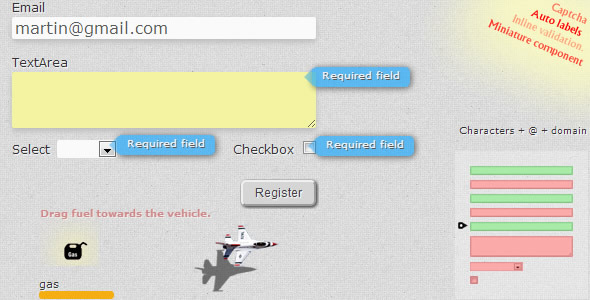
- Inline Validation & Auto-Generated Labels: Move beyond clunky error summaries. Errors appear directly beside the relevant field, and the plugin can automatically generate labels adjacent to your inputs, which is a boon for rapid development and maintenance.
- Deep Visual Customization: You are not locked into a default look. Adjust the color, shape, and border radius of error messages, control their display duration, and choose from a variety of entrance and exit animations to match your site’s aesthetic perfectly.
- Dual Captcha Vehicles: Security is dual-layered. Choose between a fully customizable, animated captcha that blends with your theme, or integrate the industry-standard Google reCAPTCHA to block bots without compromising user convenience.
- Advanced Input Types: The v1.1 update expanded the support to include dedicated URL, Checkbox Group, and Radio Group validation, ensuring that complex selection sets are as rigorously checked as simple text fields.
- Error Meter & Miniature Form: Add a subtle gamification element with the error meter, showing users their progress in filling out the form correctly. The miniature form component is perfect for sidebars, modals, or footer widgets without taking up precious space.
- Ajax & Callback Functionality: The plugin is “Ajax ready” out of the box, allowing for server-side calls to check data (like email uniqueness) without refreshing the page. Define callback functions to trigger custom scripts or analytics tracking upon successful validation.
- Regular Expression Support: For developers who need precision, you can define custom regex patterns to validate specific data formats, ensuring your business logic is enforced at the edge.
Who Is This For? Use Cases
Multivalidator is designed for developers and designers who demand control and site owners who care about their bounce rates. It is versatile enough to work across a wide spectrum of web projects.
WordPress Theme Developers and Agencies
If you build custom themes for clients, you know that contact forms, quote requests, and booking widgets are often the primary source of leads. Using Multivalidator allows you to provide a premium, “white-label” validation experience. You can style the error messages to match your theme’s exact color palette and typography, creating a cohesive look that generic plugins often disrupt. The auto-generated labels and miniature form components are ideal for crafting unique layouts in page builders without writing complex JavaScript from scratch.
E-commerce and SaaS Platforms
Checkout friction is the enemy of revenue. In a multi-step checkout or a complex SaaS onboarding flow, the error meter acts as a progress indicator, reassuring users that they are almost done. The Google reCAPTCHA integration ensures that your promo codes and signup forms are protected from fraud without adding intrusive puzzles that can annoy legitimate customers. The inline validation prevents the “white screen of death” after pressing “Pay Now,” instantly highlighting the missing ZIP code or invalid card number.
Data-Heavy B2B Applications and Intranets
When dealing with complex data entry, such as internal HR portals or client project briefs, accuracy is paramount. The support for regular expressions allows you to enforce specific data structures, such as employee IDs or project codes. The ajax callback feature lets you validate input against a company database in real-time (e.g., checking if a username is already taken) before the form is even submitted, preserving data integrity and saving time for the user.
Technical Details & Compatibility
Regarding the technical stack, the plugin operates as a client-side JavaScript library that listens to form events, meaning you do not need to modify your server-side processing logic to integrate it. The v1.1 update specifically addressed a minor bug for IE8, which, while legacy, indicates a commitment to broad compatibility during its development cycle. It ships with support for two distinct captcha vehicles, offering flexibility depending on your privacy or branding requirements. The ability to select validation types for URLs and grouped inputs (checkboxes/radios) is hardcoded into the v1.1 core, making it a stable and reliable build for production environments that do not require the very latest bleeding-edge features. It is lightweight and does not rely on heavy jQuery UI dependencies that can slow down your page speed.
Pros and Cons
Every tool has trade-offs. Here is a transparent look at the strengths and potential limitations of Multivalidator to help you make an informed decision.
Pros
- High Customization: Few validation scripts offer this level of control over animation, duration, and message styling, allowing for a truly branded experience.
- Security Flexibility: Offering both a custom animated captcha and Google reCAPTCHA ensures you can prioritize user privacy or security strength as needed.
- User Engagement: The error meter and miniature form are unique features that improve the UX of long forms, potentially reducing abandonment rates.
- Extensibility: With ajax support and callback functions, developers can easily integrate the validation with backend checks, APIs, and analytics software.
Cons
- Legacy JavaScript: The plugin uses a traditional JavaScript approach rather than a modern ES6 module syntax. Developers used to the newest Vue.js or React architecture might find the integration slightly more manual.
- Visual Identity: While highly customizable, the default styles may look dated if you do not invest time in configuring the CSS variables and animation presets out of the box.
- Update Cadence: The most recent documented update (v1.1) is older, suggesting development may have slowed in favor of newer alternatives, though the stability of this version is proven.
Frequently Asked Questions
Is Multivalidator compatible with WooCommerce?
While Multivalidator does not have a dedicated WooCommerce plugin integration file, it functions as a generic jQuery-style plugin that can be applied to any form element within your WordPress theme. In WooCommerce, you can select the specific checkout form wrapper via the plugin’s initialization options. However, because WooCommerce utilizes complex conditional shipping and payment fields, you should test the interaction thoroughly. It works best when used for the lightweight checkout fields (billing name, email, phone) rather than the dynamic shipping calculator sections.
Does Multivalidator include support and documentation?
Purchases on CodeCanyon come with the author’s standard item support policy, typically six months of support included with the purchase. This support covers questions about the core functionality, bugs, and compatibility issues with major browser versions. While the documentation is concise, it clearly outlines the options for initialization and the captcha setup. It is advisable to review the comments section on the CodeCanyon item page for community-driven plugins, as you may find snippets for specific page builders or form plugins there.
Can we use the custom animated captcha without including Google services?
Yes. This is one of the most attractive features for privacy-conscious site owners. The custom animated captcha is generated entirely by the script on your server/client side. It does not load external resources or track users via Google’s cookies. This ensures full compliance with GDPR and similar regulations in regions where using Google reCAPTCHA without explicit consent is avoided. You can simply set the captcha type to “custom” in the initialization settings to disable the Google API calls.
Final Verdict
Multivalidator remains a reliable and feature-rich solution for developers who want to distance themselves from the generic look of default validation messages. It bridges the gap between simple “required” checks and complex custom API calls, all while providing a polished, animated user interface. While its last update was some time ago, the plugin is stable, and its specific features—like the error meter and miniature form—are still unique in the WordPress ecosystem, rarely found in more modern libraries.
If you are a developer selling a premium theme on ThemeForest, this is the kind of plugin that adds value to your package without adding significant script weight. If you are a site owner struggling with form abandonment or bot spam, the dual captcha options and inline error display provide a substantial return on the small investment required. It is a pragmatic, developer-friendly tool that prioritizes user experience and conversion optimization.
Are you ready to transform your forms from a frustration point into a smooth, secure gateway to your business? Don’t settle for clunky default validation. Grab Multivalidator today, download it from CodeCanyon, and give your users the responsive, error-free experience they deserve. Your conversion rate will thank you.