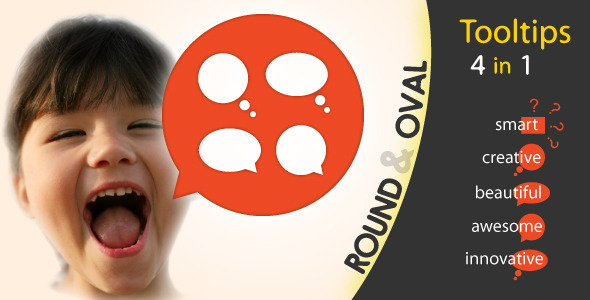
When you’re building a website for a younger audience—think kids, teens, and the young at heart—standard rectangular tooltips can feel stiff and out of place. The Round & Oval Tooltips collection solves this problem with playful, bubble-inspired UI elements that add personality to any project. This isn’t just a set of static shapes; it’s a complete package that includes round bubbles, oval bubbles, and corresponding tooltip styles, all wrapped in a lightweight, CSS3-driven design. For developers and designers using WordPress themes, ThemeForest assets, or custom-coded sites, this item offers a unique way to engage visitors without bogging down page speed.
What makes this product stand out is its focus on creative freedom. You have eight pre-made sizes, eight positioning options, sixteen color combination styles, and six bordered styles. You can drop in icons from Font Awesome, embed links, or place images inside the bubbles. And because everything is built with CSS3 and HTML markup—no images required for modern browsers—these tooltips load instantly and scale beautifully on any screen. For older browsers like IE 9 and IE 8, the package includes graceful fallbacks with jQuery and images, so you won’t alienate legacy users.
Let’s not forget the optional smarTooltip jQuery plug-in, which takes the guesswork out of positioning. This plug-in automatically repositions tooltips based on their viewport location, ensuring they never overflow off-screen. The result is a polished, professional interaction that feels native to your design—even when the user resizes the browser or scrolls through a long page.
If you’ve been hunting for tooltip designs that break the mold and add a smile to your visitors’ faces, this is the collection to consider. Below, we’ll break down everything you need to know before you buy.
Key Features
This asset is packed with options, but it never feels bloated. Here’s a closer look at the standout features that make it a versatile addition to your design toolkit:
- 4-in-1 Design Package: You get round bubbles, oval bubbles, round tooltips, and oval tooltips—all in a single purchase. That’s four unique UI elements for the price of one.
- Innovative & Unique Visual Style: Unlike standard rectangular tooltips, these are designed to feel friendly, approachable, and visually engaging. The bubble aesthetic is perfect for playful websites, educational platforms, and entertainment portals.
- 8 Pre-Made Sizes: Choose from eight fixed size classes to match your content. Whether you need a small icon bubble or a large callout, there’s a size that fits without fiddling with custom CSS.
- 8 Positioning Options: Place your tooltip above, below, left, right, or in any diagonal corner. This flexibility lets you align the bubbles precisely where they work best for your layout.
- smarTooltip Autopositioning Plug-In: This optional jQuery plug-in automatically adjusts the tooltip’s position based on its current location in the browser window. It prevents overflow and keeps your UI clean, even with dynamic page layouts.
- 16 Color Combination Styles: With a wide range of pre-defined color schemes, you can quickly match your brand palette or experiment with bold, contrasting backgrounds.
- 6 Bordered Styles: Add a subtle outline or a bold frame to your bubbles with these ready-to-use border variations.
- 13 Free Fonts Included: The package links to a curated selection of Google web fonts, giving you typographic variety without sourcing external assets.
- CSS3 Transitions: Smooth hover effects and animation transitions are built in, making the tooltips feel responsive and polished.
- Font Awesome Ready: Drop in scalable vector icons easily. You can combine icons with text, links, or images for richer tooltip content.
- No JavaScript Required (Modern Browsers): Pure CSS3 handles the styling and transitions in Firefox 16+, Chrome 23+, Safari 5.1+, and Opera 12.1+.
- Legacy Browser Support: IE 9 and IE 8 get jQuery and image fallbacks, so your site doesn’t break for older users.
- 4 LESS Files Included: For developers who use CSS preprocessors, the LESS files make it easy to generate custom sizes, colors, and styles. You can skip the heavy manual CSS and extend the system efficiently.
- Minimal Markup: The HTML structure is clean and semantic. You add just a few classes and data attributes—no unnecessary divs or clutter.
- 4 Detailed HTML Documentation Files: Comprehensive guides walk you through installation, customization, and usage. You won’t be left guessing how to tweak the code.
- Support & Updates: The author is responsive and actively maintains the item with bug fixes and new features, as evidenced by the update log.
Who Is This For? Use Cases
The Round & Oval Tooltips are designed for anyone who wants to add a dash of personality to their website. While they’re specifically recommended for younger audiences, the design is flexible enough for a broader range of projects. Here are a few scenarios where these tooltips shine:
Kid-Friendly Educational Websites and Games
If you run an e-learning platform, an interactive game, or a website for toddlers and schoolchildren, the bubble design is a natural fit. Use round tooltips to highlight quiz answers, reveal fun facts, or guide children through a lesson. The playful look reduces intimidation and keeps the interaction light and fun.
Entertainment and Creative Portfolios
Animators, illustrators, and creative agencies often need UI elements that feel as stylish as their work. These tooltips can serve as quirky “speech bubbles” for character bios, portfolio pieces, or behind-the-scenes notes. The oval and round shapes add a comic-book sensibility that pairs well with bold typography and vibrant imagery.
E-Commerce Product Callouts
While standard tooltips are functional, these bubbles can act as eye-catching product callouts. Imagine a round bubble hovering over a toy’s feature, a badge on a clothing item, or a social proof note on a landing page. The 8 sizes and 16 color styles let you match the bubble to your product photography without clashing.
Interactive Infographics and Data Visualization
If you build infographics or data-heavy dashboards, you can replace flat labels with these bubbles to highlight key statistics. The autopositioning plug-in ensures that no matter where the bubble appears on the screen, it stays fully visible and legible.
User Interface Prototypes
Designers creating high-fidelity UI prototypes in HTML/CSS can use these tooltips to demonstrate hover states and interactive elements. Since they’re pure CSS for modern browsers, they integrate seamlessly into prototype frameworks and don’t require script libraries to animate.
Technical Details & Compatibility
Before you commit, it’s worth understanding exactly how this item behaves in different environments. The tooltips are built with a minimum markup philosophy—you add a class to an element and use a data attribute for positioning. The CSS does the heavy lifting, and the jQuery plug-in is optional.
Browser support is clearly documented:
- Firefox 16+ – Full CSS3 support, no images, no JavaScript.
- Chrome 23+ – Full CSS3 support, no images, no JavaScript.
- Safari 5.1+ – Full CSS3 support, no images, no JavaScript.
- Opera 12.1 – Full CSS3 support, no images, no JavaScript.
- IE 10 – Full CSS3 support.
- IE 9 – Partial CSS3 with jQuery transitions as a fallback.
- IE 8 – Uses images and jQuery to preserve the visual quality.
The update log shows active development: a 13 March update added jQuery fallbacks for IE 9 and IE 8, and an 18 March update introduced the smarTooltip plug-in. This tells you the author is responsive to user feedback and committed to cross-browser reliability.
One important note: the author explicitly advises against using these in a CMS with dynamically generated content. Because you manually align the content inside each tooltip using the pre-made size classes, the system isn’t suited for auto-flowing text from a database. It’s designed for hand-crafted, static content where you control the exact amount of text and the visual balance.
Pros and Cons
Every product has trade-offs. Here’s an honest breakdown of what works well and what you should keep in mind.
Pros
- Visually Distinctive: Moves away from boring rectangles and gives your site a memorable, playful identity.
- Complete Package: Sizes, positions, colors, borders, fonts, and icons—almost everything is included out of the box.
- Performance-Friendly: Pure CSS3 for modern browsers means no heavy image files or JavaScript execution delays.
- smarTooltip Plug-In: Solves the common problem of tooltips getting cut off at the viewport edge. It’s a genuine time-saver.
- Good Legacy Support: IE 8 and IE 9 users aren’t completely left out thanks to the fallbacks.
- Developer-Friendly: LESS files allow rapid customization, reducing repetitive CSS writing.
Cons
- Manual Alignment Required: You must pick a size class and manually adjust it to fit your content. There’s no auto-resizing, which can be tricky if you want to reuse the same tooltip for varying text lengths.
- Not Suited for CMS Use: If you’re planning to drop this into WordPress and generate tooltips from post content, you’ll run into alignment headaches. The author explicitly advises against this use case.
- Specific Aesthetic: The design is charming, but it’s not generic. If your brand is ultra-corporate or minimalist, these bubbles might clash with your visual identity.
- Older Browsers Need Extra Files: IE 8 requires image fallbacks, which means you’ll need to keep those assets in sync if you change styles.
Frequently Asked Questions
Can I use the Round & Oval Tooltips in WordPress with dynamically generated content?
Technically, you can embed the CSS and HTML classes in a WordPress theme, but the author strongly advises against it. The tooltips rely on manually selected size classes to maintain proper alignment. If your WordPress content is generated dynamically (e.g., from posts or a plugin), the text length will vary unpredictably, and the fixed-size bubbles will either overflow or leave awkward empty space. The best approach is to use these in static HTML sections, custom landing pages, or hand-coded templates where you control the exact content.
Does the product include support and updates?
Yes. The item comes with the standard ThemeForest author support, and the update log shows active development. The smarTooltip plug-in was added in March to address positioning issues, and earlier updates added fallbacks for older IE versions. You can expect the author to fix bugs and potentially add new features based on user feedback.
Is the smarTooltip plug-in required for the tooltips to work?
No, the plug-in is entirely optional. The tooltips function perfectly with pure CSS3 in all modern browsers—you just add the appropriate classes to your HTML elements. However, the smarTooltip plug-in is highly recommended if you have tooltips positioned near the edges of the screen or if you’re working with a responsive layout. It automatically repositions the tooltips to keep them fully visible, which is especially helpful on mobile devices and small browser windows.
Final Verdict
The Round & Oval Tooltips collection is a niche but delightful asset for designers ready to move beyond conventional UI patterns. It’s not trying to be a generic tooltip library; it’s a character-driven design system for projects with personality. The package is well-structured, documented, and surprisingly lightweight given the number of style options. The inclusion of the smarTooltip plug-in adds genuine value, solving a real-world usability problem that many jQuery tooltip libraries ignore.
For developers building portfolios, educational sites, or themed landing pages, this item is a strong addition to your toolkit. It’s also a great starting point for beginners who want to learn how CSS3 shapes and transitions can be used to create interactive elements without pulling in a heavy JavaScript library.
One thing to keep in mind is the manual alignment requirement. If you’re comfortable with HTML and CSS and you’re working on a static or lightly templated site, this won’t be an issue. If you need a fully automated tooltip system that adjusts to dynamic content, you’d be better served by a more generic jQuery tooltip plugin.
Overall, the design is fun, the code is clean, and the support is reliable. The author, Tudor, has created a polished product that puts a smile on users’ faces—and that’s rare in the world of web UI components. If you’re ready to add a playful, eye-catching element to your next project, this is a worthwhile investment.
Ready to make your website more playful? Purchase the Round & Oval Tooltips today and bring your creative vision to life with a design your users won’t forget.