Key Features
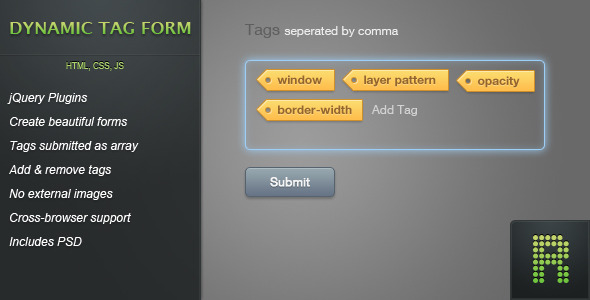
The Dynamic Tag Form plugin for jQuery brings a modern, intuitive tagging system to any web form. Designed with both developers and end-users in mind, this lightweight solution allows you to transform a simple text input into a powerful tag management interface. Whether you are building a blog post editor, a product filter, or a project management tool, the ability to add and remove tags on the fly dramatically improves the user experience. Built entirely with jQuery and CSS3, this plugin requires no external image assets, ensuring fast load times and seamless integration into your existing projects. The included Photoshop (PSD) source files give you full control over the visual appearance, while the comprehensive documentation makes implementation straightforward even for intermediate developers. When the form is submitted, tags are automatically structured as an array, making server-side processing simple and predictable.
- jQuery Plugin Architecture: Fully modular plugin that integrates cleanly with your existing jQuery codebase without conflicts.
- Create Beautiful Forms: The polished CSS3 design delivers a professional, native look that works across all modern browsers and devices.
- Tags Submitted as Array: Each tag becomes an indexed array element upon form submission, simplifying backend handling in PHP, Ruby, Python, or any server-side language.
- Add & Remove Tags: Users can add tags by pressing the Enter key (or custom configurable keys) and remove them by clicking on the tag itself — intuitive interaction that reduces friction.
- No External Images: The plugin relies entirely on CSS3 for styling, with a single image encoded directly inside the stylesheet. This eliminates extra HTTP requests and reduces page load time.
- Includes PSD Source Files: Two fully layered Photoshop files are provided, allowing you to customize the tag appearance, colors, and typography to match your brand identity.
Who Is This For? Use Cases
Web Developers and Theme Authors
If you are building custom WordPress themes or web applications, the Dynamic Tag Form plugin saves hours of development time. Instead of writing complex JavaScript validation and array handling logic, you can drop in this ready-made solution. It is particularly useful for creating post meta boxes, custom taxonomy inputs, or user profile tags. The clean, commented codebase also makes it easy to extend or modify functionality for specific project requirements.
Project Managers and Task Tracking Platforms
For project management tools or issue trackers, tagging is essential for categorization and filtering. This plugin allows you to implement a robust tag system where users can quickly assign labels like “urgent,” “design,” or “backend” to tasks. The ability to remove tags with a single click keeps the interface clean and efficient, matching the workflow of platforms like Trello or Asana.
Bloggers and Content Managers
If you manage a blog with a custom CMS or a WordPress custom post type, the Dynamic Tag Form is perfect for adding meta keywords, categories, or related article tags. The array submission format ensures that tags are processed correctly by your content management system, whether you are storing them in a database or using them for search indexing.
E-commerce Store Owners
Product filtering often relies on tags for attributes like size, color, or material. This plugin enables store owners to build a front-end tag manager for products or categories. The CSS3 styling ensures the tagging interface looks consistent with modern e-commerce designs, and the PSD files let you adjust the look to match your store’s theme.
Technical Details & Compatibility
The Dynamic Tag Form is a lightweight jQuery plugin that relies on CSS3 for all visual styling. Version 1.1.0 (released February 13, 2012) introduced several key improvements, including the ability to remove tags when clicked, configurable trigger keys, and a public function for programmatically adding tags. The plugin is compatible with all modern browsers that support jQuery 1.4 or later, including Chrome, Firefox, Safari, Opera, and Internet Explorer 9+. The single encoded image inside the stylesheet ensures that the plugin works smoothly even on slower connections or under restrictive Content Security Policies. The codebase is minified and ready for production use, while the source files include detailed comments for developers who need to customize behavior. No external dependencies beyond jQuery are required, making it ideal for projects that prioritize performance and minimal bloat.
Pros and Cons
Pros
- Lightweight and fast: No external images or heavy libraries mean minimal impact on page load speed.
- Intuitive user experience: Click-to-remove and configurable add-keys make tag management effortless.
- Developer-friendly: Tags submitted as arrays simplify backend processing, and the PSD files enable complete visual customization.
- Clean codebase: Well-documented jQuery plugin with a modular structure that is easy to extend.
- Compatible with modern frameworks: Works out of the box with WordPress, Laravel, Ruby on Rails, and similar platforms.
Cons
- No built-in autocomplete: The plugin does not include a suggestion dropdown for tag options; you would need to implement that separately.
- Limited styling flexibility without PSD: While the included PSD files help, changing the visual design significantly may require editing the encoded image in the stylesheet.
- No mobile-specific optimizations: The plugin works on touch devices, but it does not include special gestures or responsive layout options out of the box.
- Single image encoded in CSS: If you need to change that image frequently, the base64 encoding inside the stylesheet can be cumbersome to update.
Frequently Asked Questions
Is the Dynamic Tag Form compatible with WordPress?
Yes, the plugin works perfectly with WordPress. Because it is a standalone jQuery plugin, it can be enqueued in any WordPress theme or plugin. You can use it to create custom meta boxes, taxonomy inputs for custom post types, or front-end tag managers. When the form is submitted, the tags are sent as an array that PHP can easily decode using $_POST['tags'] or similar superglobals.
Can I change the keys that trigger a tag to be added?
Absolutely. Version 1.1.0 introduced the ability to configure which keyboard keys trigger tag creation. By default, the Enter key adds a tag, but you can modify the plugin options to use a comma, semicolon, or any other key. This flexibility makes the plugin suitable for different localization needs or user preferences.
Does the plugin include ongoing support or updates?
Support for the Dynamic Tag Form is provided through the CodeCanyon item page, where you can contact the author directly. The changelog shows that the plugin has received updates to fix bugs and add requested features. While there is no guarantee of continuous updates, the plugin is a mature product (first released in 2011) and has proven stable across many use cases. The included documentation also helps you troubleshoot common issues independently.
Final Verdict
The Dynamic Tag Form from CodeCanyon remains a reliable, performance-oriented solution for adding tag management to any web form. Its focus on CSS3 styling and array-based submission makes it a smart choice for developers who value clean code and fast load times. The inclusion of PSD source files gives you the creative control that many premium plugins lack, while the detailed documentation ensures you can implement it without frustration. With over a decade of availability and positive feedback from the developer community, this plugin has earned its reputation as a practical tool for real-world projects. Whether you are building a custom CMS, a task tracker, or an e-commerce platform, the Dynamic Tag Form delivers the functionality you need without the bloat. Stop writing custom JavaScript for tag systems and invest in a proven solution that just works. Purchase the Dynamic Tag Form today and streamline your development workflow while providing your users with a seamless tagging experience.