The Product Label/Barcode Generator is a comprehensive solution designed to streamline inventory management and product labeling for businesses of all sizes. This powerful system enables companies to create professional barcodes and product labels with minimal effort while maintaining complete control over their product data.
Key Features and Functionality
This robust system offers several essential features that make product labeling efficient and accurate:
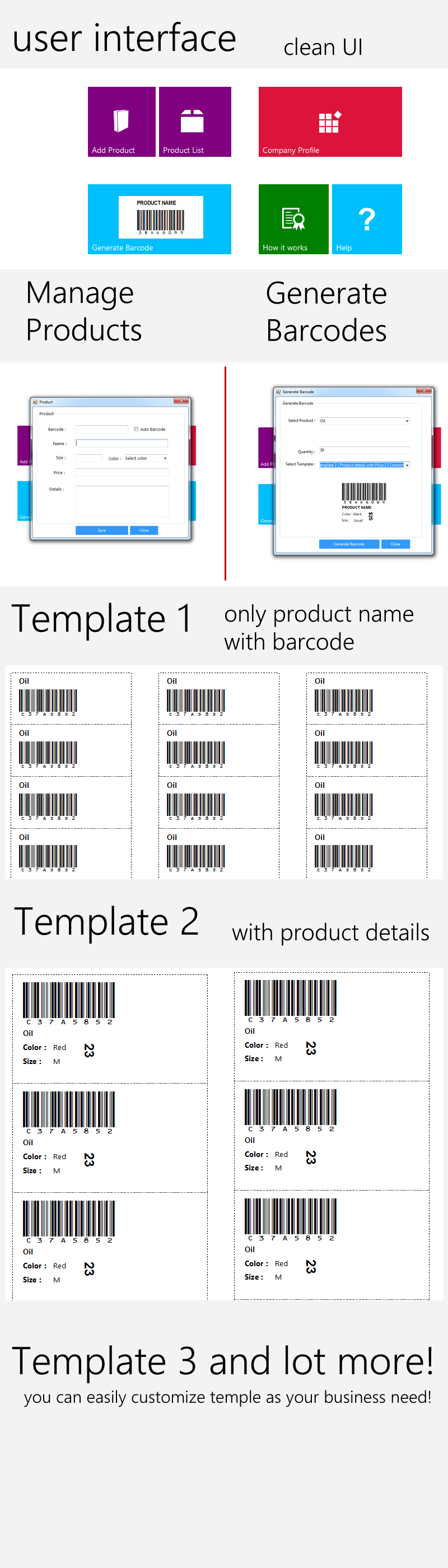
- Company Profile Setup: Create and manage detailed company profiles including logo, address, and contact information that automatically appears on generated labels
- Product Database Management: Maintain a complete product catalog with fields for SKU, description, pricing, and other critical attributes
- Customizable Barcode Generation: Generate industry-standard barcodes in three different template designs to match your branding requirements
- Batch Processing: Create multiple labels simultaneously for efficient inventory management
- Export Capabilities: Save labels in various formats for printing or digital distribution
System Requirements
To implement this solution effectively, your environment should meet these specifications:
- Development Environment: Visual Studio 2015 or later recommended
- Database: SQL Server (2012 or newer) or LocalDB for smaller implementations
- Operating System: Windows 7 or newer
- Hardware: Minimum 4GB RAM, 2GHz processor for optimal performance
Implementation and Customization
The system is built using proven technologies that ensure reliability and flexibility:
- WinForms Interface: Familiar Windows application interface for easy adoption
- Entity Framework: Modern data access layer for efficient database operations
- RDLC Reports: Powerful reporting engine for label generation and formatting
- SQL Backend: Robust data storage with relational integrity
For businesses with specific requirements, the system can be customized through our professional services. Common customization requests include:
- Adding additional product attributes
- Integrating with existing inventory systems
- Creating custom label templates
- Implementing advanced barcode formats
Version History and Updates
The system continues to evolve with regular updates and improvements:
- Version 1.0 (Initial Release):
- Core product management functionality
- Company profile setup
- Three standard barcode templates
- Basic label generation capabilities
Getting Support and Assistance
Our team provides comprehensive support for all users:
- Technical Support: Email assistance at [email protected]
- Implementation Guidance: Step-by-step setup instructions
- Custom Development: Tailored solutions for unique business needs
For visual reference, see these screenshots of the system in action:
Best Practices for Implementation
To get the most value from the Product Label/Barcode Generator, consider these implementation tips:
- Standardize your product naming conventions before importing data
- Test label formats with your specific printers before full deployment
- Establish a regular backup routine for your product database
- Train multiple team members on basic operations to ensure continuity
- Consider integrating with your POS or inventory system for maximum efficiency