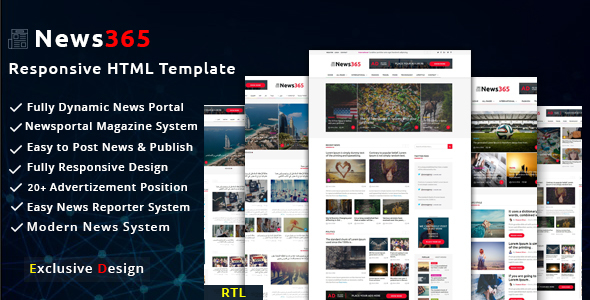
News365 creative is a multipurpose HTML template built for newspaper, magazine, blog and online news portal projects, sold on ThemeForest by the developer bdtask for $12. It is a static front-end template rather than a WordPress theme, so it suits freelancers and agencies who want a ready-made news layout to hand-code into a CMS, and it is a poor fit for anyone expecting to install a zip file and start publishing.
The listing positions it as a Bootstrap-based responsive template with a “modern news system” and clean markup. That is a fair summary of what is actually delivered, though the marketing language is doing more work than the feature list. What a buyer receives is a set of HTML pages, stylesheets and scripts that render a news-style layout across screen sizes, with no backend, no admin panel and no content management layer attached.
What News365 creative actually delivers
The core value here is layout, not functionality. The template provides a news-oriented page structure — the kind of multi-column front page, article detail view and category listing that a publication-style site needs — already styled and already responsive. For a developer, that removes the tedious part of a project: deciding on a grid, building a headline hierarchy, and making the whole thing collapse sensibly on a phone. The Bootstrap foundation means the responsive behaviour follows a framework most front-end developers already know, so overriding breakpoints or extending the grid does not require learning a bespoke system.
Because it is built on Bootstrap, the component vocabulary is familiar: a twelve-column grid, standard utility classes, and a set of pre-styled elements for navigation, cards and typography. That matters practically. A developer can drop in additional Bootstrap components — modals, tabs, carousels — without fighting the template’s own CSS, and any developer who has worked with Bootstrap before can read the markup without a period of orientation.
The vendor describes the code as “fresh and clean,” which is a claim worth testing rather than trusting. What can be said from the listing is that the template is a static HTML build with no server-side dependencies, which means there is nothing to configure, no database, and no build step required to preview it. Opening the files in a browser shows the design immediately. That is a genuine convenience for client pitches and design review, where a working visual prototype early in a project shortens the feedback loop considerably.
Browser support is listed as universal, which in practice means the template targets standard, current browsers rather than legacy versions. The vendor does not specify which browsers or versions were tested, so that claim should be verified against whatever the project’s actual support matrix requires.
One detail that appears in the listing and matters more than its placement suggests: images are not included. Every photograph visible in the demo is a placeholder. A buyer is purchasing layout and styling only, and will need to source or license all imagery separately. For a news template this is a meaningful consideration, because editorial imagery is central to how a news layout reads.
Where this template fits, and where it does not
The strongest use case is a developer or small agency building a custom publication site — a local news outlet, an industry journal, a member magazine — where the front end will be hand-integrated into a CMS such as WordPress, Craft or a headless setup. In that scenario the template functions as a head start on the design layer, and the $12 price is trivially small against the hours it saves.
A second fit is prototyping. Because the pages are static and require no setup, they work well as a clickable mockup to put in front of a client before committing to a full build. The client sees a real, responsive news layout rather than a flat design file, which tends to produce more useful feedback.
A third, narrower fit is a static site that genuinely does not need a CMS — an archived publication, a documentation-style news page, or a marketing site with a blog-shaped section that is updated infrequently by hand.
Where it is the wrong choice is equally clear. Anyone who wants to publish articles without touching code should not buy this. There is no admin interface, no post editor, no taxonomy system and no media library. A WordPress theme at a similar price point would deliver all of that out of the box. Similarly, a buyer who needs a finished, content-complete website will find that News365 creative supplies the shell and nothing inside it.
Strengths and limitations
Strengths
- Purpose-built news and magazine layout rather than a generic multipurpose theme stretched to fit editorial content.
- Bootstrap foundation means the grid, spacing and responsive behaviour follow conventions most front-end developers already know.
- Static HTML with no backend dependencies, so it previews instantly and can be integrated into any CMS or framework.
- Low entry price at $12, which is easy to justify against the design hours it replaces.
- 346 sales on ThemeForest indicate a reasonable number of buyers have taken it on, and the developer bdtask has a broader catalogue behind it.
Limitations
- The last vendor update was July 2019. That is a long gap in a category where Bootstrap itself has moved through several major versions, and it raises fair questions about whether the markup reflects current framework conventions and current browser behaviour.
- No images are included, so the demo’s visual appeal is not reproducible without separately licensed photography.
- It is a static template, not a theme. There is no CMS integration, no dynamic content handling and no publishing workflow.
- The vendor’s feature list is thin on specifics — no stated browser support matrix, no accessibility statement, no documentation details, no indication of whether SCSS source files are included alongside compiled CSS.
- Responsive behaviour is claimed broadly but not demonstrated in the listing beyond the demo, so the mobile experience should be checked directly before purchase.
How it compares with the wider category
The realistic alternatives fall into three groups, and the choice between them is about workflow rather than quality.
The first group is CMS-native themes — WordPress news themes in particular. These cost more, typically in the $40–$70 range, but they include an admin panel, post types, widget areas and a publishing workflow. For a site owner who wants to run a publication rather than build one, that is the correct category, and News365 creative is not competing there at all.
The second group is general-purpose multipurpose HTML templates. These usually offer more page variations and more component libraries, but their news layouts tend to be one demo among many rather than the organising idea. News365 creative is narrower and, for an editorial project, more directly on target.
The third group is custom design from scratch. That produces the best fit to a specific brand and content model, at a cost measured in days rather than dollars. The template makes sense when the budget does not stretch to that and the design does not need to be distinctive.
On capability, the honest positioning is that this is a design starting point with a low price and a dated maintenance record. Buyers comparing it against a current Bootstrap 5 template should weigh the update gap carefully; buyers comparing it against a WordPress theme should recognise they are shopping in a different category entirely.
Frequently Asked Questions
Is News365 a WordPress theme or an HTML template?
It is a static HTML template, not a WordPress theme. The package contains HTML pages, CSS and JavaScript, with no PHP, no theme files and no CMS integration. It cannot be installed into WordPress as-is. Using it for a WordPress site requires converting the markup into a theme, which is a development task rather than a configuration one.
Does News365 creative include the images shown in the demo?
No. The vendor states plainly that images are not included, so everything visible in the preview is a placeholder. Buyers need to source and license their own photography or graphics separately. For a news layout, where images carry a large share of the visual weight, that is a real additional cost and effort to plan for.
Is the template still maintained and updated?
The last update recorded on the listing is July 2019. The vendor does not indicate an ongoing release schedule. That does not make the template unusable, but it does mean buyers should expect no fixes for newer browser behaviour and should verify the markup against current standards before committing to a long project.
Can News365 be used for a magazine or blog rather than a newspaper?
Yes. The layout is editorial in structure and works for magazines, journals and blogs as readily as for news portals. The vendor tags cover article, blog, journal, magazine and newspaper use cases. The distinction is mostly about content density and how many columns the front page needs, both of which are adjustable in the markup.
Verdict
News365 creative is worth buying for developers and small agencies who need a responsive, Bootstrap-based news layout as a starting point and intend to integrate it into a CMS themselves. At $12 with 346 sales behind it, the risk is low and the time saved on layout work is real. It is not worth buying for site owners who want to publish content without coding, since it offers no admin layer whatsoever, and the 2019 update date means anyone building on it should budget time to audit the markup against current framework and browser standards. Buyers who need a maintained, CMS-native news theme should look in that category instead; buyers who need a design head start on a custom build will find this a reasonable, inexpensive option.