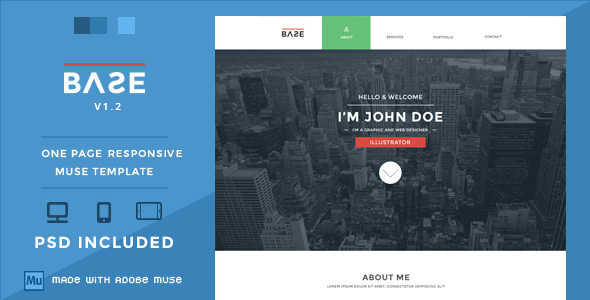
Base Muse Templates is a single-page portfolio template built for Adobe Muse, sold on ThemeForest by the developer WellMadePixel for $21. It packages a flat-design one-page layout with desktop, tablet and mobile variants plus the original Photoshop source files, and it targets freelancers and creatives who want a portfolio site assembled visually rather than coded by hand. The listing has accumulated 348 sales since release.
The product sits in an unusual corner of the template market. Adobe Muse was discontinued by Adobe in 2018, and Muse itself stopped receiving feature updates well before that, so anyone evaluating this theme today is buying into a legacy workflow. That does not automatically make it a bad purchase — plenty of Muse sites are still running, and Muse remains installed on many designers’ machines — but it changes the calculation considerably compared with a WordPress theme or a modern static site builder template.
What Base Muse Templates Actually Delivers
The core of the package is a one-page layout: navigation, a home or hero section, an about block, a portfolio grid, and a contact area, all arranged on a single scrolling page. This structure is deliberate and well suited to portfolio work, where there is rarely enough content to justify separate pages and where a continuous scroll keeps a visitor moving through the work rather than clicking away.
The portfolio section includes category filter buttons, added in the v1.1 release. For a freelancer showing mixed work — branding alongside web alongside illustration, for example — those filters let a visitor narrow the grid without leaving the page. It is a small feature, but it is the difference between a portfolio that scales to thirty projects and one that becomes an undifferentiated wall of thumbnails past a dozen.
Responsive behaviour arrived late in the product’s life. The tablet layout shipped in October 2013, and the responsive layout itself was not added until version 1.2 in May 2016 — roughly two and a half years after the initial tablet work and nearly three years after launch. The practical consequence is that the responsive implementation is a retrofit rather than something the layout was designed around from the start. Buyers should expect to check breakpoint behaviour themselves rather than assume it is flawless.
Parallax scrolling is part of the feature set, which gives the hero and section backgrounds a layered sense of depth as the page moves. Used sparingly it reads as polished; used on every section it becomes distracting and can hurt scroll performance on lower-powered devices. The template’s flat design language — no gradients, no drop shadows, solid colour blocks and clean type — pairs sensibly with that restraint.
The inclusion of the PSD source files is more valuable than it first appears. It means a buyer can modify the visual design outside Muse entirely, or hand the layered file to a designer who does not work in Muse. For agencies that need to adapt a template to a client’s brand colours and typography, having the source artwork removes a real constraint.
Where Base Muse Templates Fits, and Where It Does Not
The clearest fit is an individual creative professional — a photographer, illustrator, graphic designer or front-end developer — who already owns Adobe Muse and wants a portfolio online without writing markup. The one-page format suits someone with a focused body of work and a short list of services, and the $21 price is low enough that it functions as a starting point rather than a significant investment.
A second reasonable fit is a designer or small studio maintaining an existing Muse workflow. If Muse is already part of how the business produces sites, adding a pre-built portfolio layout is straightforward, and the PSD files slot into an existing design process without friction.
It is the wrong choice for anyone starting fresh today without Muse installed. Adobe no longer sells or supports the application, so a new buyer would need to source a discontinued tool before the template is usable at all, and would be building on a platform with no forward path. It is equally wrong for a business that needs a blog, e-commerce, multi-language support, or any content that changes frequently — a one-page Muse template has no content management layer, so every text edit means reopening the Muse file and republishing.
Strengths and Limitations
Strengths
- Genuinely low entry cost at $21, with no subscription or ongoing licence fee attached to the template itself.
- Desktop, tablet and mobile layouts are all supplied, so the responsive variants do not need to be built from scratch.
- Layered PSD source files are included, allowing the visual design to be adapted or extended outside Muse.
- Portfolio category filtering gives the grid enough structure to handle a larger body of work.
- The flat, minimal aesthetic is restrained enough that it does not fight the work being displayed — a real advantage for a portfolio whose job is to show someone else’s design.
- 348 sales indicate the template has been purchased and used widely enough to have a track record, though the listing shows no rating data.
Limitations
- The template depends entirely on Adobe Muse, which Adobe discontinued in 2018. There is no WordPress, HTML or static-site version in the package.
- The last vendor update was May 2016. Nothing has been revised in roughly a decade, so any browser quirks or accessibility gaps introduced since then remain unaddressed.
- The responsive layout was retrofitted in v1.2 rather than designed in from the beginning, which is a meaningful risk for breakpoint behaviour on unusual screen sizes.
- There is no CMS, no blog module, and no e-commerce capability. Content updates require the Muse application.
- The vendor does not state anything about accessibility — no mention of semantic markup, keyboard navigation or contrast compliance. Buyers with accessibility requirements should assume nothing is provided.
- Parallax effects and multiple background images can affect scroll performance on older mobile hardware, and the vendor provides no guidance on tuning them.
How Base Muse Templates Compares to the Wider Category
Against modern one-page portfolio templates in general, the comparison is not close on tooling. A WordPress one-page theme or a template for a current site builder gives the buyer a maintained platform, ongoing security updates, a content editor, and a plugin ecosystem. Base Muse Templates offers none of that. Judged purely as a delivery mechanism for a portfolio site in 2024 and beyond, it is behind.
The comparison shifts when the criterion is fit rather than capability. For someone who already works in Muse and has no intention of migrating, the relevant alternatives are other Muse templates — and within that shrinking pool, this one is inexpensive, complete in terms of device variants, and includes the source artwork. The design itself is competent rather than distinctive: flat, clean, professional, and unlikely to embarrass anyone, but also unlikely to be remembered.
The honest framing is that this is a purchase for a specific, narrowing audience. It competes well on price and on the inclusion of PSD files within its own niche, and poorly on everything that depends on the platform underneath it.
Frequently Asked Questions
Do I need Adobe Muse to use Base Muse Templates?
Yes. The template is a .muse file and requires Adobe Muse to open, edit and publish. Adobe discontinued Muse in 2018 and no longer sells it, so a buyer without an existing installation would need to source the application separately. The included PSD files can be opened without Muse, but they are design source files, not a working website.
Is the template actually responsive on modern phones?
The vendor added a responsive layout in version 1.2, released in May 2016, alongside the earlier desktop and tablet versions. The vendor does not state which breakpoints are used or whether the layout has been tested against current devices. Given the age of the last update, buyers should test the published output on their own target devices before committing.
Can the portfolio section handle a large number of projects?
Yes, up to a point. Category filter buttons were added in version 1.1, which lets visitors narrow the grid by project type rather than scrolling through everything. That makes a portfolio of twenty or thirty items manageable. Beyond that, a single-page layout with no pagination or search becomes unwieldy, and a multi-page structure would serve better.
What is included in the $21 purchase?
The package contains the Muse template with desktop, tablet and mobile layouts, plus the layered PSD source files. The vendor does not state whether documentation, support terms or future updates are included, and the listing shows no update since May 2016. Buyers should treat the purchase as a one-off download of the files as they currently exist.
Verdict on Base Muse Templates
Base Muse Templates is worth buying for one group: designers and freelancers who already have Adobe Muse installed and working, and who want a clean, inexpensive single-page portfolio they can publish without touching code. The flat design is tasteful, the device variants and PSD files add real value at $21, and 348 sales suggest it has done the job for others.
It is not worth buying for anyone else. The dependency on a discontinued application, the absence of any update since 2016, and the complete lack of CMS, blog or e-commerce functionality rule it out for new projects, for businesses with changing content, and for anyone with accessibility obligations. The template is a reasonable artefact of its era rather than a live option, and it should be evaluated on those terms.