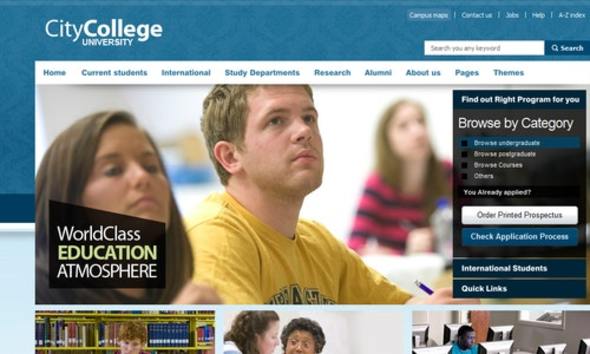
City College is a static HTML template sold on ThemeForest for $14, aimed at schools, colleges, training providers and education-focused agencies that need a small marketing site without a CMS behind it. It ships with seven hand-built pages, four colour scheme previews, editable Photoshop source files for the home page, and a responsive layout added in a 2021 update. It suits freelancers and small teams who want a lightweight, editable front end rather than a WordPress theme or a full learning management system.
The listing carries 537 sales and has been maintained by Chimpstudio, an author with a long catalogue of HTML and CMS templates on the same marketplace. That sales figure is modest by ThemeForest standards, which is worth noting before purchase: this is a niche template, not a mass-market bestseller, and the support community around it is correspondingly small.
What the City College business template actually includes
The core deliverable is a set of seven static pages. The home page acts as a landing surface for the institution, and the remaining six cover a blog index, a blog detail view, a news listing, a courses listing, a gallery and a contact page. For an education site, that is a sensible minimum: prospective students want to see what is taught, current students want announcements, and everyone eventually wants a phone number or an enquiry form. What is missing from that set is equally telling — there is no dedicated staff directory, no admissions or fees page, no events calendar and no single course detail template. Those gaps matter more than the page count suggests, and they are discussed further below.
Colour variants and the visual direction
Four colour schemes are offered as live previews: yellow, blue, green and red. In practice this means the accent colours, buttons and highlight treatments can be swapped without rewriting the stylesheet from scratch, which is useful when pitching the same base layout to two different institutions that want distinct branding. The palette leans warm and academic rather than corporate-SaaS, and the vendor tags list brown alongside the more obvious education keywords. Anyone expecting a neutral, monochrome starting point will need to strip the theme back.
Photoshop source files for the home page
Home page PSDs are bundled and described as largely editable. They are saved in Photoshop CS3 format, which the vendor notes is backwards compatible with CS and CS2. That is a deliberate choice for longevity — older design shops still running legacy Creative Suite licences can open the files without conversion. The practical benefit is that a designer can restructure the hero area, swap imagery and export new assets before touching any markup, rather than reverse-engineering the layout from the CSS. Note that the PSDs cover the home page only; the other six pages have no layered source.
Responsive behaviour and front-end stack
The vendor’s change log records a June 2021 entry adding full responsiveness across the whole template. That is a meaningful correction rather than a marketing line: a template first built as a fixed-width desktop layout and later retrofitted for mobile will usually show its seams in the navigation and grid behaviour, so it is worth testing the menu at narrow widths before committing. The tagged stack is HTML, CSS, jQuery and AJAX. jQuery is a legacy dependency by current standards — it still works, but it adds weight and means the template is not built on a modern component framework. There is no mention of a build step, preprocessor, or package manager, so expect to edit plain CSS and JavaScript files directly.
Where the City College business template fits, and where it does not
The strongest fit is a small institution or programme that needs a brochure site live quickly. A tutoring centre, a language school, a single-department microsite within a larger university, or a vocational training provider with a handful of course offerings can all be served by seven pages. Freelancers will appreciate the low price point and the fact that a client can be shown four colour directions in the same demo. Agencies building a pitch prototype will find the PSDs useful for mockups that go beyond what a browser screenshot can show.
It is also a reasonable choice when the client explicitly does not want a CMS. Some organisations have hosting restrictions, security policies or internal politics that make a static upload the path of least resistance. Seven hand-coded pages can be dropped on almost any host and will not require database credentials, plugin updates or a maintenance contract.
Where it falls down is any project that needs to grow. A college with an expanding course catalogue will hit the absence of a course detail template almost immediately, and a static HTML site cannot generate those pages from structured data. The same applies to news archives, staff profiles and events. If the institution expects to publish weekly, or wants students to log in, or needs an application form that writes to a database, this is the wrong product — a WordPress education theme or a proper LMS is the correct category, and the $14 saved here will be spent several times over in custom development.
Strengths and limitations
Strengths
- Seven pages cover the essential surfaces of a small education site — home, blog, blog detail, news, courses, gallery and contact — without requiring a CMS.
- Four switchable colour schemes make it practical to reuse one codebase across multiple client brands.
- Home page PSDs in CS3 format give designers a layered starting point and remain openable in older Creative Suite versions.
- Full responsiveness was added in a 2021 update, so the layout adapts to mobile rather than being desktop-only.
- At $14 the entry cost is low enough to absorb as a prototyping or pitch expense.
- 537 sales and an established author provide a basic signal that the product has been bought and used, even if the community is small.
Limitations
- There is no course detail page. A courses listing without a corresponding single-course template is a structural gap for any institution that wants to describe individual programmes, entry requirements or fees.
- No admissions, staff directory or events page is included, so those must be built from scratch or the site shipped incomplete.
- The PSDs cover the home page only, which limits how much of the design can be restructured before working directly in code.
- jQuery and AJAX form the JavaScript layer. That is a legacy dependency, and it means no modern build tooling, component structure or tree-shaking.
- The last vendor update recorded is August 2023. Buyers should treat the template as stable rather than actively evolving, and should not expect new pages or features.
- Static HTML means no content management. Every text change, new news item or course addition is a code edit and a redeploy.
- The vendor does not state browser support targets, accessibility conformance, or whether the contact form submits anywhere by default.
How it compares with the wider category
Templates in this bracket divide into three groups: static HTML templates like this one, CMS themes, and full site builders. Static templates win on hosting simplicity, load weight and predictability — there is no database, no plugin conflict surface and nothing to patch. They lose on content workflow, scalability and anything requiring user accounts or dynamic data.
Against other static education templates, the differentiators here are the colour variants and the bundled PSDs. Many competitors in the same price band ship a single colour scheme and no source files, so the ability to hand a client four visual directions and a layered mockup is a genuine advantage. Against CMS-based alternatives, the comparison is less favourable: a WordPress education theme at a similar price will include course custom post types, search, archives and a admin interface, at the cost of ongoing maintenance and a heavier stack. The City College business template is the better answer only when the site is genuinely small and genuinely static.
Frequently Asked Questions
Is City College a WordPress theme or an HTML template?
It is a static HTML template, not a WordPress theme. The package contains seven hand-coded pages built with HTML, CSS and jQuery, with no PHP, no database and no admin dashboard. That means it can be uploaded to any web host as-is, but content changes require editing the source files directly rather than logging into a CMS.
How many pages does the City College business template include?
Seven pages are included: home, blog, blog detail, news, courses, gallery and contact. There is no course detail page, admissions page, staff directory or events calendar. Any additional page must be built by hand using the existing markup as a starting point, which is straightforward for a developer but adds scope to the project.
Can the colour scheme be changed without editing the CSS?
Four colour schemes are provided as live previews — yellow, blue, green and red — and switching between them is a matter of swapping the relevant stylesheet rather than rewriting rules. Custom colours outside those four presets require editing the CSS directly, since the vendor does not describe a variable-based theming system.
Are the Photoshop files editable, and which version do they need?
The bundled home page PSDs are described as almost entirely adjustable and are saved in Photoshop CS3 format, which the vendor states is backwards compatible with CS and CS2. They cover the home page only. The other six pages have no layered source, so design changes there must be made in code.
Verdict on the City College business template
Buy it if the project is a small, static education site with a fixed set of pages and no requirement for content management, user accounts or a growing course catalogue. The City College business template delivers a workable seven-page structure, four colour directions and editable home page source files for $14, which is a fair trade for a freelancer or agency prototype. Skip it if the institution expects to publish regularly, needs per-course pages, or will eventually want an admissions workflow — those requirements push the project into CMS or LMS territory where this template cannot follow. The 2023 last-update date also means buyers should plan to own the code themselves rather than rely on future vendor additions.
.__large_preview.png)