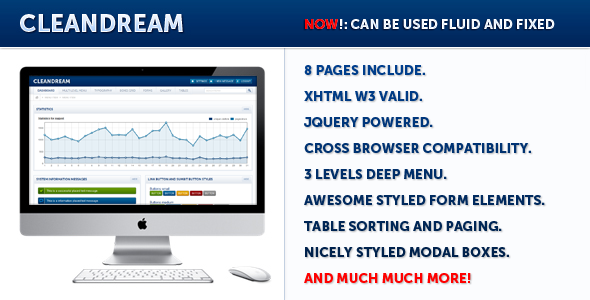
CleanDream Admin Templates is a static HTML and CSS package for building the back-end interface of a web application, sold on ThemeForest by developer dreamwirenl for $16. It ships as a set of eight ready-made pages — a login screen, dashboard, typography sheet, box grid, forms, gallery, tables and an extras page — built on xHTML 1.0 transitional markup with jQuery-driven widgets. It suits freelancers and small studios who need a presentable admin skin quickly and are comfortable editing raw HTML, and it is a poor fit for anyone expecting a modern framework-based workflow.
The listing has accumulated 452 sales, which is a respectable figure for a niche admin skin and suggests the template found a steady audience during its active life. The last vendor update is dated January 2012, a fact that shapes almost everything else in this review.
What CleanDream Admin Templates Actually Includes
The package is a front-end skin, not an application. There is no server-side code, no database layer and no authentication logic — the login page is a styled form, not a working gate. What the buyer gets is a visual system plus the JavaScript behaviour to make it feel alive in a browser.
The page set covers the screens most admin panels need. The dashboard is the centrepiece, and the vendor has put visible effort into the statistics display, including an update that added month names to the charts and the ability to define custom colours for the statics. That last point matters more than it sounds: a dashboard that can be recoloured to match a client’s brand without touching a stylesheet is genuinely useful on agency work.
Navigation is handled by a dropdown menu that runs three levels deep, which is deeper than most admin templates of this era bothered with. For applications with nested settings or multi-tier content structures, that depth avoids the usual workaround of splitting sections across separate pages.
On the interaction side, the template leans heavily on jQuery and jQuery UI. The vendor consolidated the jQuery UI files into a single bundle, which simplifies the script includes at the top of each page. Available components include:
- Modal boxes for confirmations and inline dialogs
- Accordion panels and tree views for collapsible navigation or categorised settings
- Tooltips on interface elements
- Sliders and progress bars for numeric input and status display
- A WYSIWYG editor for content entry fields
- Autocomplete on text inputs
- Data tables with live search, replacing an earlier tablesorter implementation
- Styled select boxes, including small and multi-select variants
- System notification styles for success, warning and error states
- Gallery thumbnails with zoom and delete controls
The forms page is the most complete part of the package. Every standard input type is styled, and the combination of autocomplete, sliders and a rich text editor means a developer can assemble a reasonably sophisticated settings screen without writing custom CSS for each control.
A layered and named PSD file is included alongside the HTML. That is a practical addition rather than a marketing bullet: it lets a designer extend the visual language to new screens — a billing page, a user management view — without reverse-engineering the CSS to match colours, spacing and type.
Markup validation is claimed as xHTML 1.0 transitional, and the vendor lists cross-browser compatibility as a feature. The update log references fixes for Internet Explorer 7 and Opera bugs, which indicates the template was tested against the browsers that mattered when it was current.
Where CleanDream Admin Templates Fit — and Where They Do Not
The strongest use case is a small internal tool or a lightweight SaaS back end where the interface is functional rather than the product itself. A freelancer building an inventory tracker, a booking system or a client reporting dashboard can drop these pages in, wire the forms to a backend, and deliver something that looks considered rather than default.
Agencies doing rapid prototyping will also get value from it. The eight pages cover enough ground to mock up a full admin flow for a client presentation, and the PSD makes it straightforward to extend that mockup when the scope grows.
It is also a reasonable choice for developers who want a reference implementation of jQuery UI components styled consistently. The consolidated jQuery UI bundle and the working examples of modals, accordions, tree views and data tables serve as a starting point that is faster to adapt than building each widget from the jQuery UI documentation.
Where it fails is any project with modern expectations. There is no responsive grid in the original release — a fluid layout option was added in January 2012, but fluid is not the same as mobile-first, and there is no evidence of breakpoint-based behaviour for tablets and phones. There is no build tooling, no preprocessor, no component structure and no framework integration. A team building on React, Vue or any modern stack will spend more time extracting the CSS than they would writing it fresh. Anyone needing accessibility compliance, dark mode or a design token system should look elsewhere entirely.
Strengths and Limitations of This Admin Template
Strengths
- Broad component coverage for the price — modals, accordions, tree views, tooltips, sliders, progress bars, autocomplete, WYSIWYG editing and searchable data tables all ship in one package.
- Three-level dropdown navigation handles deeper information architectures than most competing admin skins.
- Customisable chart colours and month labels let the dashboard be rebranded without stylesheet surgery.
- The included PSD is properly layered and named, which makes extending the design to new pages realistic.
- Consolidated jQuery UI files reduce the number of script tags and the chance of load-order mistakes.
- Validated xHTML 1.0 transitional markup is a cleaner starting point than the table-based layouts common in its era.
Limitations
- The last update was January 2012. Any jQuery or jQuery UI version bundled at that point is well behind current releases, and the vendor does not state which version is included. Buyers should assume they will need to upgrade dependencies themselves.
- There is no responsive framework. The fluid layout option changes how the page stretches on a desktop, not how it reflows on a phone.
- It is HTML only. Every piece of server-side logic — sessions, validation, data persistence, permissions — has to be written from scratch.
- Browser compatibility claims are anchored to a 2012 browser landscape. Testing against current Chrome, Firefox and Safari is the buyer’s responsibility, and some jQuery UI components may behave unexpectedly.
- The gallery’s zoom and delete controls are front-end only; deletion has no backend counterpart.
- Documentation is not described in the listing, so the depth of setup guidance is unknown.
How CleanDream Admin Templates Compare to Other Admin Skins
Admin templates generally fall into three groups: static HTML skins like this one, framework-specific kits built for React or Vue, and full admin dashboards that bundle backend scaffolding. CleanDream sits firmly in the first group, and within that group its differentiator is breadth of components relative to price.
Compared with framework-specific kits, it offers no integration story — no components to import, no props to pass, no state management. The trade-off is that it imposes no technology choice either. It can sit behind a PHP application, a Rails app or a static prototype with equal ease, which is precisely why static skins retained a market long after component libraries appeared.
Compared with full admin dashboards that include authentication, user roles and database migrations, CleanDream is a fraction of the scope. Those products cost more and demand a specific stack. This one asks for $16 and gives a visual layer, nothing more.
The honest comparison is against writing the CSS yourself. For a developer comfortable with CSS and jQuery UI, building equivalent pages might take a day or two. CleanDream Admin Templates compresses that into an afternoon of wiring, which is the entire value proposition — and it only holds if the 2012-era dependency stack is acceptable.
Frequently Asked Questions
Is CleanDream a WordPress theme or a standalone HTML template?
It is a standalone HTML and CSS template, not a WordPress theme. The package contains static .html files, stylesheets, JavaScript and a PSD, with no PHP templates, functions file or CMS integration of any kind. It can be adapted into a WordPress admin skin or a plugin interface, but that conversion work falls entirely to the buyer.
Does CleanDream Admin Templates include a responsive mobile layout?
No. A fluid layout option was added in a January 2012 update, which allows the page width to stretch with the browser window, but the template predates mobile-first design and has no breakpoint-based reflow. Admin screens built on it will need custom media queries before they are usable on phones or tablets.
What JavaScript libraries does the template depend on?
It relies on jQuery and jQuery UI, with the jQuery UI files consolidated into a single bundle. The vendor does not state which versions are included, and given the 2012 update date, buyers should expect to audit and likely upgrade those dependencies before deploying to a live environment.
Can the dashboard charts be customised?
Yes, to a degree. An August 2011 update added the ability to build custom statics with chosen colours, and a September 2011 update added month names to the statistics display. These are presentational changes handled in the HTML and CSS rather than a charting library with a data API.
Verdict on CleanDream Admin Templates
CleanDream Admin Templates is worth buying for developers who need a static admin interface quickly, are comfortable working in raw HTML and jQuery, and can accept a dependency stack that has not been touched since January 2012. At $16 with 452 sales behind it, the component coverage — particularly the three-level menu, the searchable data tables and the customisable dashboard statics — represents reasonable value for a prototype, an internal tool or a legacy application that already runs on jQuery.
It should be avoided by anyone building a responsive product, working in a modern JavaScript framework, or needing accessibility and design-system support. Those buyers will spend more time stripping the template apart than they would starting from a current component library.
The deciding question is simple: does the project tolerate a decade-old front-end stack? If yes, CleanDream Admin Templates saves real time. If no, the low price is not low enough to offset the rework.