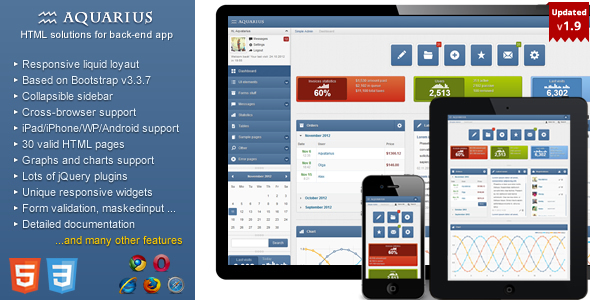
Aquarius – Responsive Admin Panel is a Bootstrap 3 and jQuery admin template sold on ThemeForest by developer Aqvatarius, priced at $16, and built for developers who need a working dashboard interface rather than a blank canvas. It ships with a full set of pre-built pages, a large collection of integrated jQuery plugins, and a layout system that adapts between desktop and mobile screens. It suits freelancers and small agencies delivering internal tools, CRM front ends or reporting dashboards on tight timelines, and it is a poor fit for anyone who needs a modern JavaScript framework or long-term vendor support.
The template has accumulated 746 sales on the marketplace and holds a strong rating from those buyers, which is a reasonable signal of stability for a product in this price bracket. The last vendor update was September 2017, and that date matters more than any feature list when assessing whether Aquarius Admin Templates belong in a project started today.
What Aquarius Admin Templates Actually Deliver
The core of the package is a responsive layout system built on Bootstrap 3. Buyers get a choice between a liquid two-column arrangement and a fixed-width layout, and the left navigation collapses on smaller viewports rather than being hidden behind a separate mobile build. Eight colour schemes and eight background options ship with the template, and the vendor provides a settings panel for switching them, so rebranding a demo into something client-appropriate takes minutes rather than an afternoon of CSS work.
The plugin bundle is where most of the practical value sits. A single download includes DataTables for sortable, searchable grids, FullCalendar for scheduling views, Flot and Sparkline for charts, Select2 and Uniform for form controls, Plupload for uploads, and elFinder for a browser-based file manager. Masked input, inline form validation with multi-language support, tag inputs, multi-selects, a WYSIWYG editor and a stepped form wizard round out the form tooling. Assembling that stack manually means resolving version conflicts between a dozen libraries; here the integration work is already done.
Interface components cover the usual administrative ground: accordions, tabs, sortable and selectable lists, datepickers, sliders, progress bars in static and animated variants, and both jQuery UI and Bootstrap dialog windows. Alert blocks for warning, error, success and info states are styled and responsive. The vendor also includes a mailbox template, a user profile page, a users info page, an FAQ example and custom error pages, which together give a project a credible starting point for most of the screens an internal tool needs.
Documentation is provided, and the vendor states that bug reports and questions are handled directly by the author. That is a reasonable support posture for a marketplace template, though it depends entirely on the author remaining active.
Where This Template Fits and Where It Does Not
Aquarius makes most sense on projects where the interface is a means to an end. An agency building an internal reporting tool for a client, a freelancer delivering a lightweight CRM front end, or a developer prototyping an admin area before committing to a heavier stack will all find the pre-built pages and plugin bundle shorten the work considerably. The $16 price is trivial against even a few hours of saved integration time, and the breadth of sample pages means less time spent designing table, form and dialog states from scratch.
It is also a reasonable fit for legacy environments. The vendor states compatibility with IE7 and IE8 alongside current browsers, which is unusual and occasionally still relevant for organisations running older internal systems on locked-down machines.
The wrong choice is any project that needs a single-page application. There is no React, Vue or Angular version here, no component library in the modern sense, and no build pipeline. Teams working in a framework-based stack will spend more effort stripping Aquarius back to markup and styles than they would writing the interface themselves. Projects with accessibility requirements should also look elsewhere: the template predates the mainstream adoption of WCAG-driven component patterns, and the vendor does not state any conformance level.
Strengths and Limitations
Strengths
- Broad plugin integration already completed, covering data grids, calendars, charts, uploads, file management and form validation in one download.
- Genuine responsive behaviour with both liquid and fixed layout options, rather than a desktop layout squeezed onto small screens.
- Eight colour schemes and eight backgrounds with a settings panel, which makes client rebranding straightforward.
- Unusually wide browser support, including IE7 and IE8, for organisations still maintaining older internal systems.
- Large library of sample pages — mailbox, profile, users, FAQ, error pages — that reduces design decisions on routine screens.
- Low price relative to the volume of pre-built interface work included.
Limitations
- The last vendor update was September 2017. Bootstrap 3 itself reached end of life, and the bundled jQuery and plugin versions are correspondingly old, so any project using this template inherits a dependency stack that no longer receives security patches.
- No framework version exists. There is no React, Vue or Angular build, and no npm package or modern build tooling.
- Accessibility is not addressed. The vendor does not state a WCAG conformance level, and the markup patterns typical of this era rarely meet current standards without rework.
- Support depends on a single author responding through marketplace channels. There is no stated support period, SLA or public issue tracker.
- The vendor does not state a licence beyond the standard marketplace terms, so buyers should confirm what applies to end products before shipping.
- Customising beyond the supplied colour and background options means editing compiled CSS and older jQuery plugin code, which is slower than working with a modern preprocessor setup.
How Aquarius Compares to the Wider Admin Template Category
Admin templates generally split into two groups: static HTML and Bootstrap packages like this one, and framework-native kits built for React, Vue or Angular. Aquarius sits firmly in the first group and competes on breadth rather than modernity. Against other Bootstrap-based templates, its differentiators are the size of the integrated plugin set, the inclusion of a file manager and mailbox, and that legacy browser support. Against newer Bootstrap 4 or Bootstrap 5 templates, it loses on currency: newer options ship with updated dependencies, better accessibility defaults and ongoing maintenance.
Against framework-native kits, the comparison is really about project type rather than quality. A team already working in a component framework gets more from a kit that matches its stack, even at a higher price. A team building a server-rendered application with PHP, Rails or a CMS gets more from a static template, and Aquarius is a competitive option there on price and completeness. The deciding factor is not which template is better in the abstract but whether the buyer’s stack can absorb static HTML without friction.
Frequently Asked Questions
Is Aquarius compatible with Bootstrap 4 or Bootstrap 5?
No. Aquarius is built on Bootstrap 3, which is a different major version with incompatible class names and grid behaviour. Migrating the template to Bootstrap 4 or 5 would require rewriting the markup and most of the custom styling rather than adjusting a few classes, so buyers needing a current Bootstrap version should choose a template built for it.
Does Aquarius work with React, Vue or Angular?
No framework version is available. The template is static HTML, CSS and jQuery, so using it inside a component framework means porting the markup manually and replacing the jQuery-driven behaviour with framework equivalents. That work usually costs more than starting from a framework-native component library, which is the better route for those stacks.
Is the template still maintained and updated?
The vendor’s last recorded update was September 2017, so the template is effectively in maintenance-freeze territory rather than actively developed. The author has historically responded to bug reports and questions, but buyers should treat the current version as final and plan for no further dependency upgrades, security patches or feature additions.
What is included in the $16 purchase?
Buyers receive the full template package with all sample pages, the settings panel for colours and backgrounds, and the integrated plugin bundle covering DataTables, FullCalendar, Flot, Sparkline, Select2, Plupload, elFinder, form validation and the rest. Documentation is included. The vendor does not state a separate support period, so ongoing help depends on the author’s availability.
Verdict
Aquarius Admin Templates remain a practical purchase for developers building server-rendered admin interfaces who want a large, pre-integrated set of pages and plugins at minimal cost. The 746 sales and strong buyer rating suggest the template has held up well for the projects it was bought for, and the plugin bundle alone justifies the price for anyone who would otherwise spend days wiring the same libraries together. Buyers should go in with clear eyes about the 2017 update date: this is a finished product, not a maintained one, and the Bootstrap 3 and jQuery dependencies will not receive security updates. Teams working in React, Vue or Angular, or with formal accessibility obligations, should look at framework-native alternatives instead. For everyone else, the trade-off is straightforward — modern tooling in exchange for a working interface today.