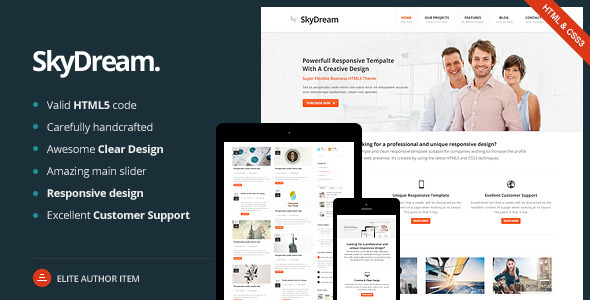
SkyDream is a multi-purpose HTML5 template sold on ThemeForest for $14, built by WebLionMedia as a static front-end package rather than a WordPress theme. It ships with 63 HTML pages, eight home page layouts, six slider options and three portfolio styles, aimed at freelancers and small studios that need a ready-made marketing or portfolio site without a CMS behind it.
The listing has accumulated 404 sales since its last update in July 2015, which places it in the long tail of ThemeForest’s creative category. Anyone evaluating SkyDream creative templates today should understand one thing up front: this is a mature, frozen codebase, and the decision hinges less on features than on whether a static HTML build still suits the project.
What the SkyDream creative template actually includes
The headline number is 63 HTML pages, and it is not padding in the way page counts often are. The package covers the full set of pages a small business site typically needs: home, about, services, portfolio listings and detail views, blog index and post pages, pricing, and contact. That breadth matters because it removes the most tedious part of a static build — writing markup and CSS for pages nobody enjoys building.
Eight home page layouts and six slider implementations are the most consequential inclusions. Eight home pages means the same underlying stylesheet can produce a corporate landing page, a portfolio grid, or a service-led layout without a redesign, which is useful when pitching variations to a client before committing to a direction. The slider count is generous by the standards of the era, though buyers should note the vendor does not specify which slider libraries are used, so the dependency footprint is unclear from the listing alone.
Three portfolio styles and eight blog layouts give the template more range than a typical single-purpose creative theme. For agencies producing several small sites a year, that variety reduces the risk of every project looking identical.
On the technical side, the template is built with HTML5 and CSS3, uses jQuery for interaction, and includes an Ajax contact form plus a Twitter feed block. The Ajax form is a small but practical detail — it avoids the full page reload that makes static contact forms feel dated. Seven colour schemes ship with the package, and layered PSDs are included for buyers who need to modify the visual design rather than just the content.
Shortcodes and reusable elements round out the build: info boxes, column layouts, tabs and toggles, and a pricing table. In a static context these are CSS and markup patterns rather than a plugin system, which means they are edited directly in the HTML. That is simpler to debug but slower to apply at scale.
Documentation is described as extensive, and the author offers support through the ThemeForest profile. The vendor does not state a support period or response time, so buyers should treat ongoing support as best-effort rather than contractual.
Where a static HTML5 template like SkyDream fits — and where it does not
The clearest fit is a brochure or portfolio site that will not change often. A photographer, design studio, consultancy or trades business with a fixed set of pages and no editorial workflow can deploy this quickly and host it almost anywhere, including cheap static hosting or a CDN. There is no database, no PHP requirement, and no plugin update cycle to maintain.
It also suits freelancers who build sites for clients on tight budgets. At $14, the template costs less than an hour of most freelancers’ time, and the 63 pages mean a project can go from brief to staging in a day. The layered PSDs are a genuine advantage here for anyone who needs to adapt the design rather than ship it unchanged.
A second scenario is prototyping. The eight home page layouts make it easy to show a client three or four visual directions without designing from scratch, then rebuild the chosen one properly.
The wrong choice is any project that needs a content management system. If the client expects to publish blog posts, edit service pages, or manage a product catalogue themselves, SkyDream is the wrong tool — every content change means editing HTML and re-uploading. The same applies to sites needing e-commerce, membership, multi-language routing, or structured data at scale. Those requirements point to a CMS-based theme, and the vendor itself links to a separate WordPress version of SkyDream, which is a tacit acknowledgement that the static package has a ceiling.
There is also a currency problem. The template was last updated in July 2015. Browser support has moved on considerably since then, and while the underlying HTML and CSS will still render, buyers should expect to audit and modernise parts of it rather than deploying it untouched.
Strengths and limitations of the SkyDream creative package
Strengths
- 63 HTML pages cover the full range of a small business site, removing most repetitive markup work.
- Eight home page layouts and three portfolio styles give real variety without a redesign.
- Layered PSDs are included, which is uncommon at this price point and valuable for design customisation.
- Seven colour schemes and a shortcode-style element set (tabs, toggles, pricing tables, info boxes) speed up page assembly.
- Ajax contact form and a Twitter block handle two of the most common small-site requirements out of the box.
- Static output means no database, minimal hosting requirements, and fast load times when served from a CDN.
Limitations
- No CMS. Content edits require direct HTML changes, which rules it out for clients who want to self-manage.
- Last updated in July 2015. Expect to review jQuery dependencies, vendor prefixes and any third-party slider scripts for outdated or insecure code.
- The vendor does not name the slider libraries used, so the JavaScript dependency footprint cannot be assessed before purchase.
- Support terms, response times and support duration are not stated in the listing.
- 404 sales is a modest figure, which means a smaller pool of community answers and forum threads than a best-selling template would have.
- Shortcodes here are markup patterns, not a plugin system — reusing an element across 60 pages means editing 60 files.
How SkyDream creative compares with the wider template category
Static HTML5 templates occupy a shrinking but still legitimate niche. Their main advantage over CMS themes is deployment simplicity: no server-side runtime, no plugin conflicts, no security patches for a database layer, and hosting that costs almost nothing. For a site that genuinely will not change, that is a better architecture, not a compromise.
The trade-off is flexibility. A WordPress or Joomla theme costs more and demands more setup, but it hands content control to the client and supports growth — new pages, new post types, new integrations — without a developer. Buyers comparing on capability alone will find CMS themes win on extensibility; buyers comparing on time-to-launch and hosting cost will find static templates win comfortably.
Within the static segment, SkyDream creative templates differentiate mainly on volume and design variety. The 63-page count and eight home layouts sit at the generous end for a $14 package, and the inclusion of layered PSDs is a differentiator that cheaper templates usually skip. Where it falls behind is maintenance: newer static templates are built on modern CSS layout systems and current JavaScript, while SkyDream reflects 2015 tooling. That gap is the single biggest factor separating it from a template released in the last few years.
It is also worth noting that the author, WebLionMedia, sells a WordPress counterpart. Buyers who like the design but need a CMS should compare the two rather than trying to bolt a CMS onto the static package.
Frequently Asked Questions
Is SkyDream a WordPress theme or a static HTML template?
It is a static HTML5 template, not a WordPress theme. There is no PHP, no database and no admin dashboard — pages are plain HTML files edited directly. WebLionMedia sells a separate WordPress version of SkyDream, so buyers who need a CMS should look at that product instead of this one.
How many pages and layouts does the SkyDream creative template include?
The package contains 63 HTML pages, eight home page layouts, six slider options, three portfolio styles and eight blog layouts. That covers home, about, services, portfolio, blog, pricing and contact pages. The vendor’s listing also mentions 50+ pages in one section, so the exact count varies between descriptions.
Can SkyDream be customised without knowing how to code?
Only to a limited degree. Colour schemes and content can be swapped by editing HTML and CSS, but structural changes require comfort with markup. Layered PSDs are included for buyers who want to redesign the visuals in Photoshop first. Anyone unwilling to touch code should choose a CMS-based theme with a visual builder.
Is SkyDream still maintained and updated?
The listing shows the last vendor update as July 2015, so it is not actively maintained. The HTML and CSS will still render in modern browsers, but jQuery, slider scripts and CSS vendor prefixes may need auditing. Buyers should budget time for modernisation rather than assuming a drop-in deployment.
Verdict on the SkyDream creative template
SkyDream creative templates make sense for a specific buyer: a freelancer or small studio building a fixed, brochure-style site for a client who will not edit it themselves, on a budget where $14 and a day of work is the whole project. The 63 pages, eight home layouts and included PSDs deliver solid value at that price, and the static architecture keeps hosting cheap and load times fast.
It is the wrong purchase for anyone who needs a CMS, e-commerce, or a site the client will maintain. The 2015 last-update date is the deciding factor for many projects — the design still holds up, but the underlying scripts need review before anything goes live.
Buyers who accept those terms get a workable, well-stocked starting point. Buyers who need content management should look at WebLionMedia’s WordPress version, or a current CMS theme, rather than working around the limitations of a static package.