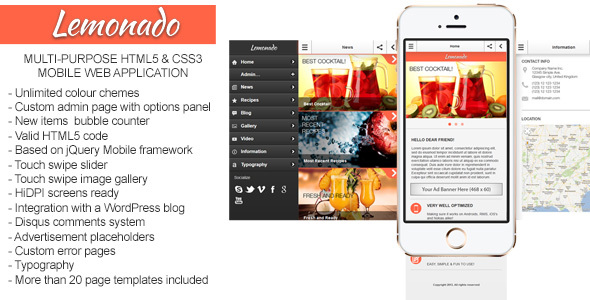
Lemonado Mobile is a multi-purpose mobile web application template sold on ThemeForest for $15, built on the jQuery Mobile framework and shipped in both HTML and PHP versions. It bundles an admin panel with an extendable options screen and more than twenty ready-made page templates, and it can be pointed at any WordPress-based site as a data source. It suits freelancers and small agencies that need to deliver a lightweight mobile web app quickly, and it is a poor fit for teams that require a modern JavaScript framework or long-term vendor updates.
What Lemonado Mobile Actually Delivers
The core promise of Lemonado Mobile is speed of assembly. Rather than starting from a blank canvas, a developer gets a set of pre-built screens that already share a consistent visual language, plus a control panel for wiring them together. The practical value sits in three areas: the admin layer, the template library, and the framework underneath.
An Admin Panel With Extendable Options
The admin page is the part that separates a template from a finished application. It provides a configuration interface where site-wide settings are managed, and the vendor describes the panel as extendable, meaning new option groups can be added without rebuilding the surrounding UI. For an agency handing a project to a client, that matters: the client can adjust content and settings without touching markup. The demo admin area is protected by a password, which the vendor lists as admin — a reminder that the shipped credentials need replacing before anything goes live.
Because the package includes both HTML and PHP builds, the same front end can be deployed as a static prototype or as a server-rendered application. That dual packaging is unusual at this price point and gives a developer a natural staging path: build and sign off on the HTML version, then move to PHP for the live deployment.
More Than Twenty Ready-Made Screens
The template library covers the screens most mobile projects need on day one. The vendor names a home page, a contact page, a blog page, and photo and video galleries among the twenty-plus layouts, and the tag list points to magazine, portfolio, restaurant directory and advertisement use cases. In practice this means a project can start from a working navigation structure rather than an empty folder, and the individual screens can be mixed and matched to suit a specific content model.
The gallery and portfolio screens are the ones most likely to be reused verbatim, since they involve the fiddliest layout work on small screens. The blog and contact screens are more likely to need reworking to match an existing brand.
WordPress Connectivity and jQuery Mobile Widgets
Lemonado Mobile can connect to any WordPress-based website, which turns it into a presentation layer for content that already exists in a CMS. For publishers, restaurants and directory operators who already run WordPress, that avoids duplicating a content workflow. The framework itself is jQuery Mobile, which brings a large set of customizable widgets, icons and theme options — the vendor cites more than thirty widgets and unlimited themes. The trade-off is covered in the limitations below, but the immediate benefit is broad device compatibility and a very shallow learning curve for anyone who has written jQuery before.
Supporting Screens and Utilities
The package also includes an error page and a counter component, according to the vendor’s tag list. These are small details, but they indicate the template was assembled with real deployments in mind rather than as a visual demo. A styled error page in particular is something most mobile templates omit entirely.
Where Lemonado Mobile Fits, and Where It Does Not
The strongest fit is a client project with a modest budget and a short timeline. A restaurant that wants a mobile companion to its WordPress site, a local directory that needs browsable listings, or a small magazine that wants a touch-friendly reading experience — all three map cleanly onto the template library and the WordPress connection. Freelancers who bill by the project rather than the hour will find the pre-built screens reduce the amount of unbillable setup work.
A second good fit is prototyping. Because the HTML version is self-contained, it can be used to demonstrate a mobile concept to a stakeholder before committing to a backend. The PHP version then becomes the production build. Agencies that routinely pitch mobile work will get repeat value from that workflow.
The clear wrong choice is any project that needs to behave like a native app or that depends on a modern component architecture. jQuery Mobile renders as a web page with page transitions; it does not provide the gesture handling, offline storage patterns or performance profile of a React Native, Flutter or Vue-based build. A team that has standardised on a JavaScript framework will spend more time bending Lemonado Mobile into that stack than it would spend building the screens from scratch. Projects with strict accessibility requirements should also look elsewhere, since the vendor does not state any WCAG conformance.
Strengths and Limitations
Strengths
- Both HTML and PHP versions ship in the same $15 package, which supports a prototype-then-deploy workflow without a second purchase.
- More than twenty pre-built screens cover the common mobile content patterns, including galleries, blogs and contact forms.
- The admin panel is extendable, so project-specific settings can be added rather than hard-coded.
- Direct connection to any WordPress site means existing content can be reused instead of re-entered.
- jQuery Mobile’s widget and theme system provides a large amount of customisation without writing new components.
- A styled error page and counter component are included, which is more than most templates at this price offer.
- 643 sales and a positive buyer rating on ThemeForest indicate the template has been used in real projects rather than sitting untested.
Limitations
- The last vendor update was 25 May 2020. That is a long gap, and it means the codebase has not been refreshed for newer browser behaviour, PHP releases or WordPress changes since then. Anyone buying now should assume they are maintaining it themselves.
- jQuery Mobile is a legacy framework. It is no longer actively developed, and its page-transition model feels dated next to modern single-page approaches. New projects built on it are building on a stack with a shrinking ecosystem.
- Demo preview images are explicitly excluded from the download. Buyers who expect the demo to look identical out of the box will need to source their own photography.
- The vendor does not state accessibility conformance, browser support matrix, or a PHP version requirement. Those gaps have to be resolved by testing.
- The default admin password is published in the listing, so the authentication layer should be treated as a placeholder rather than a security feature.
- Documentation is hosted online only. There is no indication of an offline copy, which is awkward for developers working without reliable connectivity.
How Lemonado Mobile Compares With the Wider Category
Multi-purpose mobile templates on marketplaces generally fall into two groups. The first group is pure HTML/CSS template packs: fast to customise, but with no backend, no admin layer and no CMS integration. Lemonado Mobile sits above that group because it adds the PHP build, the admin panel and the WordPress connector — capabilities that normally require buying or building a separate layer.
The second group is full application starters built on contemporary frameworks such as React, Vue or Ionic. Those offer better long-term maintainability, a larger pool of developers, and a component model that scales to complex features. They also cost more, take longer to learn, and rarely include a ready-made admin panel at this price. Lemonado Mobile’s advantage is time to first working screen; the framework starters’ advantage is everything that happens after month six.
There is also the option of a dedicated WordPress mobile theme or a progressive web app plugin. Those keep everything inside the WordPress ecosystem and update alongside it, but they constrain the design to whatever the theme or plugin exposes. Lemonado Mobile gives more layout freedom at the cost of sitting outside that update cycle. The right answer depends on whether the project is a one-off deliverable or a product that will be maintained for years.
Frequently Asked Questions
Does Lemonado Mobile require WordPress to work?
No. The package includes a standalone HTML version and a PHP version that run without WordPress, and the WordPress connection is an optional integration for pulling in existing content. Projects with a different backend, or with static content, can use the template as-is and wire up their own data source through the PHP layer.
Is Lemonado Mobile still maintained by the developer?
The vendor’s most recent update was 25 May 2020, so the template has not received a refresh in several years. Gramatton may still respond to support requests, but buyers should not expect ongoing compatibility patches for new browser or PHP releases. Budget for maintaining the code in-house after purchase.
Can Lemonado Mobile be used for a restaurant or directory app?
Yes, and that is one of its better use cases. The template library includes listing-style layouts, gallery screens and contact pages, and the WordPress connector lets a restaurant or directory reuse content that already exists in a CMS. The admin panel then gives the operator a way to update that content without editing files.
What is included in the $15 purchase?
Buyers receive the HTML and PHP versions of the template, the admin panel, and access to more than twenty pre-built page layouts. The vendor states that the preview images shown in the demo are not included, so photography and graphics must be licensed separately. Online documentation is provided; the listing does not mention an offline copy.
Verdict on Lemonado Mobile
Lemonado Mobile is worth buying for freelancers and small agencies that need a working mobile web application in days rather than weeks, particularly when the content already lives in WordPress and the budget rules out a custom build. The combination of HTML and PHP versions, an extendable admin panel and twenty-plus screens at $15 is genuinely good value, and the 643 sales suggest other buyers reached the same conclusion. It is not the right purchase for teams building on React, Vue or Ionic, nor for anyone who needs a vendor actively maintaining the code — the 2020 update date makes that clear. Projects with accessibility requirements or long maintenance horizons should treat Lemonado Mobile as a starting point they will own and support themselves, not as a product with an ongoing roadmap.