Soonr is a static HTML5 coming soon template sold on ThemeForest for $7, built by the developer CREATEBRILLIANCE as a single-page placeholder for projects that are not ready to launch. It bundles a countdown timer, newsletter capture, modal content panels and more than ten visual variations into one Bootstrap 3 package, and it suits freelancers, agencies and small businesses that want a polished holding page without building one from scratch. Soonr Site Templates of this kind sit between a custom-coded placeholder and a full CMS theme, and the trade-offs of that middle ground matter more than the feature list suggests.
What Soonr Site Templates Actually Deliver
The core of the package is a responsive single-page layout that scales from desktop monitors down to phones, with touch gestures supported in the modal panels. Content is not scattered across separate pages: the newsletter form, the about text and the contact details all live in off-canvas modals that slide down from the top of the viewport, which keeps the landing view clean and gives the countdown room to breathe.
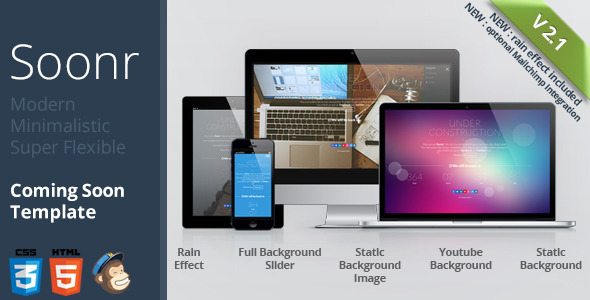
Backgrounds are the most configurable part of the template. A buyer can choose a static colour, a static image, a repeating pattern overlay, a full background slider or an embedded YouTube video, and layer effects on top of any of them. The bokeh overlay is a jQuery animation with adjustable item count, colour, speed and size, so the density and pace of the floating circles can be tuned rather than accepted as-is. The rainday effect, added in version 2.0, works the same way across static images and slider slides. The vendor warns that the rain script is resource-heavy and does not run in Internet Explorer 8, which is a fair caveat given how much canvas animation it draws.
Practical launch mechanics are covered too. A countdown timer counts down to the go-live date, and a template variation without the counter ships in the download for anyone who would rather not commit to a deadline. The newsletter form submits over AJAX with a sending animation and guards against duplicate submissions, and version 2.1 added an optional Mailchimp integration with its own demo file. Social network links, a preloader, an under-construction message of the buyer’s choosing and 361 scalable vector icons round out the set. The download includes more than fifty CSS3 animation effects for text and images, and the markup is HTML5-valid and tested across IE9 and later, Firefox, Safari, Opera and Chrome.
One detail worth flagging early: the product images shown in the demo are not included in the download. Buyers need to supply their own photography or licensed stock, which is a real cost that the $7 price tag does not cover.
Where Soonr Fits and Where It Does Not
The strongest fit is a pre-launch campaign for a creative studio, a product page or a personal brand where the visual impression carries weight. A photographer or design studio can drop in a full-bleed background slider, layer the bokeh effect, and have something that looks deliberate rather than default. Agencies building a holding page for a client while the main site is in development can reuse the same base across multiple projects and change only the backgrounds and copy.
Event organisers are another natural audience. The countdown timer, the under-construction message and the newsletter capture map directly onto a conference or product launch that needs an email list before doors open. The Mailchimp integration means the list can flow straight into an existing mailing workflow rather than being exported by hand.
It is the wrong choice for anyone who needs a content management system behind the page. Soonr is static HTML, so changing the countdown date, the headline or the background means editing files directly. A marketing team that wants a non-technical colleague to update copy every week will find that workflow painful, and a WordPress coming soon plugin would serve them better. It is also a poor fit for sites that must support Internet Explorer 8 or older, since the rain effect is explicitly unsupported there, and for anyone who needs a multi-page site rather than a single holding screen.
Strengths and Limitations of This Coming Soon Template
Strengths
- Genuine visual range: static colour, image, pattern, slider and YouTube video backgrounds can be combined with bokeh or rain overlays, giving more than ten documented variations from one download.
- Configurable effects rather than fixed ones — bokeh item count, colour, speed and size are all adjustable, so the animation can be dialled back for a more restrained look.
- Newsletter capture works out of the box, with AJAX submission, duplicate-submit prevention and an optional Mailchimp path added in version 2.1.
- Touch-ready modal panels keep the main view uncluttered while still exposing about, contact and signup content.
- Documentation is described by the vendor as extensive and detailed, and the changelog shows four releases between January and April 2014, including a YouTube fallback that swaps to a background image on touch devices.
- At $7 with 684 sales and a strong rating, the price-to-effort ratio is hard to argue with for a short-lived holding page.
Limitations
- The last vendor update was April 2014. More than a decade without maintenance means the jQuery dependencies, Bootstrap 3 build and Modernizr version are all well behind current practice, and there is no indication of ongoing support.
- Images are not included, so the demo look cannot be reproduced without sourcing equivalent photography separately.
- The rain effect is explicitly resource-intensive and does not work in Internet Explorer 8, so it is unsuitable as a default on low-powered devices or legacy browser requirements.
- Static HTML means no admin panel. Every content change is a file edit, which rules out non-technical editors.
- Bootstrap 3 predates modern CSS layout and accessibility conventions, so buyers inherit older markup patterns and would need to audit contrast, focus states and ARIA attributes themselves.
- Mailchimp integration is a separate demo file rather than a unified build, so the newsletter path requires choosing the right template variant before customising.
How Soonr Compares With Other Coming Soon Options
The realistic alternatives fall into three groups. The first is a WordPress coming soon plugin or a theme’s built-in maintenance mode, which costs nothing extra if a WordPress install already exists and gives non-technical editing through the dashboard. Soonr cannot match that convenience, but it also carries no CMS overhead and can be hosted on any static host, which makes it lighter and faster to deploy.
The second group is a hand-coded placeholder page. A developer comfortable with HTML and CSS could build an equivalent countdown and email form in an afternoon, but would then own the background slider, the modal animation, the preloader and the icon set as ongoing maintenance. Soonr’s value is that those pieces already exist and are documented, which matters most when the deadline is tight.
The third group is other ThemeForest coming soon templates in the same price band. Here Soonr’s differentiator is the effect layer — bokeh and rain animations applied across multiple background types — rather than the underlying feature set, which is broadly standard for the category. Buyers who want restrained, typography-led minimalism may find the animation options excessive, while buyers who want a striking visual will find more here than in plainer competitors. The deciding factor is usually whether the effect-heavy aesthetic matches the brand, not whether the feature list is longer.
Frequently Asked Questions
Does Soonr require WordPress or any CMS?
No. Soonr is a static HTML5 template built on Bootstrap 3, so it runs on any web host without a database or CMS installation. That makes deployment simple and fast, but it also means content changes require editing the HTML files directly. Anyone who needs a dashboard for updating copy should look at a WordPress coming soon plugin instead.
Can the countdown timer be removed or changed?
Yes. The download includes a template variation without the counter, listed in the changelog as index-nocounter.html, so buyers who do not want to commit to a public launch date can use that version. Changing the target date itself is a matter of editing the relevant value in the template’s JavaScript, which the documentation covers.
Does the newsletter form connect to Mailchimp?
Yes, as of version 2.1. The package includes a dedicated Mailchimp folder and a separate demo file, index-mailchimp.html, alongside the built-in AJAX form. The AJAX version submits without a page reload and blocks duplicate submissions, while the Mailchimp path routes signups into an existing mailing list. Buyers should choose the right variant before customising.
Will the rain and bokeh effects slow the page down?
They can. The vendor states plainly that the rain script consumes significant resources, and canvas-based animation of that kind is heavier than a static background. The bokeh effect is configurable by item count, size and speed, so it can be tuned down. Testing on mid-range phones before launch is advisable, and the rain effect does not work in Internet Explorer 8.
Verdict on Soonr Site Templates
Soonr Site Templates remain a reasonable buy for a specific, short-lived job: a visually striking holding page for a creative studio, product launch or event, where the buyer is comfortable editing HTML and wants a polished result without building it. The effect layer is the reason to choose it over plainer alternatives, and at $7 with 684 sales and a solid rating, the risk is low. The case against is equally clear — a 2014 last-update date, Bootstrap 3 markup, no CMS and no included imagery mean it is a poor fit for long-term projects, non-technical editors or anyone with modern accessibility and maintenance requirements. Buyers who need ongoing updates or a dashboard should look elsewhere; buyers who need one good page for a few months will find it does the job.