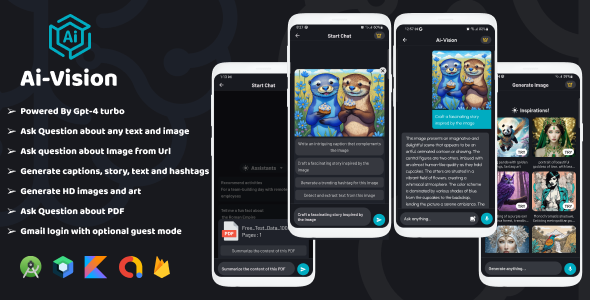
AiVision Powered By Chat GPT-4o/gpt-4o-mini, Image Input, AI Chat, Complete Android App is a source-code template for building an Android chat and image-generation client on top of OpenAI’s models. It ships as a Kotlin project built with Jetpack Compose and Material 3, and it bundles the surrounding commercial scaffolding — Google sign-in, subscriptions, a credit wallet, ads and Firestore — that most AI app tutorials leave out. It suits Android developers and small studios who want a working AI assistant app rather than a blank project, and it is a poor fit for anyone who cannot manage third-party API accounts and backend configuration.
What the AiVision Android App Template Actually Delivers
The listing is long, but the feature set clusters into four practical areas: the AI capabilities themselves, the input methods, the monetisation layer, and the codebase quality. Each matters for a different reason.
Model access and multimodal input
The app routes requests to GPT-4o and GPT-4o-mini, and the change log shows the vendor has tracked OpenAI’s model line rather than leaving the project on GPT-3.5. Version 3.4 replaced GPT-3.5 Turbo with GPT-4o Mini, and version 3.1 moved from GPT-4 to GPT-4o. That history is a reasonable signal that the template is maintained, though it also means the project’s value is partly tied to how long the vendor keeps updating it.
On the input side, the app accepts typed text, images from the device gallery, images from a URL, and PDF documents. That combination covers the common real-world requests: describing a photo, extracting text from a scanned page, summarising a PDF, or generating an image from a prompt. GPT Vision handles the image-to-text direction, and the text-to-image path supports HD output with selectable styles, so a developer can offer more than a single generic render.
Accounts, credits and monetisation
Google Sign-In is included alongside a guest mode, which lowers the friction of a first launch without abandoning authenticated accounts entirely. A subscription system is wired in through Google Play Billing, and the change log records billing library updates from version 6.0.0 to 6.0.1, so the integration is being kept current rather than frozen at initial release.
More interesting is the credit architecture. User wallets live in Firestore, credits are costed by word count so that heavier prompts consume more, and daily free credits are issued to keep lite users engaged. A daily usage cap for premium users was added in version 3.0 — an unusual choice that protects the operator’s OpenAI bill rather than maximising subscription revenue, and a sign the vendor has thought about margin. Rewarded, interstitial and banner ad units are also present for developers who want an ad-supported tier.
Security and operational controls
API keys are stored in Firebase rather than hard-coded into the APK, and the vendor describes an easy key-rotation path. ProGuard obfuscation is enabled, text input moderation is included, and version 3.0 added a check that disables the app on rooted devices. Version 3.7 introduced a report-content feature for AI-generated output. Taken together, these are the details that separate a template built for store submission from a demo built for a portfolio.
Interface and localisation
The UI is written in Jetpack Compose with Material 3 components, includes dark and light themes, and supports multiple languages — Spanish strings were added in version 3.0 and a language-selection fix followed in 2.1. The vendor states that documentation is included but does not describe its depth, so the quality of the written setup guide cannot be assessed from the listing alone.
Where This AI Chat App Template Fits, and Where It Does Not
The clearest fit is a developer or small agency that wants to launch a branded AI assistant on Android within weeks rather than months. Building Google Sign-In, Play Billing subscriptions, a Firestore credit ledger, ad mediation and a Compose chat interface from scratch is a substantial amount of plumbing; buying it for $22 is a straightforward trade of money for time.
A second fit is the operator running an existing content or utility app who wants to add an AI assistant as a companion product without rebuilding account infrastructure. Because the wallet and subscription logic already exist, the work becomes theming and branding rather than architecture.
It is also reasonable for a learning project. A developer studying how production Android apps integrate OpenAI endpoints, secure their keys and meter usage will find a complete reference implementation here.
The wrong choice is anyone treating this as a no-code product. The listing is explicit that the template depends on OpenAI, Firebase and Firestore accounts that the buyer must create and pay for separately. A buyer with no Android build experience and no willingness to configure a Firebase project will not get a working app out of the box. The same applies to teams that need iOS parity, since this is an Android-only codebase, and to anyone whose budget assumes a one-off $22 cost — OpenAI usage and Firebase reads are ongoing operating expenses.
Strengths and Limitations of the AiVision Powered By Chat GPT-4o/gpt-4o-mini Build
Strengths
- Genuinely complete monetisation stack. Subscriptions, word-based credit costing, daily free credits and three ad formats are already integrated, which is the part most templates skip.
- Current model support. GPT-4o and GPT-4o-mini are both wired in, and the change log shows the vendor migrating off older models rather than leaving them in place.
- Broad input coverage. Device images, image URLs, PDFs and plain text all feed the same pipeline, which supports more use cases than a text-only chat client.
- Security treated as a first-class concern. Keys held in Firebase, ProGuard enabled, rooted-device checks and input moderation all point to store-readiness.
- Modern Android stack. Kotlin with Jetpack Compose and Material 3 means the codebase is aligned with current Android development practice rather than legacy XML layouts.
- Low entry price. At $22 the template costs less than a few hours of a contractor’s time.
Limitations
- No sales or rating history is disclosed. The listing shows no sales figure and no reviews, so there is no independent evidence of how the template behaves in production or how responsive support is.
- Ongoing third-party costs are unavoidable. OpenAI charges per token and Firestore charges per read and write; the app cannot run without both, and the vendor does not publish cost estimates.
- Demo credits are restricted. The vendor notes that rewarded credits are disabled in the demo build and credits are granted only at sign-up, so the monetisation flow cannot be fully evaluated before purchase.
- Android only. There is no iOS counterpart, which limits the product to a single platform.
- Maintenance dependency. Because the app depends on OpenAI’s API surface, its longevity rests on the vendor continuing to ship updates — a risk the change log history mitigates but does not remove.
- Documentation depth is unstated. The listing confirms documentation exists but gives no indication of format, coverage or whether it includes Firebase setup walkthroughs.
How the AiVision Powered By Chat GPT-4o/gpt-4o-mini Template Compares With the Wider Category
Android AI app templates generally fall into three groups: thin chat wrappers that call an API and render text, single-purpose tools such as image generators or PDF summarisers, and full commercial kits with accounts and billing. This product sits firmly in the third group, and that positioning is its main differentiator.
Against thin chat wrappers, the difference is the entire back office. A wrapper gives a developer a conversation screen; this template gives a conversation screen plus a wallet, a subscription gate, ad slots and moderation. The trade-off is complexity — a wrapper can be understood in an afternoon, whereas this project requires a Firebase project, an OpenAI account and a Play Console setup before anything runs.
Against single-purpose tools, the comparison is breadth versus focus. A dedicated PDF summariser or image generator will usually have a more refined interface for its one job. This app covers text-to-text, image-to-text, text-to-image and PDF-to-text in a single shell, which is better for a general assistant and worse for a specialist product where users expect a deeply tuned workflow.
Against other commercial kits in the same bracket, the deciding factors are model currency, the completeness of the credit system and whether the vendor keeps shipping. The word-based cost model and the premium daily cap are more sophisticated than the flat-credit systems many templates use, and the migration to GPT-4o Mini shows active upkeep. Buyers comparing on price alone will find cheaper options; buyers comparing on the amount of infrastructure included will find this competitive.
Frequently Asked Questions
Do I need my own OpenAI API key to use this app?
Yes. The template calls OpenAI’s models directly, so the buyer must create an OpenAI account, generate an API key and store it in Firebase as the vendor instructs. There is no bundled key or shared proxy. OpenAI bills the key owner per token, so usage costs sit with the app operator rather than the template vendor.
Can this AiVision template be published on Google Play as-is?
It can be published after configuration, not before. The project includes Google Sign-In, Play Billing, ProGuard obfuscation and rooted-device checks, which are the pieces store review tends to scrutinise. However, the buyer must still supply their own Firebase project, API keys, subscription product IDs, ad unit IDs and branding before submission.
Does the app support image generation as well as image analysis?
Both directions are supported. Users can send an image from the device or a URL for GPT Vision to describe or extract text from, and they can also generate images from a text prompt with HD output and selectable styles. PDF-to-text conversion is included on the same input pipeline.
What happens to user credits if they change their device date?
The vendor closed that loophole. Version 3.0 of the change log records a fix for free credits being claimed by altering the device date, and credits are held in Firestore rather than locally, so the wallet is server-side. Daily free credits and the premium daily usage cap are both enforced through that backend.
Verdict: Who Should Buy This Android AI App Template
Developers and small studios with Android experience who want a head start on a monetised AI assistant should consider this seriously — the AiVision Powered By Chat GPT-4o/gpt-4o-mini, Image Input, AI Chat, Complete Android App packs subscriptions, a server-side credit wallet, ads, moderation and multimodal input into a $22 Kotlin codebase, which is difficult to replicate cheaply. Buyers should budget for OpenAI and Firebase costs from day one and accept that the app’s future depends on continued vendor updates. Those without Android build skills, teams needing iOS, or anyone expecting a turnkey product with no third-party accounts should look elsewhere. The absence of any sales or review history is the main reason to inspect the demo APK and documentation before committing.