Data Table Add Ons is a small commercial extension that adds a configurable table element to WPBakery Page Builder, letting a site owner publish structured rows and columns of information without hand-coding HTML or installing a separate table plugin. It is sold on ThemeForest for $10 and is aimed at anyone already building pages with WPBakery who needs a responsive, styled data grid inside the page builder’s own editing interface.
The product is best understood as a single-purpose tool rather than a broad add-on bundle. It does one thing — render a table — and the value it offers depends entirely on whether that one thing is done well enough to justify a purchase over the alternatives.
What the Data Table Add Ons extension actually does
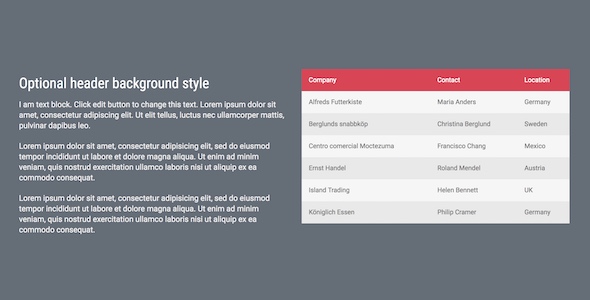
The core capability is straightforward: a new element appears in the WPBakery element list, and from there a table can be assembled column by column. The vendor states support for up to ten columns, which covers the overwhelming majority of comparison tables, pricing grids, specification sheets and schedule layouts a typical business site would publish. Each column can carry its own width and cell padding settings, so a table does not have to be a rigid, evenly divided grid — a narrow label column next to a wide description column is achievable without custom CSS.
Styling is handled through built-in options rather than a stylesheet edit. There is a header background colour control and a set of predefined row styles, which means alternating row shading and a distinct header band can be set from the element dialog. For agencies handing a finished site to a client, that matters: the client can restyle the table later without touching theme files.
Responsiveness is claimed, and it is the feature most worth scrutinising in any table tool, because a ten-column table on a phone is a genuinely hard layout problem. The vendor does not state the specific technique used — whether columns collapse into stacked rows, whether the table scrolls horizontally inside a container, or whether columns are hidden at breakpoints. That omission is worth noting before purchase, since the three approaches produce very different results on narrow screens.
Two implementation details are more interesting than they first appear. First, the extension works both when bundled inside a theme and when installed as a standalone plugin, so it fits projects where WPBakery ships with the theme as well as sites where the builder was added separately. Second, the vendor states that its JavaScript and CSS are enqueued only on pages where the element is actually used. Conditional asset loading is a real performance consideration — a table add-on that loaded its stylesheet sitewide would add weight to every page for the sake of a few. The listing also cites compatibility with current WordPress and jQuery versions, though no version numbers are given.
The package includes documentation in the form of an FAQ and the source code, and the vendor promises free future updates. Source code inclusion is a meaningful plus for developers who want to adjust markup or extend the element.
Where these Data Table Add Ons fit in a real project
The clearest fit is a WPBakery site that needs a handful of structured information tables — product specification comparisons, service tier breakdowns, fee schedules, opening hours, shipping rate matrices, or a simple feature grid. In those cases the alternative is either a generic table plugin with its own shortcode system and its own styling to override, or raw HTML in a text block that the client will inevitably break. A native builder element sits between those extremes and keeps editing inside the interface the site owner already knows.
Freelancers building on a theme that bundles WPBakery are a natural audience, because the extension slots into an environment that already exists and costs less than an hour of billed time. The same applies to agencies standardising on WPBakery across multiple client sites, where a consistent table element reduces the amount of bespoke CSS per project.
It is the wrong choice in several situations. A site that needs sortable, filterable, paginated tables backed by a database — a product catalogue, a staff directory with search, a large dataset — needs a data management tool, not a static layout element; this extension does not claim any of that functionality. Sites built on Gutenberg, Elementor or another builder gain nothing from it. And a project requiring complex merged cells, row grouping, footers with computed totals, or exportable tables will likely find the column-and-row model here too limited, since the listed feature set describes simple header-plus-rows structure only.
Strengths and limitations of the Data Table Add Ons element
Strengths
- Editing happens inside WPBakery, so content updates do not require shortcode syntax or HTML knowledge.
- Up to ten columns with per-column width and padding gives enough layout control for most comparison and specification tables.
- Header background colour and preset row styles cover the common visual treatments without custom CSS.
- Conditional loading of its CSS and JavaScript avoids adding page weight to pages that contain no table.
- Works whether WPBakery is theme-bundled or installed as a plugin, which widens compatibility across setups.
- Source code and an FAQ ship with the package, and updates are included at no extra cost.
- At $10 the price is low relative to the time saved versus hand-building responsive tables.
Limitations
- The vendor does not describe how the responsive behaviour works, so the mobile result — stacked rows, horizontal scroll, or hidden columns — cannot be assessed from the listing alone.
- No sorting, filtering, search, pagination or CSV import is claimed; this is a presentation element, not a data tool.
- No stated support for merged cells, row spans, table footers or summary rows, which rules out more complex financial or technical tables.
- No import path from a spreadsheet, so every cell is entered manually — tedious for tables beyond a few dozen rows.
- No sales history or rating is disclosed on the listing, so there is no independent signal of how the element behaves in production across many sites.
- The vendor notes the same functionality is included in the All In One Addons bundle, which makes the standalone purchase redundant for anyone who already owns that package — and arguably poor value for anyone likely to want several WPBakery extensions.
How it compares with the wider category of table tools
Three broad alternatives exist. The first is a dedicated WordPress table plugin, typically offering sorting, filtering, responsive breakpoint controls, import from CSV or Google Sheets, and sometimes chart rendering. Those tools are more capable and correspondingly heavier, with their own admin screens, shortcodes and styling systems that must be reconciled with the theme. The second is a general WPBakery add-on bundle, which packages a table element alongside dozens of others; the vendor here explicitly recommends that route, and for a buyer who expects to need more than one element it is the more economical decision. The third is manual HTML in a raw content block, which costs nothing but shifts maintenance onto whoever edits the page next.
Measured against those, the Data Table Add Ons extension competes on integration and restraint rather than features. It wins where the requirement is a styled, editable table inside the builder and nothing more. It loses to dedicated table plugins on any requirement involving dynamic data, and it loses to the bundle on cost-per-element. The honest framing is that this is a convenience purchase for a narrow job, priced accordingly.
Frequently Asked Questions
Do I need WPBakery Page Builder installed to use this?
Yes. The extension is an add-on and does not function on its own; it requires WPBakery Page Builder to be active, either bundled with the theme or installed as a separate plugin. On a site using Gutenberg, Elementor or another builder, it provides no functionality at all.
Is the table responsive on mobile devices?
The vendor lists responsiveness as a feature, but does not specify the method used to adapt tables on small screens. Buyers should confirm before purchase whether columns stack vertically or the table scrolls horizontally, since the two behave very differently with ten columns of content on a phone.
Can the table be sorted or filtered by the visitor?
No. Nothing in the listed feature set describes visitor-facing sorting, searching, filtering or pagination. The element renders a static table of the content entered in the builder. Sites needing interactive data browsing should use a dedicated table or data management plugin instead of this extension.
Is it worth buying if I already own the All In One Addons package?
No. The vendor states that this extension is included in All In One Addons for WPBakery Page Builder and that existing owners of that package do not need to purchase it again. The standalone listing exists for buyers who want only the table element.
Verdict on the Data Table Add Ons extension
Buy this if the site already runs WPBakery, the tables needed are static and presentational, and the priority is letting a non-technical editor update rows and columns without touching code. The low price, conditional asset loading and in-builder editing make it a sensible small purchase for that specific job.
Do not buy it if the tables must sort, filter, paginate or pull from a database, if the project uses a different page builder, or if more than one WPBakery extension is likely to be needed — in that last case the vendor’s own bundle is the better route. The absence of any published responsive methodology is the detail most worth resolving before spending the $10, because it determines whether the element holds up on the traffic that matters most.