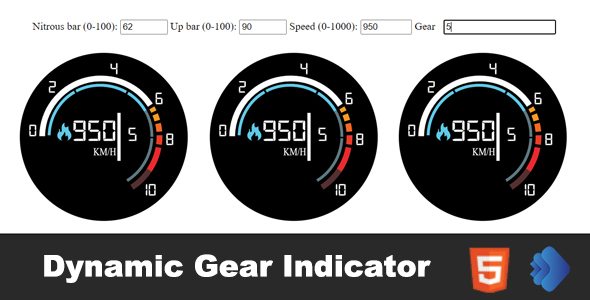
Dynamic Gear Indicator is a small HTML5 and JavaScript widget that renders a racing-style gear and speed display using SVG, with adjustable nitrous and “up bar” gauges alongside the gear number and speed readout. It is sold as a standalone code package (HTML, CSS and JS files) on ThemeForest for $10, and it is aimed at developers and site owners who want an automotive or gaming-flavoured dashboard element without building one from scratch. The Dynamic Gear Indicator html5 package suits hobby projects, fan sites, game landing pages and demo dashboards; it is not a full telemetry system.
The product comes from a single independent developer who also advertises custom work, and the listing does not disclose a sales figure, so there is no meaningful purchase history to weigh. That matters less than usual here, because the item is cheap and the code is inspectable before and after purchase. What follows is an assessment of what the widget actually does, where it fits, and where a buyer should temper expectations.
What the Dynamic Gear Indicator html5 widget actually does
At its core the component draws a cluster of gauges: a gear indicator, a speed value, a nitrous bar and an “up bar”. All four values are dynamic, meaning they can be changed at runtime rather than being baked into a static image. For anyone building a driving game mock-up, a motorsport-themed landing page or an in-car style dashboard demo, that is the useful part — the numbers move.
SVG rendering instead of raster images or Flash
The graphics are built with Scalable Vector Graphics, which is the single most consequential design decision in the package. Vector output stays sharp at any size and on any pixel density, so the same widget can sit in a small sidebar card or stretch across a hero section without blurring. The vendor explicitly notes that no Flash is involved, which is a reasonable reassurance for anyone auditing older templates for obsolete technology. In practice this also means the widget inherits CSS styling and can be recoloured or resized through ordinary stylesheet rules rather than by editing image assets.
Adjustable data across four readouts
Speed, gear, nitrous bar and up bar can each be set to different values. The vendor does not publish a documented JavaScript API, method names or event hooks, so the exact mechanism for updating values has to be discovered from the source files. Buyers should expect to read the JS to find the update function rather than rely on a manual. That is a normal trade-off at this price point, but it is worth knowing before purchase.
Embedding anywhere with standard HTML
Because the package is plain HTML, CSS and JavaScript, it can be dropped into any page that accepts markup — a WordPress custom HTML block, a static site, a PHP template, or a standalone demo file. The vendor describes both embed-code and direct HTML usage. There is no plugin dependency, no build step and no framework requirement, which keeps integration friction low for simple sites.
Responsiveness and load behaviour
The widget is described as fully responsive and fast-loading. SVG markup is inherently lightweight compared with sprite sheets or canvas-heavy alternatives, so the performance claim is plausible for a component of this size. Cross-device and cross-browser compatibility is also claimed; the absence of Flash and the use of standard web technologies support that, though the vendor does not list specific browser versions or minimum requirements beyond “beginner level HTML, CSS and JavaScript”.
Where this widget fits, and where it does not
The clearest fit is a project that needs a decorative but interactive automotive element and has a developer or confident tinkerer available to wire it up. Concrete examples include a browser-based racing game prototype that needs a HUD, a car club or motorsport fan site wanting an animated hero graphic, a landing page for a driving experience or simulator product, and a portfolio piece demonstrating SVG animation.
It also works as a teaching aid. Because the whole thing is a handful of readable HTML, CSS and JS files, it is a reasonable reference for someone learning how to bind JavaScript values to SVG elements.
The wrong choice is any project that needs genuine telemetry. If a site must display real speed, RPM or gear data from a vehicle, a simulator or an API, this widget is a display layer only — the vendor supplies no data source, no backend integration and no documented interface for feeding live values from an external system. It is equally unsuitable for teams that need a maintained, documented component with versioning and support SLAs; this is a one-off code download. Anyone uncomfortable editing JavaScript should also look elsewhere, since changing the displayed values requires it.
Strengths and limitations of the package
Strengths
- Genuinely resolution-independent. SVG output means the gauges stay crisp on high-DPI screens and at any container size, which is more than can be said for image-based dashboard graphics.
- No framework or plugin dependency. Plain HTML, CSS and JS drop into almost any stack, including CMS custom HTML blocks.
- Low price relative to effort saved. At $10, the widget costs less than the time required to hand-draw and animate comparable gauges.
- Obsolete-technology-free. The explicit absence of Flash makes it safe to drop into a modern template without triggering browser warnings.
- Four independently adjustable readouts. Speed, gear, nitrous and up bar can each carry different values, giving more flexibility than a single static dial.
Limitations
- No published API documentation. The listing does not name the JavaScript functions, parameters or events used to update values, so integration requires reading the source.
- No data source included. The widget displays numbers; it does not obtain them. Any live or calculated values must be supplied by the buyer’s own code.
- No stated browser support matrix. Compatibility is asserted in general terms only, with no list of tested browsers or versions.
- No sales history disclosed. There is no public purchase count to indicate how widely the code has been deployed or tested in the wild.
- Single-purpose visual style. The racing gauge aesthetic is fixed in concept; restyling beyond colours and sizing would mean editing the SVG markup directly.
- Support expectations should be modest. The developer offers custom work, but the listing describes no formal support policy or update schedule.
How it compares with the wider category of HTML5 dashboard widgets
The general alternatives fall into three groups: full charting and dashboard libraries, canvas-based gauge components, and custom-built SVG work. Charting libraries offer far more chart types, documented APIs and active maintenance, but they are heavier, often require a framework or build tooling, and rarely include an automotive gauge aesthetic out of the box. Buyers choosing that route pay in setup time and bundle size.
Canvas-based gauge components can animate smoothly and handle high update rates well, but they render to a bitmap surface, so they do not scale as cleanly as vector output and are harder to restyle with CSS. Custom SVG work gives total control and no licensing cost, but it takes real time to design, animate and make responsive — the exact effort this package is priced to remove.
Against all three, the Dynamic Gear Indicator html5 widget competes on narrowness. It does one visual job, does it with lightweight vector graphics, and asks for no dependencies. That is an advantage for a small decorative element and a disadvantage for anyone who needs configurability, documentation or a maintained component library. The honest framing is that this is a pre-built asset, not a platform.
Frequently Asked Questions
What is Dynamic Gear Indicator and what does it do?
It is an HTML5 and JavaScript widget that displays a racing-style cluster of gauges — gear, speed, a nitrous bar and an up bar — drawn with SVG. Each value can be changed dynamically, so the display can animate or respond to code. It is a front-end visual component, not a data collection tool.
Do I need coding skills to use the Dynamic Gear Indicator html5 files?
Yes, some. The vendor specifies beginner-level HTML, CSS and JavaScript as the requirement. Dropping the markup into a page is straightforward, but changing the displayed speed, gear or bar values requires editing or calling JavaScript, and the listing does not document those functions, so the source files must be read.
Can it show real speed or gear data from a vehicle or app?
Only if that data is supplied by separate code. The widget renders values it is given; it includes no telemetry source, API connection or backend integration. A developer can feed it numbers from a game engine, a simulator or an external service, but that wiring is the buyer’s responsibility and is not covered by the package.
Is the gear indicator responsive and compatible with modern browsers?
The vendor states that it is fully responsive and cross-device and cross-browser compatible, and that it uses SVG rather than Flash. Those claims are consistent with the technology, but the listing does not publish a tested browser list or minimum version requirements, so verification on a specific target browser is advisable before relying on it.
Verdict: who should buy the Dynamic Gear Indicator html5 package
Buyers who should consider it are developers and site owners who need an attractive, scalable racing gauge graphic for a game prototype, motorsport page or demo dashboard and who are comfortable editing JavaScript to drive the values. At $10 the Dynamic Gear Indicator html5 download is a low-risk way to skip the design and animation work, and the SVG approach keeps it sharp and light.
Buyers who should not bother are teams needing documented APIs, live telemetry integration, formal support or a maintained component library — those requirements point to a charting library or custom development. Anyone unwilling to open the JS files should also stay away, because the vendor publishes no integration guide. Treat it as a well-made visual asset rather than a system, and the purchase makes sense.