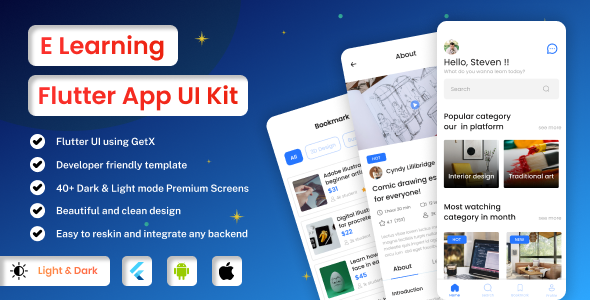
E Learning Flutter is a source-code template for building mobile learning and coaching apps on iOS and Android from a single Flutter codebase. It is aimed at developers and agencies who want a working app shell — screens, navigation and UI components for courses, lessons and coaching — rather than a finished, hosted learning platform. At $29 it sits at the low end of the ThemeForest Flutter category, which sets expectations accordingly.
The listing itself is thin. Beyond the product name, tags and a version note for v1.1 dated 16 June 2025 mentioning minor bug fixes, the vendor supplies almost no detail: no screen inventory, no feature list, no documentation summary, no demo credentials described in the copy provided. That absence is the single most important fact about this product and shapes everything below. What follows assesses the template on what it demonstrably is — a Flutter UI kit for the education niche — and flags clearly where the vendor does not state something.
What the E Learning Flutter template actually provides
The core proposition is a cross-platform Flutter project that compiles to native iOS and Android builds. For a team already working in Dart, that means one codebase, one set of widgets and one release pipeline instead of two native projects. The practical benefit is schedule: a small team can get a testable app onto both stores without writing the interface twice.
Because the product is tagged as both a template and a UI kit, the reasonable expectation is a set of pre-built screens with sample content and a navigation structure suited to online coaching. In this category that typically means onboarding and authentication screens, a course or programme catalogue, lesson or video detail views, a progress or dashboard area, and profile and settings pages. Buyers should treat that as the category norm rather than a confirmed manifest — the vendor does not publish a screen list in the material available, and that gap matters when comparing against kits that document every screen.
The version history is worth reading as a signal rather than a feature. A v1.1 release in mid-2025 with bug fixes indicates the product is being maintained after launch, which is more than can be said for many low-cost Flutter templates that ship once and never update. It does not indicate maturity. A single point release tells a buyer that the author is responsive but says nothing about how the template handles Flutter SDK upgrades, which is the recurring cost of any Flutter purchase.
Price is part of the capability story here. At $29 the template is cheap enough to be treated as a starting point or a reference implementation — a way to see how an experienced Flutter developer structures an education app — rather than a foundation a business stakes its roadmap on. That framing is honest and useful: many buyers of budget Flutter kits are solo developers or small studios who intend to rewrite most of the UI anyway.
Where an E Learning Flutter template fits, and where it does not
The clearest fit is a coaching business or small training provider that wants a branded mobile app for existing clients and has, or can contract, a Flutter developer. The template removes the blank-page problem: navigation, theming and the common screens of a learning app are already assembled, so effort goes into content, backend integration and brand customisation. It also suits agencies pitching mobile learning apps who need a credible prototype quickly.
A second fit is the freelance developer building a first app in the education vertical who wants a working reference for screen structure and state handling in Flutter. At this price the template can pay for itself as a learning artefact even if little of it survives into production.
It is the wrong choice for anyone who needs a complete learning platform. There is no indication that the template includes a backend, video hosting, payment processing, SCORM or xAPI support, live class infrastructure, or an admin panel for managing courses. Those are the hard parts of an e-learning product, and a UI template does not solve them. Organisations without in-house Flutter skills should also look elsewhere: a template assumes a developer who can wire it to an API, handle app store submission and maintain it through Flutter version bumps. Buyers expecting a no-code app builder will be disappointed.
Strengths and limitations of this E Learning Flutter kit
Strengths
- Genuine cross-platform output. One Flutter project targets both iOS and Android, which halves interface work compared with maintaining two native codebases.
- Low entry cost. At $29 the financial risk is minimal; the template can be evaluated and discarded without consequence.
- Active maintenance signal. The v1.1 bug-fix release in June 2025 shows the author is still tending the product rather than abandoning it post-launch.
- Niche-appropriate structure. The education and coaching focus means the screen flow is likely closer to a learning app’s needs than a generic multipurpose Flutter template.
- Useful as a reference. Even buyers who rebuild the UI can study how an experienced developer organises a Flutter education app.
Limitations
- Almost no published specification. The vendor does not state the screen count, included components, state management approach, Flutter version targeted, or whether a demo is available. Buyers are effectively purchasing blind.
- No evidence of backend or service integration. Authentication, payments, video delivery and course management are not described, and a UI template of this kind rarely includes them.
- Maintenance depth is unproven. One minor release is not a track record; there is no stated policy for keeping pace with Flutter SDK and dependency updates.
- No sales or rating history to weigh. The listing discloses no sales figures, so there is no community signal about quality or support responsiveness.
- Documentation is unaddressed. Setup instructions, customisation guidance and support terms are not described in the listing, which for a code product is a material omission.
How it compares with the wider Flutter template category
Flutter templates on marketplaces cluster into two groups: broad multipurpose kits that bundle dozens of unrelated screens, and focused vertical templates like this one. Multipurpose kits offer more raw screens but force buyers to strip out irrelevant modules; a niche template trades breadth for a coherent flow. For an online coaching app, the focused approach usually wins on time-to-first-build, provided the screens actually match the use case — which, again, the vendor does not document here.
Against premium Flutter learning templates priced higher, the trade-off is support and specification. Higher-priced products typically publish a full screen list, a live demo, documented state management and a support commitment. This template competes on price and on being a lightweight starting point; it does not compete on transparency. Buyers should weigh whether the $29 saving is worth the uncertainty, and in many cases the answer depends on how comfortable the team is reading and adapting unfamiliar Dart code.
Compared with building from scratch, the template’s value is entirely in saved setup time. A competent Flutter developer can scaffold an app shell in a few days; the template compresses that to hours if the structure suits. If it does not suit, the saving evaporates and the buyer has paid $29 for code they will largely replace — a small but real risk given the absent documentation.
Frequently Asked Questions
What is included in the E Learning Flutter template?
The listing confirms a Flutter source-code template for iOS and Android aimed at e-learning and online coaching apps, plus a v1.1 bug-fix update from June 2025. The vendor does not publish a detailed inventory of screens, components, state management approach or documentation, so buyers should request specifics before purchase.
Do I need to know Flutter to use this template?
Yes. It is a developer template built in Flutter and Dart, not a no-code app builder. Using it requires the ability to set up a Flutter environment, read and modify Dart code, connect the app to a backend, and publish to the App Store and Google Play. Non-technical buyers will need to hire a developer.
Does the template include a backend or payment system?
No backend or payment system is stated in the product information. Templates in this category typically supply the interface only, leaving authentication, course storage, video hosting, subscriptions and payments to the buyer. Anyone needing a complete learning platform should budget for backend development or a separate learning management system.
Is the E Learning Flutter template kept up to date?
There is one documented update, v1.1 in June 2025, described as minor bug fixes and a version upgrade. That shows some ongoing maintenance but not a long track record. The vendor does not state a policy for Flutter SDK compatibility, so buyers should confirm the supported Flutter version before starting.
Verdict: who should buy this E Learning Flutter template
This template makes sense for Flutter developers, freelancers and small agencies who want a cheap, education-focused starting point and are comfortable reading undocumented code. The $29 price, cross-platform output and evidence of an update make it a low-risk experiment or reference purchase. It is not suitable for organisations without Flutter skills, nor for anyone expecting a complete learning platform with backend, payments and course management built in. The absence of a published screen list, demo description and support terms is the main reason to hesitate — buyers should ask the author directly before committing. Treated as a scaffold rather than a solution, the E Learning Flutter template is a reasonable budget option; treated as a finished product, it will fall short.