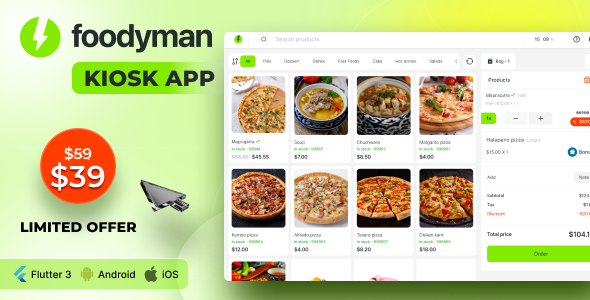
Foodyman – Restaurant Self-ordering KIOSK App is a Flutter-based companion application for iOS and Android that turns a tablet or kiosk terminal into a customer-facing ordering point for restaurants. It handles menu browsing, dine-in or pickup selection, order submission and hand-off to the kitchen, but it is not a standalone product: it only functions alongside one of two Foodyman backend platforms. It suits restaurant operators already running, or planning to run, the Foodyman Flutter ecosystem who want to add self-service ordering without building a custom app.
What the Foodyman Flutter Kiosk App Actually Does
The core loop is deliberately narrow, and that narrowness is the point. A customer walks up to the terminal, browses the menu, taps through to a basket, chooses whether the order is dine-in or pickup, and submits it. The app then generates an order ID with the order details, and that order is pushed to the kitchen or admin side for preparation. The customer collects the food by referencing the order ID. Nothing in that sequence requires staff intervention, which is the entire value proposition of a kiosk deployment.
Because the front end is built in Flutter, a single codebase covers both iOS and Android. For operators that means one build to maintain rather than two native apps, and it means the kiosk can run on consumer-grade tablets rather than proprietary hardware. That matters commercially: dedicated kiosk terminals are expensive, while a mid-range Android tablet in an enclosure is not.
The integration layer is where the product’s real constraints and real strengths both live. The kiosk connects to either the Foodyman Multi-Restaurant Food and Grocery Ordering and Delivery Marketplace or the Foodyman Single (Multi-Branch) Restaurant & Grocery Ordering & Delivery Platform. Orders placed at the kiosk appear in the corresponding admin panel, so the same back office that manages delivery and online orders also manages kiosk orders. In the vendor’s demo configuration, the kiosk is wired to the multi-restaurant platform and orders are monitored from that admin panel.
That shared admin panel is more significant than it first appears. It means menu items, pricing, availability and categories are presumably managed once and reflected everywhere, rather than maintained separately for the kiosk. For a multi-branch operation, that consistency is the difference between a kiosk that stays accurate and one that silently sells items the kitchen stopped stocking weeks ago.
Where a Self-Ordering Kiosk Fits, and Where It Does Not
The clearest fit is a quick-service or fast-casual restaurant with a predictable menu, a queue at peak hours, and limited counter staff. A kiosk absorbs order-taking volume without adding a till and a person to run it. It also fits multi-branch groups already on the Foodyman single/multi-branch platform, because the kiosk becomes another channel into infrastructure they already pay for and already understand.
A second fit is the multi-restaurant marketplace operator. If a Foodyman multi-restaurant installation already aggregates vendors, adding kiosk terminals at physical locations extends the same ordering flow into the venue itself. Dine-in and pickup selection map naturally onto that model.
There is also a reasonable fit for operators who want to test self-service before committing. At $39 for the app itself, the software cost of a pilot is trivial compared to the hardware and the staff time. A single tablet in a corner, running for a month, produces real data about whether customers use it and whether average order value changes.
The wrong choice is any restaurant not running a Foodyman backend. The vendor states plainly that this is not a standalone app, and that is not a soft caveat — without one of the two Foodyman platforms, the kiosk has no menu to display and nowhere to send orders. Anyone evaluating this as a general-purpose kiosk solution for a restaurant on different software should stop here. It is also a poor fit for full-service dining where the ordering interaction is part of the hospitality, and for venues with menus that change daily, since the kiosk reflects whatever is configured in the admin panel.
Strengths and Limitations of the Foodyman Kiosk Application
Strengths
- Single codebase for both platforms. Flutter means the same app ships to iOS and Android, which reduces maintenance overhead and widens the choice of kiosk hardware.
- Shared admin with the wider platform. Orders land in the same Foodyman admin panel used for other channels, so there is no separate back office to learn or reconcile.
- Two deployment paths. It works with either the multi-restaurant marketplace or the single/multi-branch platform, so the same kiosk app covers different business models.
- Low software entry cost. At $39, the licence is a minor line item next to the cost of a tablet, an enclosure and installation labour.
- Complete ordering loop. Menu selection, order type, submission, kitchen routing and order-ID collection are all handled, so no custom middleware is needed between customer and kitchen.
Limitations
- Hard dependency on Foodyman backends. The app is useless without one of the two Foodyman platforms. That is a deliberate ecosystem lock-in, and it should be priced into any comparison against a standalone kiosk product.
- No disclosed sales or rating history. The ThemeForest listing shows no sales figure and no rating, so there is no independent signal from other buyers about reliability or support responsiveness. That is a genuine risk factor for a product that will sit in front of paying customers.
- Payment handling is not described. The vendor’s feature list covers selection, submission and pickup, but does not state whether the kiosk takes card payment at the terminal or whether orders are settled at the counter. That is a material gap for anyone planning an unattended deployment.
- Order type is limited to dine-in and pickup. Delivery is not part of the kiosk flow, which is sensible for an in-venue device but worth noting if the expectation was a unified channel.
- No stated offline behaviour. The listing does not describe what happens if the kiosk loses network connectivity mid-order, which is the failure mode that matters most in a busy venue.
- Documentation and setup detail are thin. Beyond the integration note, the listing does not describe installation, device requirements or hardware recommendations.
How the Foodyman Flutter Kiosk Compares to the Wider Category
Self-ordering kiosk software generally splits into three groups. The first is standalone kiosk platforms, which bundle their own menu management and payment processing and work independently of any other system. Those are more flexible at the point of purchase but introduce a second back office, a second menu to maintain and a second vendor relationship.
The second group is kiosk modules sold as add-ons to an existing restaurant platform — which is exactly what this is. The advantage is consolidation: one menu, one admin panel, one order queue. The disadvantage is that the kiosk is only as good as the host platform, and switching costs are high once deployed.
The third group is custom development, where an operator commissions a bespoke kiosk app. That offers total control over flow, branding and payment, but at a cost several orders of magnitude above $39 and with ongoing maintenance obligations.
Judged against those groups, the Foodyman Flutter kiosk competes on consolidation and price rather than on breadth of features. It does not attempt to be a payment terminal, a loyalty engine or a standalone product. For an operator already inside the Foodyman ecosystem, that focus is an advantage. For anyone outside it, the comparison is not close: the add-on model only makes sense when the host platform is already in place.
Frequently Asked Questions
Can the Foodyman Kiosk app be used on its own without the Foodyman platform?
No. The vendor explicitly states that this is not a standalone app and that it integrates with either the Foodyman Multi-Restaurant marketplace or the Foodyman Single (Multi-Branch) platform. Without one of those backends there is no menu source and no admin panel to receive orders, so the kiosk cannot function.
Does the kiosk handle card payments at the terminal?
The vendor does not state this. The documented flow covers menu selection, dine-in or pickup choice, order submission with an order ID, kitchen routing and customer pickup. Payment processing at the kiosk is not mentioned, so operators planning an unattended terminal should confirm the payment model directly with the vendor before buying.
What hardware does the Foodyman Flutter kiosk app run on?
Because it is built in Flutter and targets iOS and Android, it can run on tablets and kiosk terminals based on either operating system. The listing does not specify minimum device specifications, screen sizes or recommended enclosures, so hardware selection is left to the operator.
Can the kiosk support both dine-in and takeaway orders?
Yes. Order type selection is part of the built-in flow, letting the customer mark an order as dine-in or pickup before submitting. The order then routes to the kitchen through the Foodyman admin panel, and the customer collects it using the generated order ID. Delivery ordering is not part of the kiosk flow.
Verdict on the Foodyman Flutter Kiosk App
This is a sensible purchase for one specific buyer: a restaurant or multi-branch group already running a Foodyman backend that wants to add self-service ordering without commissioning custom software. The $39 price makes a pilot low-risk, the shared admin panel keeps operations consolidated, and the Flutter codebase keeps hardware options open.
It is the wrong purchase for everyone else. Restaurants on different platforms, operators wanting a standalone kiosk with integrated payments, and anyone needing documented offline behaviour or a track record of buyer reviews should look at dedicated kiosk products instead. The absence of disclosed sales and ratings, combined with the unstated payment model, means the Foodyman Flutter kiosk app should be evaluated as an ecosystem add-on rather than a complete self-service solution — and confirmed with the vendor on the specifics the listing leaves out before any terminal is installed in front of customers.