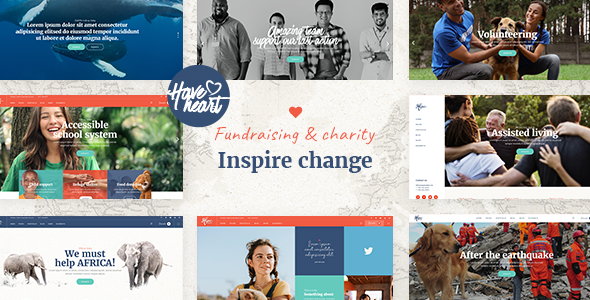
HaveHeart Charity is a WordPress theme built by Select-Themes for nonprofits, fundraising campaigns, foundations and NGOs that need a donation-focused website without commissioning custom development. It bundles the WPBakery page builder and Slider Revolution, ships with GiveWP compatibility, and includes predesigned page templates, event and portfolio post types, and a volunteer application form. It is aimed at organisations that want a recognisable charity site structure in place quickly and are willing to work inside an established page-builder workflow.
What HaveHeart Charity Actually Delivers Out of the Box
The theme’s core proposition is that a nonprofit can assemble a complete site from prepared sections rather than designing layouts from scratch. The demo content imports in one click, which means the home page, inner pages, donation pages and event listings arrive populated and can then be edited down. For an organisation with a small web budget, that removes the blank-canvas problem that stalls most theme-based builds.
Donation handling is delegated to GiveWP, the established WordPress donation plugin. HaveHeart does not implement its own payment processing; it styles and integrates with GiveWP instead. That is the right architectural call, because donation forms, receipts, recurring giving and payment gateways are genuinely hard to get right, and a theme that rolled its own would be a liability. The practical consequence is that the donation experience is only as capable as the GiveWP configuration underneath it, and the theme’s job is to make it look coherent.
Beyond donations, the theme ships a set of shortcodes that map directly onto nonprofit content needs: a donation list, an event list, progress bars for campaign targets, countdown timers for deadline-driven appeals, counters for impact figures, team member displays, testimonials and client logos. Progress bars and countdowns are the two that matter most for fundraising pages, since they communicate urgency and momentum without any custom code. There is also an application form for volunteer sign-ups, which the vendor describes as a few-click process for the applicant.
The structural options are unusually broad for a theme at this price point. Four header types are included — standard, minimal, vertical and tabbed — each with separate normal, sticky and mobile logo variants, plus light and dark logo versions. Footers can be configured from one to four columns with either a regular or unfolding behaviour. There are multiple sidebar types, a side area, video background sections and parallax sections. Portfolio and blog content each get several layout options including masonry, gallery, slider and justified gallery variants.
The stack is conventional for this segment: WPBakery for layout, Slider Revolution for hero content, Contact Form 7 for forms, WooCommerce for merchandise or ticketed items, and WPML for multilingual sites. A child theme is supported, which matters if the site will be maintained long term. The bundled plugins alone — WPBakery at $64 and Slider Revolution at $26 — account for more than the theme’s $79 price, which is worth noting when comparing against a bare theme that expects separate plugin purchases.
Where This Theme Fits and Where It Does Not
The clearest fit is a small-to-mid-sized charity, foundation or NGO that needs a credible public-facing site with donation collection, an events calendar, a volunteer pipeline and a way to present programmes or projects. A single-person or two-person web team can realistically ship this in days rather than weeks, because the demo import provides the content architecture and the shortcodes provide the components.
It also suits agencies building charity sites on a repeatable stack. The child theme support, the WPML integration and the breadth of layout options mean the same base can be reskinned for different clients without rebuilding structure each time. The portfolio post type is flexible enough to serve as a “programmes” or “projects” section with minimal relabelling.
Where it fits less well is on sites that need bespoke donation logic — peer-to-peer fundraising with individual campaigner pages, complex matching-gift rules, or integrations with a CRM that has no GiveWP bridge. In those cases the theme’s contribution is largely cosmetic, and the real work sits in custom plugin development that the theme neither helps nor hinders. Similarly, an organisation with a strict performance budget and a preference for block-based editing will find WPBakery’s shortcode-driven output and its additional CSS and JavaScript a poor match; a lean block theme with a donation plugin would be a better starting point.
It is also the wrong choice for anyone who wants to avoid ongoing plugin licence management. Slider Revolution and WPBakery are bundled, but bundled licences typically do not entitle the buyer to independent updates from those vendors — updates arrive when Select-Themes ships a new theme version. That is a maintenance rhythm to be aware of rather than a defect, but it does mean the site’s security posture depends partly on how promptly the theme author releases compatibility updates.
Strengths and Limitations
Strengths
- The bundled WPBakery and Slider Revolution licences represent more retail value than the theme itself costs, which lowers the effective entry price for a full build.
- GiveWP integration is the correct approach to donations: proven payment handling underneath, themed presentation on top.
- Purpose-built shortcodes for progress bars, countdowns, donation lists, event lists and counters cover the specific content patterns fundraising pages rely on.
- Four header types with independent sticky, mobile, light and dark logo variants give more layout control than most themes in this category.
- Child theme support, WPML compatibility and translation readiness make it viable for multilingual and long-lived projects.
- The theme has been maintained across multiple WordPress and WooCommerce release cycles, with the most recent update in May 2025.
Limitations
- WPBakery is a shortcode-based builder. Content is stored with shortcode markup embedded in the post body, so migrating away from the theme later means either rebuilding pages or leaving orphaned shortcodes behind. This is a real lock-in cost, not a hypothetical one.
- The vendor explicitly states that the demo images are not licensed for use. Buyers must source and license their own photography, which is an additional cost that the $79 price does not cover and that is easy to overlook.
- Donation functionality is entirely dependent on GiveWP. Anything the plugin cannot do, the theme cannot do either, regardless of how the theme is configured.
- The bundled plugin versions are updated on the theme’s release schedule rather than the plugin vendors’ schedules, so security patches for WPBakery or Slider Revolution may lag behind the upstream releases.
- No information is provided about accessibility conformance. For charities, many of which have public-sector funding obligations or serve disabled constituents, the absence of a stated WCAG position is a gap worth raising with the vendor before purchase.
- Page weight is likely to be substantial given the number of bundled scripts, icon packs and slider assets. The vendor does not publish performance figures, so this should be tested against a realistic hosting setup rather than assumed.
How It Compares to the Wider Charity Theme Category
Charity themes on marketplaces broadly split into two groups. The first is built around a specific donation plugin — usually GiveWP — and treats the theme as a presentation layer. The second attempts to include donation handling natively, which typically means a simpler but less flexible giving experience and a harder upgrade path when payment requirements change. HaveHeart belongs firmly to the first group, and that is the more defensible position.
Against general-purpose multipurpose themes, the trade-off is specialisation versus flexibility. A multipurpose theme can be configured into a charity site, but the buyer supplies the content architecture themselves: the progress bars, the event listings, the volunteer form and the donation page styling all become manual work. HaveHeart arrives with those patterns already assembled, which is the entire reason to choose a niche theme over a general one.
Against lighter block-based themes paired with a donation plugin, the comparison runs the other way. A block theme will generally produce leaner markup, offer a more modern editing experience, and avoid shortcode lock-in. What it will not do is hand over a finished charity site structure on import. The choice comes down to whether speed of launch or long-term flexibility is the higher priority, and for a small organisation with a fixed deadline, speed usually wins.
On social proof: the theme has 426 sales on ThemeForest, which is a modest but not negligible figure — enough to suggest it has been used on real projects, not enough to treat its popularity as a quality signal on its own. Prospective buyers should weigh the demo and documentation more heavily than the sales count.
Frequently Asked Questions
Does HaveHeart Charity require any coding knowledge?
No coding is required for the standard build. The vendor states that the theme is usable without coding knowledge, and the one-click demo import plus WPBakery’s visual editing covers layout, content and styling. Custom functionality beyond what GiveWP and the bundled shortcodes provide would still need a developer, but a typical charity site can be assembled without touching code.
Can HaveHeart Charity process donations without GiveWP?
Not through the theme itself. HaveHeart does not include its own payment processing; it is built to work with the GiveWP donation plugin, which handles forms, gateways and receipts. Any alternative donation system would need separate integration work. Buyers should budget for GiveWP’s own licensing if the free version does not cover their requirements.
Are the images shown in the HaveHeart demo included with the purchase?
No. The vendor states plainly that it does not own the copyright to the demo images and that they are presentational only. They cannot be used on a live site unless the buyer licenses them separately from a stock photography provider. This is an additional cost to plan for, and it applies to every demo image on the site.
Is HaveHeart Charity compatible with multilingual websites?
Yes. The theme is translation ready and integrates with WPML, so content can be served in multiple languages. The practical caveat is that every string added through the page builder needs translating too, so a multilingual build roughly multiplies the content work rather than the setup work. The theme does not impose a limit on the number of languages.
Verdict
HaveHeart Charity is a sensible purchase for a charity, foundation or NGO that needs a donation-capable site launched quickly and is comfortable working inside WPBakery. The GiveWP integration, the fundraising-specific shortcodes and the breadth of header and layout options give it a genuine advantage over a general-purpose theme that would require the same structure to be assembled by hand. The bundled plugin licences also make the $79 price easier to justify.
It is a poor fit for organisations that need bespoke fundraising mechanics, that have strict accessibility conformance requirements the vendor does not document, or that want to avoid page-builder lock-in and the maintenance rhythm of bundled plugins. Those buyers are better served by a lean block theme paired with a donation plugin, accepting more setup work in exchange for a cleaner long-term foundation.
Anyone evaluating HaveHeart Charity should test the demo on a mobile connection, confirm the GiveWP feature set covers their giving model, and price in stock photography before committing. Those three checks will resolve most of the uncertainty in either direction.