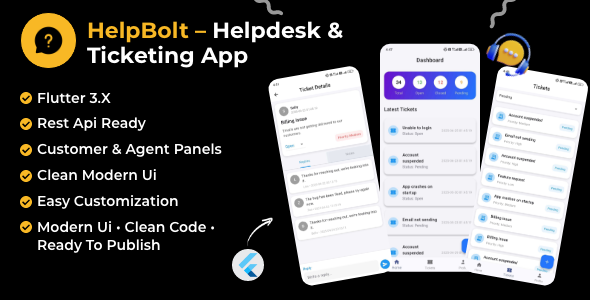
HelpBolt is a Flutter-based mobile client for a customer support helpdesk, sold on ThemeForest for $19 as source code rather than a hosted service. It provides the agent-facing half of a ticketing system — login, a statistics dashboard, a filterable ticket list, ticket detail screens with replies and private notes, and a create-ticket form — all of which talk to a REST API that the buyer must already have running. It suits Flutter developers and agencies who have a backend and need a finished mobile front end for it; anyone expecting a complete helpdesk product out of the box will be disappointed.
What the HelpBolt Flutter app actually does
The package is best understood as a set of screens and a thin networking layer, not as a platform. The vendor ships the full Flutter source, an authentication service, an API helper class and six ready-built screens, and states plainly that the admin panel and web application are not part of this item and are planned as a separate add-on. That framing matters because it defines the boundary of what a buyer receives.
Authentication and session handling
Login is email and password against the REST API, with a forgot-password route included. Tokens are persisted through a user-preferences wrapper, so a returning agent does not have to re-authenticate on every launch. Both flows are wired to the centralised API service rather than scattered across widgets, which means swapping the endpoints for a different backend is a matter of editing one layer instead of hunting through the UI.
Dashboard and ticket triage
The dashboard surfaces counts for total, open, pending and closed tickets alongside a list of the most recent ones. For a support agent opening the app between other tasks, that is the useful summary view: how much is outstanding and what has just arrived. The ticket list adds a status filter and pull-to-refresh, so the queue can be narrowed to a single state and reloaded without restarting the screen.
Ticket detail, replies and internal notes
The detail screen is where most of the working time is spent. It carries a priority badge, a status dropdown that updates dynamically, and separate tabs for public replies and private notes. The distinction between the two is the feature that makes this a support tool rather than a messaging app — internal notes let an agent record context that the customer never sees. The status dropdown is driven from the API rather than hard-coded, which is a sensible choice for anyone whose workflow uses custom statuses.
Ticket creation and the customer role
A create-ticket form takes a subject, a message and a category pulled from the API, and there is a floating action button for the customer role. That floating button is a small but telling detail: it suggests the codebase anticipates the same app being used by end customers as well as agents, even though the vendor does not describe a full customer portal experience. Buyers should treat multi-role support as a starting point to extend rather than a finished feature.
Codebase and platform coverage
The app targets Flutter 3.x with null safety, is described as following clean architecture with modular components, and builds for both Android and iOS. A live APK demo is linked from the listing, which is more useful than screenshots for judging animation smoothness and layout behaviour on a real device. Documentation covers setup, environment configuration and building APK/IPA artefacts.
Where this HelpBolt Flutter app fits, and where it does not
The clearest fit is a team that has already built or bought a ticketing backend with a REST API and wants a mobile agent client without writing one from scratch. A development agency delivering a support app to a client falls into the same category: the clean architecture and centralised API service make it a reasonable foundation to rebrand and extend, and the $19 price is negligible against the hours saved on boilerplate screens.
A second fit is an internal tool. Organisations running a service desk for staff — IT support, facilities requests, HR queries — often need a mobile view for agents who are not at a desk, and this provides exactly that layer without the overhead of a full SaaS platform.
It is the wrong purchase for anyone who does not have a backend. The listing is explicit that the app consumes a REST API and that the server must be configured before the app will run, and no backend code is included. A buyer with no API, or with an API that does not match the expected shape, is looking at integration work before seeing a single screen of live data. It is also the wrong choice for a non-technical business owner wanting a working helpdesk: there is no admin panel, no hosting, and no way to manage the system without building or buying those parts separately.
Strengths and limitations of the HelpBolt Flutter helpdesk app
Strengths
- The scope is honest. The listing states clearly what is excluded, so the gap between expectation and delivery is smaller than is typical on this marketplace.
- Centralised API handling with token storage in one place makes backend substitution tractable rather than a rewrite.
- The replies-versus-private-notes split and the API-driven status dropdown reflect real support workflows, not a generic chat UI.
- Null-safe Flutter 3.x code with a documented build process lowers the cost of the first compile and the first release.
- A live APK demo lets a buyer assess the interface before paying, which is more than most listings at this price offer.
- At $19 the financial risk is minimal relative to the screens and plumbing provided.
Limitations
- No backend, no admin panel and no web app. The product is one component of a system, and the vendor does not state when or whether the add-on will ship.
- The app is at version 1.0.0 with a single initial release in the changelog. There is no track record of maintenance, and no sales figures are disclosed, so longevity is unproven.
- Push notifications are not mentioned anywhere in the listing. For a support app, the absence of notification handling is a significant gap that a buyer will likely have to close.
- There is no offline caching or local persistence described beyond token storage, so behaviour on a poor connection is undefined.
- Preview images are placeholders, so the visual design in the demo may not match what a buyer sees after purchase without asset substitution.
- The Envato licence permits one purchase per project, which constrains agencies planning to reuse the code across several client builds.
How it compares with the wider helpdesk app category
Alternatives fall into three groups. Hosted SaaS helpdesks — Zendesk, Freshdesk, Crisp and similar — deliver a working system in an afternoon with mobile apps included, but charge per agent per month and keep the code closed. For a small team, subscription cost accumulates quickly; for a team that needs to own its data or customise deeply, hosted tools become a constraint rather than a convenience.
Open-source self-hosted helpdesks such as osTicket or Zammad sit in the middle: no licence fee, full data ownership, but the mobile experience is typically a responsive web view rather than a native app. HelpBolt occupies a narrow band between these — native Flutter screens, one-off cost, source included — but only for buyers who already have the API layer that the open-source platforms would have supplied.
Compared with other Flutter app templates on the same marketplace, the differentiator is domain specificity. A generic e-commerce or booking template gives more screens but no opinion about support workflows; HelpBolt gives fewer screens, tightly aimed at ticketing. The trade-off is that a template with a bundled backend is a more complete starting point, while HelpBolt assumes more of the architecture is already in place.
Frequently Asked Questions
Does HelpBolt include a backend or admin panel?
No. The package contains only the Flutter mobile app and its API integration layer. The vendor states that the admin panel and web application are not included and are planned as a separate add-on, and that hosting is not provided. A working REST API on the buyer’s own server is a prerequisite before the app will display any data.
What Flutter version does HelpBolt require?
Flutter 3.x with null safety enabled. The code is described as following clean architecture with modular, null-safe components, and it builds for both Android and iOS. The documentation covers environment configuration and the steps for producing APK and IPA builds, so the toolchain expectations are documented rather than assumed.
Can the HelpBolt Flutter app connect to my existing helpdesk API?
Only if the endpoints match what the app expects, or can be adapted to. All requests pass through a centralised API service with GET and POST helpers, headers and token handling, so endpoint paths and response shapes can be changed in one place. Buyers should compare their API’s ticket schema against the documented expectations before purchasing.
Is there a live demo of HelpBolt available?
Yes. The listing links to a live APK that can be installed on an Android device, which allows the interface and navigation to be assessed before purchase. No web-based demo of the app is described, and the admin panel has no demo because it is not part of this item.
Verdict: who should buy the HelpBolt Flutter app
Buy HelpBolt if there is already a ticketing API in place and the missing piece is a native mobile agent client — the screens, authentication and networking layer here will save real development time for $19. It also suits agencies building a client support app on a known backend who want a clean, null-safe Flutter base to rebrand. Do not buy it if a complete helpdesk is needed, if there is no backend to connect to, or if push notifications and offline behaviour are hard requirements at launch. The single 1.0.0 release and undisclosed sales mean maintenance risk should be priced in, and the missing admin panel is the largest gap in the overall system.