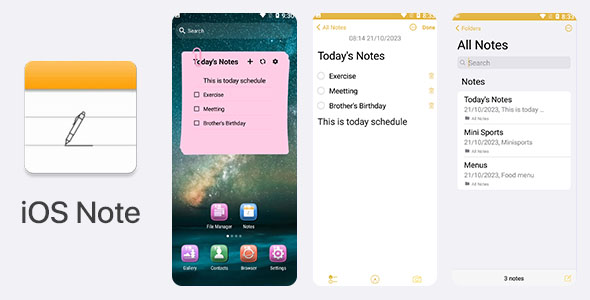
iOS Note Android is a native Android application source code package that recreates the look and feel of Apple’s Notes app, offering plain-text notes, checklists, handwritten sketches, PIN and password protection, and pinned favourites. It is sold on ThemeForest for $99 and is aimed at developers and agencies who want a ready-made note-taking app they can rebrand rather than build from scratch. The vendor does not disclose a sales figure, so there is no purchase history to weigh up.
The package is best understood as a starting point rather than a finished consumer product. It ships with full documentation and is described as easy to re-skin, which places it in the crowded category of template apps that developers buy to save weeks of interface work. The developer’s name is not stated in the listing, which is worth noting for buyers who like to check a seller’s track record before spending.
What iOS Note Android actually does well
The feature set is modest but coherent. Each capability maps to a real task a note app user performs, and the package covers the basics without obvious gaps.
Note creation in three formats
Users can write plain text, build checklists, or draw with a handwriting painter. That three-way split covers the most common reasons people open a notes app: quick thoughts, shopping and task lists, and freeform sketching. The checklist mode in particular is the kind of feature that turns a demo into something a user returns to daily.
Locking, both per-note and app-wide
There are two distinct security layers here, and the distinction matters. An app-level password gates entry to the whole application, while individual notes can carry their own password. For anyone building a journal, a credentials store, or a private diary, per-note locking is the more useful of the two because it lets a user share a device without exposing sensitive entries. Buyers should verify how the credentials are stored before shipping this to real users, since the listing does not state the encryption method.
Pinning and deletion history
Favourite notes can be pinned for quick access, which is a small convenience that noticeably improves the feel of a note app once a user has dozens of entries. The delete-history manager is less common in template apps and gives users a recovery path after accidental deletion, a feature that reduces support requests in any app that holds user-generated content.
Interface and customisation
The design mimics the iOS 15-era Notes app, with a clean, minimal layout and adjustable font size. The vendor describes the app as lightweight, and the interface is simple enough that re-skinning should be straightforward for anyone comfortable with Android Studio. Font-size control is a genuine accessibility win rather than a cosmetic extra.
Build requirements
The listing specifies Android Studio 2012.3.1.19, an older release. That is a specific and checkable detail, and it tells a buyer something useful: the project was built against a previous toolchain, so expect to update Gradle, the Android Gradle Plugin, and target SDK before publishing to Google Play. This is normal for template code but should be budgeted for.
Where iOS Note Android fits, and where it does not
The strongest use case is a developer or small studio that needs a functional note-taking app under its own brand quickly. A freelance Android developer quoting for a client who wants a private notes or diary app could use this as the foundation and spend the saved time on branding, onboarding, and store assets. Agencies building a portfolio of small utility apps will find the re-skinning claim attractive, since one codebase can plausibly become several products.
It also suits a solo developer learning Android who wants a real, working project to study. The documentation is described as step-by-step, and a complete app with checklists, drawing, and password handling is a more instructive reference than a toy sample.
It is the wrong choice for anyone who needs cloud sync, cross-device backup, rich media attachments, or collaboration. None of those appear in the feature list, and a note app without sync in 2024 competes poorly against free built-in options on most phones. It is equally wrong for a buyer who wants a finished, store-ready product with no engineering work: the outdated toolchain requirement and the need to verify password storage mean some development time is unavoidable.
Strengths and limitations of this iOS Note Android template
Strengths
- Three note formats (text, checklist, handwriting) cover the core use cases without bloat.
- Two-tier locking, at app level and per note, supports privacy-focused products.
- Delete history gives users a recovery option that many template apps omit.
- Adjustable font size adds a real accessibility control.
- Step-by-step documentation and a re-skinnable codebase lower the cost of rebranding.
- Lightweight build suits low-end devices and keeps the app responsive.
Limitations
- No sync, cloud backup, or multi-device support is listed, which limits the app’s appeal against free native alternatives.
- The required Android Studio version is dated, so dependency and SDK updates are likely before release.
- The vendor does not state how passwords are stored or encrypted, which is a material gap for a security-adjacent feature.
- No sales figure is disclosed, so there is no market validation to reference.
- The developer is not named in the listing, making it hard to assess support history.
- At $99 the price sits at the higher end for a single-purpose app template with no stated sync or backend.
How iOS Note Android compares with the wider template category
Note-taking app templates on marketplaces generally fall into two groups: thin UI shells that look good in a preview but lack working features, and fuller applications with real data handling. This package leans toward the second group. Checklists, drawing, pinning, and delete history are functional features rather than mockups, which puts it ahead of purely cosmetic templates.
Against templates that include cloud sync or a backend, however, it is behind. Sync is the single most requested feature in note apps, and its absence narrows the addressable market. Buyers comparing options should weigh whether they can add sync themselves; if not, a template that bundles a backend, even at a higher price, may work out cheaper overall.
On price, $99 is mid-to-high for an Android app template. The value depends on how much of the interface work a buyer would otherwise do manually. For a developer billing hourly, saving a week of UI and feature work easily justifies the cost. For a hobbyist, the same figure buys several cheaper templates or a subscription to a no-code app builder.
Frequently Asked Questions
What is iOS Note Android and what does it include?
It is an Android app source code package that recreates the iOS Notes experience, including text notes, checklists, handwriting, pinning, delete history, and password protection. The purchase includes the project files, a re-skinnable interface, and step-by-step documentation. It requires Android Studio to open and build.
Can iOS Note Android be published on Google Play?
Yes, in principle, since it is a native Android project, but some work is needed first. The listed Android Studio version is old, so the Gradle setup and target SDK should be updated before submission. Buyers should also review Google Play’s data-safety requirements around password storage before publishing.
Does iOS Note Android support cloud sync or backup?
No. The vendor’s feature list does not mention cloud sync, backup, or multi-device support. Notes are stored locally within the app. Developers who need sync would have to integrate a backend service themselves, which adds meaningful development time to the project.
Is the app password protection secure?
The listing does not specify how passwords are stored or whether notes are encrypted. It only confirms that app-level and per-note passwords exist. Buyers planning to ship this to real users should inspect the code and, if necessary, replace the storage mechanism with a vetted encryption library before release.
Verdict on iOS Note Android
iOS Note Android is a sensible purchase for an Android developer or small studio that wants a working, re-skinnable note app and is prepared to update the toolchain and audit the password handling before release. The feature set is honest and functional, the documentation lowers the learning curve, and the price is defensible for anyone billing their own time. It is not the right buy for someone wanting a store-ready product with no engineering work, nor for a project that depends on cloud sync or multi-device access, since neither is included. Buyers should also accept that the missing sales data and unnamed developer mean less reassurance than a proven, well-reviewed template would provide.