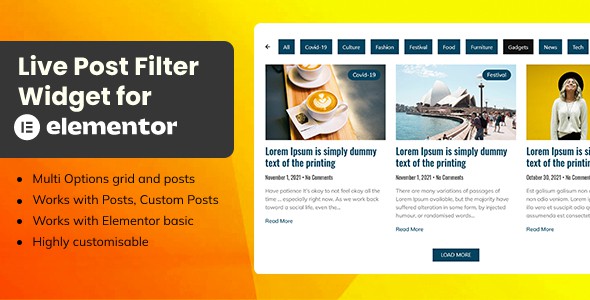
The Live Post Filter Widget for Elementor Add Ons is a WordPress plugin that adds a single Elementor widget for displaying blog posts with interactive filtering, using AJAX to fetch results from the server rather than hiding and showing pre-loaded items. It is aimed at site owners building news, magazine or blog index pages who want visitors to narrow a post listing by category or similar criteria without a page reload. At $13 it is a narrow, single-purpose tool rather than a general widget pack, and it works alongside the free version of Elementor.
What the Live Post Filter Widget for Elementor Add Ons actually does
The plugin’s scope is deliberately tight: one widget, dropped into any Elementor section, that renders a list of posts plus a control bar for filtering them. The vendor’s feature list is short, which makes it easier to assess honestly than the sprawling bullet lists typical of larger add-on bundles.
Server-side AJAX filtering instead of CSS hiding
The most consequential design decision is that filtering triggers a fresh request to the server rather than toggling the visibility of posts already on the page. In practice this means the widget can serve archives far larger than a single page load would reasonably contain, because only the matching subset is ever sent to the browser. It also means the filter respects the full result set rather than whatever happened to be pre-rendered. The trade-off is inherent to the approach: each filter interaction costs a round trip, so perceived speed depends on hosting quality and on how the loader is configured.
Two layout modes and a configurable filter bar
Posts can be presented in either a list or a grid arrangement, and the filter controls themselves can take the form of a dropdown or a menu-style bar. That combination covers the two most common patterns on editorial sites — a compact category dropdown above a grid, or a horizontal row of category links above a list. The vendor also states that colours and styling for the posts, the filters and the loading indicator are editable, which matters because a filter widget that cannot inherit a theme’s typography and spacing tends to look bolted on.
Query control over which posts appear
The listing mentions selecting a query for posts, which is the mechanism that determines the initial set — by category, by post type or by other WordPress query parameters. This is the part that decides whether the widget is useful for a straightforward blog roll or for something more structured, such as pulling posts from a specific category into a landing page section. The vendor does not publish a detailed parameter list, so the exact depth of query control is something to confirm in the documentation before purchase.
Compatibility with base Elementor
The plugin is stated to work with Elementor basic, meaning it does not require Elementor Pro. For sites running the free builder, that removes a common blocker, since many post-grid widgets in this category are gated behind the Pro tier or a larger add-on pack.
Where this widget fits, and where it does not
The clearest fit is an editorial site with a growing archive. A news outlet, a multi-author magazine or a niche blog that accumulates hundreds of posts quickly runs into the problem of a static grid that only ever shows the latest dozen items. A filter bar that queries the server solves that directly, and the dropdown variant keeps the interface compact on mobile.
It also suits agencies building a template once and reusing it across client sites where Elementor Pro is not licensed. Because the widget is a standalone plugin rather than part of a bundle, it can be installed on a single project without pulling in a large dependency.
Where it is the wrong choice: sites that need faceted search across many attributes at once — price, taxonomy, custom fields, date ranges combined — will find a category-style filter bar too limited. The same applies to projects that need the filtered results reflected in the URL for sharing or indexing; the vendor does not state that filter state is written to the address bar, and AJAX-driven listings frequently are not. A site whose entire post count is under roughly fifty items gains little from server-side filtering and may be better served by a plain post grid with no filter controls at all.
Strengths and limitations
Strengths
- Server-side filtering genuinely scales: the widget is not constrained by how many posts were rendered on initial load.
- Both list and grid layouts are included, so one widget covers index pages and sidebar-style listings.
- Dropdown and menu filter styles let the same widget match either a minimal or a more prominent editorial design.
- Works with free Elementor, avoiding an Elementor Pro licence for a single feature.
- Loader styling is exposed, which is often overlooked in AJAX widgets and affects how the wait feels.
- Low entry price at $13 for a focused capability rather than a large bundle.
Limitations
- Filtering is limited to the filter bar styles the vendor provides — dropdown or menu — with no indication of multi-select, range or combined-attribute filtering.
- No sales history or rating is disclosed on the listing, so there is no independent signal of how the plugin behaves across the range of themes and Elementor versions in the wild.
- The vendor explicitly notes that preview images are not included in the purchase files, so the demo appearance must be rebuilt from scratch.
- Because results are fetched per interaction, performance on cheap shared hosting is an open question the listing does not address.
- Documentation is described only as setup steps; there is no stated developer documentation for extending the query or the filter logic.
- Filter state persistence, browser back-button behaviour and deep-linking are not documented, which are exactly the details that decide whether an AJAX filter feels finished.
How it compares with the wider post-grid and filter category
Most alternatives fall into three groups. The first is the post grid built into Elementor Pro and into large add-on packs such as Elementor add-on bundles: these offer many layout presets and query options, but filtering, where it exists, is usually a client-side affair that hides already-loaded posts. The second group is dedicated post-grid plugins, which tend to be more configurable than this widget but heavier, often adding their own settings screens and shortcodes. The third is faceted search plugins, which are built for filtering by many attributes and integrate with search rather than with a page builder widget.
Against the first group, the Live Post Filter Widget for Elementor Add Ons wins on the specific point of server-side filtering and loses on breadth — it does one thing and offers no other widgets. Against the second, it is lighter and more Elementor-native, since configuration happens in the builder panel rather than a separate admin area, but it exposes fewer query and layout controls. Against the third, it is far simpler and cheaper, but it is not a search product and should not be chosen when the requirement is genuinely faceted.
The honest positioning is that this is a single-purpose widget for a specific pattern: a filterable post listing on an editorial site. Buyers who need that pattern exactly will find it efficient. Buyers who need a general-purpose post display tool with filtering as one option among many will find it too narrow.
Frequently Asked Questions
Does Live Post Filter Widget for Elementor require Elementor Pro?
No. The vendor states the plugin works with Elementor basic, so the free version of the page builder is sufficient. That is a meaningful distinction, because several competing post-grid widgets are only available through Elementor Pro or through paid add-on bundles that carry a recurring licence. Sites running free Elementor can install this plugin and use the widget without upgrading the builder.
How does the AJAX filtering differ from a normal post grid?
It requests matching posts from the server each time a filter is applied, instead of hiding posts that were already loaded on the page. The practical benefit is that the filter can reach the entire archive rather than only the items rendered initially. The cost is a network request per interaction, so responsiveness depends on hosting and on how the loading indicator is configured.
Can the filter bar be styled to match an existing theme?
Yes, within limits. The vendor lists customisation options for the posts, the filters and the loader, and offers both dropdown and menu presentations for the filter bar. Exact control depends on which settings are exposed in the Elementor panel, and the vendor does not publish a full list. Preview images from the demo are not included, so the styling has to be recreated.
Is it suitable for a site with only a few dozen posts?
Usually not. Server-side filtering earns its keep when the archive is large enough that a static grid cannot show everything relevant. Below roughly fifty posts, a plain post grid without filter controls is simpler, faster and easier to maintain. The widget is best treated as a scaling solution for editorial archives that keep growing.
Verdict
The Live Post Filter Widget for Elementor Add Ons is worth buying for one job: putting a filterable, server-queried post listing on an Elementor site that does not run Elementor Pro. News, magazine and multi-author blog projects with expanding archives are the natural buyers, and the $13 price makes the decision low-risk for a single site. It is not the right purchase for anyone who needs multi-attribute faceted filtering, URL-reflected filter state, or a broad set of post layouts — those requirements point to a dedicated search or post-grid product instead. The absence of any disclosed sales or rating data means buyers should test it against their own theme early, and treat the vendor’s documentation as setup guidance rather than a full technical reference. Developer credit for the plugin is attributed to its ThemeForest vendor account, which is the only authorship information the listing provides.