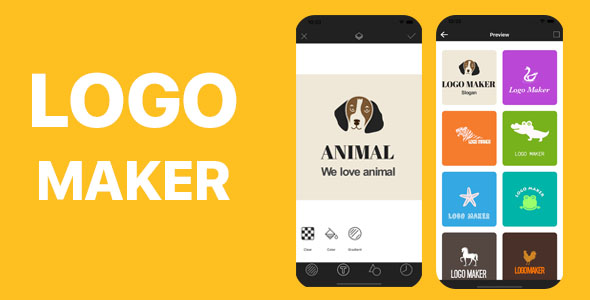
Logo Maker is a native iOS source-code package sold on ThemeForest under the Full Applications category. It provides the complete Xcode project for a logo design app: template and sticker libraries, a layered editor, text and sticker customisation tools, a work history manager, and in-app purchase wiring, priced at $99. It is aimed at developers and small studios that want to ship a branded logo-creation app on the App Store without building the editor from scratch.
The product is best understood as a starting codebase rather than a finished consumer brand. What a buyer receives is the Objective-C project, the assets behind the template and font libraries, and documentation covering setup. Everything after that — naming, visual identity, store listing, marketing — remains the buyer’s work.
What Logo Maker Full Applications Actually Ships With
The headline numbers are the template and asset libraries: more than 400 logo templates, over 1,000 stickers and upwards of 800 fonts. Volume alone is not the selling point; the useful part is that these libraries feed directly into the editor, so a user can start from a designed composition rather than a blank canvas. For a buyer, that means the app has something to show on first launch, which matters for App Store screenshots and for retention in the first session.
The editor itself is the core of the package. Backgrounds support solid colours, gradients and transparency, which is the minimum expected of any logo tool and is handled here as a first-class setting rather than an afterthought. Text layers can be recoloured, gradient-filled, repositioned, rotated, resized, shadowed and curved. Curved text in particular is a feature that separates a serious logo editor from a caption tool, and its presence suggests the editor was designed with real mark-making in mind rather than simple text overlays.
Sticker layers get comparable treatment: colour and gradient fills, position, rotation, shadow, glow and alpha. The layer ordering control lets text and stickers be stacked in any sequence, which is the difference between a toy and something a user can iterate on. A work history manager stores previous designs and supports instant export, re-editing and deletion, so the app has a basic project lifecycle rather than a single-session canvas.
Two further capabilities are worth flagging because they affect commercial viability. First, in-app purchase support is built in, which means the project is structured to monetise from day one — commonly through unlocking premium templates or removing watermarks, though the vendor does not specify the exact paywall model. Second, the project includes a “quick custom logo” path alongside the full editor, giving less patient users a shortcut. The interface is built with Storyboards and written in Objective-C, and the vendor states the build targets Xcode 14.1.
Where Logo Maker Full Applications Fits and Where It Does Not
The clearest fit is a developer or small agency that wants to launch a branded iOS utility quickly. If the goal is a logo or sticker app with a working editor, a stocked asset library and a monetisation hook, this package removes months of interface work. Freelancers building apps for small business clients — a print shop, a sign maker, a merchandise seller — are another natural audience, because the editor can be re-skinned to match a client’s identity and the template library gives the client something tangible immediately.
It also suits buyers who want to learn from a real project. A complete, published-style app with Storyboard layout, layer management and in-app purchase integration is a reasonable reference for how those pieces fit together in Objective-C.
It is the wrong choice for anyone who needs a cross-platform release. There is no Android or web build here; the project is iOS-only and Objective-C-only. Teams that have standardised on Swift will find themselves either maintaining an unfamiliar codebase or rewriting it, and that cost should be weighed against the $99 price. It is also a poor fit for buyers who want a finished, market-ready brand — the app is a shell to be styled, not a product with an identity of its own.
Strengths and Limitations of This Logo Maker Package
Strengths
- The editor covers the operations that matter for logo work: gradients, transparency, curved text, shadows, glow, alpha and layer ordering, all in one place.
- The asset libraries (400+ templates, 1,000+ stickers, 800+ fonts) give the app immediate content, which is often the hardest part of launching a design utility.
- In-app purchase support is already wired in, so monetisation does not require a separate integration project.
- Work history with instant export, re-edit and delete gives the app a credible project model rather than a throwaway canvas.
- Storyboard-based layout and step-by-step documentation lower the barrier for developers who are comfortable in Interface Builder.
- A live App Store demo is linked from the listing, so the interface and behaviour can be assessed before purchase rather than inferred from screenshots.
Limitations
- The codebase is Objective-C with Storyboards. That is a legitimate choice, but it is not where most new iOS work happens, and it narrows the pool of developers who can maintain or extend the project comfortably.
- The vendor specifies Xcode 14.1 as the build environment. Buyers on newer toolchains should expect to verify compatibility and possibly resolve deprecations before shipping.
- No sales figures are disclosed on the listing, so there is no external signal of how many buyers have shipped with it or how the code holds up in production.
- The listing does not state the licence terms for the bundled templates, stickers or fonts. Anyone publishing commercially needs to confirm those rights directly with the vendor before release.
- There is no indication of Android, iPad-specific layout work or cloud sync. The scope is a single-platform, local-storage app.
- Re-skinning is described as easy, but the visual identity, onboarding copy, store assets and marketing remain entirely the buyer’s responsibility.
How Logo Maker Full Applications Compares With the Wider Category
Full Applications on ThemeForest generally fall into two groups: complete, publishable apps and starter kits that need substantial work. This package sits closer to the first group — it has a working editor, stocked libraries, a history manager and in-app purchase support, and the vendor links a live App Store build. That combination is more than most starter kits offer, and it is the main argument for the price.
Against generic app templates, the difference is specialisation. A general-purpose design or photo app template gives broader canvas tools but no logo-specific workflow: no template library organised around marks, no curved text, no sticker system tuned for logo composition. Against building from scratch, the trade-off is control versus time. A custom build gives exactly the features wanted in the language and architecture preferred; this package gives a working product in days, at the cost of inheriting someone else’s structural decisions.
Against no-code app builders, the comparison is less favourable on effort but stronger on ownership. A no-code tool may get an app to market faster, but the buyer does not own the code, cannot re-skin deeply, and is locked into the platform’s limits and fees. For a developer who wants a codebase to own and extend, the source package wins; for a non-technical founder, it probably does not.
Frequently Asked Questions
What programming language is Logo Maker written in?
It is written in Objective-C and uses Storyboard-based interface layout. That means buyers need familiarity with Objective-C and Xcode’s Interface Builder to modify the project comfortably. Developers who work exclusively in Swift should factor in the cost of either learning the codebase or rewriting portions of it before committing.
Can the app be published on the App Store as-is?
Yes, the vendor states the project is ready to style and publish, and links a live App Store demo. In practice, publishing requires the buyer’s own Apple Developer account, app name, icons, screenshots, privacy details and store description. The code provides the product; the store presence and branding remain the buyer’s work.
Does Logo Maker include in-app purchases?
Yes, in-app purchase support is built into the project. The listing does not specify which features sit behind the paywall or how products are configured, so buyers should confirm the intended monetisation model with the vendor. Apple’s commission and subscription rules still apply to whatever is sold through the app.
Can the templates, stickers and fonts be used commercially?
The listing does not state the licensing terms for the bundled assets, so this must be confirmed with the vendor before release. Commercial use of fonts and graphic assets depends on the rights attached to each item, and an app store submission without clear rights carries real risk. Buyers should request written confirmation.
Verdict on Logo Maker Full Applications
Logo Maker Full Applications is a sensible purchase for an iOS developer or small studio that wants a working logo editor with stocked libraries and in-app purchase support, and is comfortable in Objective-C. The editor’s feature set — gradients, transparency, curved text, layered stickers and a history manager — is genuinely more than a superficial template, and the live demo makes the quality assessable before buying.
It is not the right buy for teams working in Swift, for anyone needing Android or web, or for non-technical founders expecting a finished brand. Those buyers will find the language, the single-platform scope and the re-skinning workload harder to absorb than the $99 price suggests. For the right developer, though, it is a credible shortcut to a shippable app.
