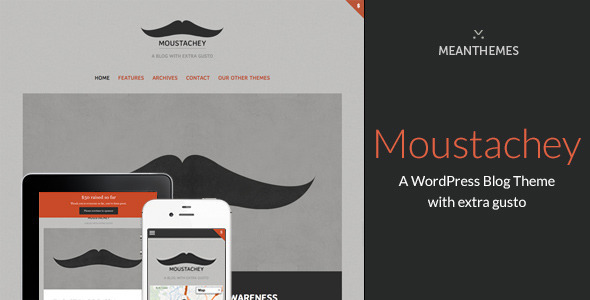
Moustachey: A Blog Theme With Extra Gusto blog-magazine is a WordPress theme sold on ThemeForest by the developer meanthemes for $39, built around the full set of WordPress post formats and a colour control panel that reaches into almost every element of the design. It suits personal bloggers, photographers and small editorial sites that want a distinctive, image-friendly layout without paying for a magazine-grade page builder. It is not a fit for anyone who needs a block-based site editor, e-commerce, or a theme that receives regular maintenance.
The listing carries 605 sales and a version history that stops at April 2019, which is the single most important fact about this product. Everything below should be read in that light: the feature set is genuinely broad for the price, but the codebase has been static for years.
What Moustachey Actually Does Well
The theme’s core proposition is post format coverage. Aside, audio, video, gallery, image, status, chat, link, quote and standard are all supported, and each one gets its own presentation rather than collapsing into a generic article layout. For a personal blog that mixes a photo post, a quick status update and a long-form piece in the same stream, that variety is the difference between a feed that reads as designed and one that reads as a list. Gallery posts run through a Flexslider-powered gallery, and the vendor provides toggles to hide post thumbnails either on gallery posts only or across every post.
Design control is the second pillar. A single options panel governs colours and fonts across the entire theme, including font sizes, background colour and a background swatch, with a choice between boxed and wide layouts for the whole site. Typography pulls from Google Fonts, Typekit and Adobe Edge Web Fonts, all wired in with inline help. There is also a custom CSS block for overrides that avoids editing the stylesheet directly, which matters because it keeps customisations from being wiped out by a theme update.
Layout flexibility is handled through five page templates, including a blog layout, an archives layout and a full-width option. The archive template can present posts by month, year or category, and the “Archives:” label in category views can be switched off. Navigation can be moved to the left, removed entirely, or enabled specifically on the homepage template — a small detail that lets a landing page stay clean while the rest of the site keeps its sidebar. The footer is widgetised and configurable, with control over how many tweets appear and which social network links are shown.
Two features stand out because they are unusual in a theme at this price. The first is a configurable donate or message block at the top of the page, which the vendor tags alongside charity and Movember use cases — this is what makes the theme plausible for a fundraising or awareness site rather than only a personal journal. The second is the Google Maps integration: API v3, a custom pin upload, and the ability to change the road colour on the map itself. That is a cosmetic touch, but it is the kind of detail that signals the developer cared about visual consistency.
On the practical side, the theme includes a contact form, Google Analytics support, Twitter integration, custom and retina-only logo uploads, favicon and Apple touch icon uploads, dropdown menus, shortcodes, and a general text control that lets common template strings be edited without touching .mo and .po files. Localisation files are provided. The current release adds Gutenberg editor support and moves theme settings into the WordPress Customizer with live preview, which brings the options experience closer to modern expectations.
Where Moustachey Fits and Where It Does Not
This theme is a reasonable purchase for a solo blogger or photographer who wants a finished, colourful, responsive blog with strong image handling and does not want to assemble one from a block theme and a stack of plugins. The donate block and charity-oriented tags make it a sensible starting point for a small campaign site or a personal fundraising page where the blog is the main content type. Freelancers building a low-budget site for a client whose needs are genuinely just “a blog” will find the five page templates and Customizer settings enough to ship something presentable quickly.
It is the wrong choice for a project that needs to be maintained for years. The last vendor update was April 2019, so there is no evidence of testing against recent WordPress releases, no block theme or full site editing support, and no indication that the bundled JavaScript libraries have been refreshed since the jQuery updates noted in earlier changelogs. Anyone building a site with structured data requirements, accessibility compliance targets, or a need for ongoing security patching should look elsewhere. The same applies to stores, membership sites and anything requiring custom post types beyond what the theme ships with.
Strengths and Limitations
Strengths
- All ten WordPress post formats are supported with distinct styling, which keeps a mixed-content blog visually coherent.
- Colour and typography control extends across the whole theme from one panel, including font sizes and background treatment.
- Custom CSS block and template text overrides reduce the need to edit theme files directly.
- Five page templates, including archive and full-width layouts, cover the common blog structures without a page builder.
- The configurable donate/message block and charity tagging give the theme a genuine niche beyond personal blogging.
- Retina logo support, retina graphics for iPad and iPhone, and a responsive layout address mobile presentation properly for its era.
- Documentation is described as extensive, and the vendor maintains a dedicated support system.
Limitations
- No update since April 2019. Compatibility with current WordPress versions is unverified by the vendor.
- Post format custom metaboxes and Google Analytics settings were moved out of the theme into a separate MeanThemes Tools plugin, so the theme is not fully self-contained.
- The Google Maps road colour and custom pin options are cosmetic and depend on a Google Maps API key and continued API availability.
- Twitter integration is tied to an oAuth implementation from the early 2010s; social platform APIs have changed substantially since.
- No e-commerce, membership, or custom post type functionality is included.
- The archive template covers month, year and category views but the listing does not mention tag or author archives as configurable options.
- No stated accessibility conformance or structured data output.
How It Compares to Other Blog and Magazine Themes
In the blog-magazine category on ThemeForest, the market has split into two camps. One is the multipurpose theme bundled with a page builder and dozens of demo sites, usually priced between $50 and $70, offering far more layout range but a heavier footprint and a steeper configuration curve. The other is the lightweight single-purpose blog theme, which is where Moustachey sits: fewer moving parts, a narrower feature set, and a lower price.
Against the multipurpose group, Moustachey loses on flexibility and on maintenance. It cannot be reshaped into a portfolio, a directory or a store, and it has not been kept current. Against the lightweight group, it competes well on post format handling and on colour control, which are the two things a blog theme is actually judged on. The donate block is a differentiator that most general blog themes do not offer at all.
The deciding factor is not features but timing. A buyer comparing this against a theme updated within the last year is choosing between a broader feature set that is maintained and a narrower one that is not. For a throwaway project or a personal site where the owner accepts the risk, the price makes that trade defensible. For client work, it usually does not.
Frequently Asked Questions
Is Moustachey compatible with the current version of WordPress?
The vendor has not confirmed compatibility since the April 2019 update, so it cannot be assumed. The last release notes reference WordPress 5.1 and Gutenberg support, which means the theme predates several major WordPress releases. It may still function, but there is no vendor statement covering newer versions, and testing on a staging site before deployment is essential.
Does Moustachey support Gutenberg and the block editor?
Yes, Gutenberg editor support was added in version 1.4.0. That release also moved the theme options into the WordPress Customizer, so settings now appear under Appearance > Customize with a real-time preview rather than in a separate options screen. Existing settings from the older panel are imported automatically on update.
Can Moustachey be used for a charity or fundraising website?
It can, within limits. The theme includes a configurable donate or message block at the top of the page and is tagged for charity and Movember-style campaigns, which makes it suitable for a small awareness or donation-driven blog. It does not include donation processing, payment gateways or campaign management, so a separate donation plugin would be required.
Is the theme translation-ready and can the text be changed without editing files?
Yes to both. Localisation support ships with .mo and .po files for translating the theme, and a separate general template text control lets common on-page strings be edited directly from the settings without modifying those files. That second option is useful for small wording changes that do not warrant a full translation workflow.
Verdict
Moustachey: A Blog Theme With Extra Gusto blog-magazine is worth buying for a personal blogger, photographer or small charity campaign site that wants strong post format handling, wide colour and typography control, and a donate block, all for $39. The 605 sales and the breadth of the feature list show it was a competent theme in its time, and the Customizer migration in version 1.4.0 was a genuine improvement.
It should be avoided for client work, long-lived sites, or anything requiring current WordPress compatibility guarantees. The absence of updates since April 2019 is not a minor caveat — it is the central risk, and no amount of colour control offsets it. Buyers who accept that trade-off and test thoroughly will get a capable blog theme; buyers who need ongoing maintenance should spend more elsewhere.

.__large_preview.png)