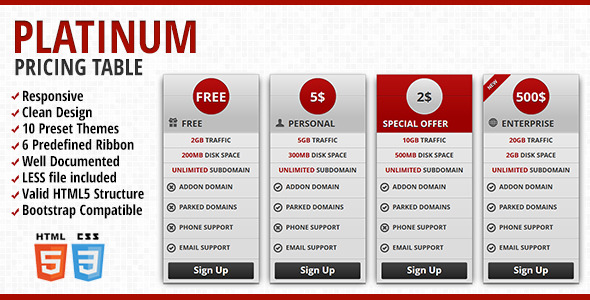
Pricing tables are the silent salespeople of your website. They are the final checkpoint before a visitor decides whether your service is worth their investment. A clunky, non-responsive, or poorly designed pricing table can destroy conversion rates, while a clean, fast, and visually persuasive layout can significantly boost your revenue. For web developers, designers, and business owners who rely on WordPress, crafting an effective pricing section often requires a robust, ready-to-deploy solution. The Platinum – Responsive Pricing Table is a high-quality, Bootstrap-compatible item that delivers exactly that: a professional, fully responsive grid for showcasing plans, features, and prices without the need for complex coding. Whether you are building a SaaS landing page, a membership site, or a local business site offering tiered services, this plugin provides the structural backbone to present your offers with clarity and visual appeal.
Key Features
- Fully Responsive Design: Built with a mobile-first approach, the pricing table automatically adjusts its layout to fit any screen size, from large desktop monitors to smartphones. This ensures a seamless user experience, crucial for maintaining high conversion rates on mobile traffic, which often accounts for over half of all web visits.
- Clean, Modern Aesthetic: The template avoids unnecessary visual clutter. Its minimalist design focuses attention on your pricing tiers and call-to-action buttons, making it easy for visitors to compare options and make a decision quickly.
- 10 Preset Color Sets: You are not locked into a single color scheme. The plugin includes ten professionally curated color palettes, allowing you to match your brand identity with minimal effort. This versatility makes it suitable for a wide range of industries, from creative agencies to tech startups.
- 6 Predefined Ribbons: Use stylish, pre-built ribbons to highlight your most popular or best-value plan. This psychological trigger (e.g., “Most Popular,” “Best Value”) directly influences user behavior by guiding their attention to the option you want them to choose.
- Valid HTML5 Markup: The code adheres to the latest web standards. This ensures compatibility with modern browsers, improves site accessibility, and contributes positively to your site’s SEO performance by providing clean, semantic structure for search engines to parse.
- Bootstrap Compatibility: Because it is built to work seamlessly with the Bootstrap front-end framework, integration into existing Bootstrap-based projects is straightforward. This also guarantees a solid grid system and consistent cross-browser functionality.
- Comprehensive Documentation: A well-written, step-by-step guide is included, making setup and customization accessible even for users with limited development experience. This reduces the learning curve and gets your pricing page live faster.
- Included LESS File: For developers who prefer to work with a CSS preprocessor, the LESS file provides full control over variables, mixins, and the overall styling. This allows for deep customization without manually editing hundreds of lines of CSS.
Who Is This For? Use Cases
The Platinum – Responsive Pricing Table is designed for a broad audience, from freelance designers building client sites to established e-commerce store owners. Its flexibility makes it a go-to solution for anyone who needs to present multiple service tiers or product options. Below are the most common real-world scenarios where this plugin adds the most value.
Freelance Web Designers & Agencies
When building sites for clients, time is money. Instead of coding a pricing table from scratch for every project, you can deploy this plugin to deliver a polished, professional result in minutes. Its clean design fits into virtually any modern template, and the 10 color presets allow you to quickly adapt it to a client’s brand guidelines. This reduces project turnaround time and increases your profit margin.
SaaS Product Landing Pages
Software-as-a-Service businesses rely heavily on the clarity of their pricing tiers. A confusing table can lead to high bounce rates and lost subscriptions. The clean layout and responsive nature of this table ensure that potential customers can easily compare features across plans, whether they are browsing on a laptop during work hours or on a phone during their commute. The “Most Popular” ribbon is particularly effective here for steering users toward the plan that delivers the best value.
Membership & Subscription Sites
Whether you offer online courses, a premium newsletter, or a video library, you need a pricing table that clearly delineates what each membership level includes. The plugin’s straightforward list structure allows you to present feature comparisons (e.g., “Access to all courses,” “Monthly Q&A calls”) in a way that is easy to scan. The lack of overwhelming animations keeps the focus on the value proposition.
Local Service Businesses
Businesses like gyms, salons, cleaning services, or marketing consultants often offer tiered service packages. A professional pricing table on their website can replace a downloadable PDF or a static image, offering a more dynamic and trustworthy experience. The responsive design ensures that potential clients looking for a “gym membership near me” on their phone see a perfectly laid-out pricing structure.
Technical Details & Compatibility
This pricing table is built on a solid technical foundation, ensuring reliability and ease of integration. It is compatible with Bootstrap 3 and 4, two of the most widely used front-end frameworks in web development. The plugin uses valid HTML5 structure, which means it will render correctly across all modern browsers including Chrome, Firefox, Safari, and Edge. The file structure includes the necessary CSS, JavaScript (minimal, for toggle functionality if any), and the LESS source file for deep customization. While the original release date and specific version number are not listed in the provided snippet, the use of Bootstrap and LESS indicates a modern, developer-friendly approach. The included documentation covers installation, basic customization of colors and ribbons, and integration tips. For users who prefer not to touch code, the plugin is designed to be inserted into a theme’s template files or widget areas by following the simple setup instructions.
Pros and Cons
Pros
- Extremely lightweight: The code is uncluttered, meaning it will not slow down your page load times, which is critical for both user experience and SEO rankings.
- High visual flexibility: With 10 presets and 6 ribbon options, you can avoid the “cookie-cutter” look often associated with template-based tools.
- Developer-friendly: The inclusion of a LESS file and compatibility with Bootstrap makes it easy for developers to extend and customize.
- Excellent for mobile conversion: The responsive layout ensures that call-to-action buttons are easily tappable and feature lists are readable on small screens.
- Easy to implement: Even non-developers can follow the documentation to get a professional pricing table live on their site within minutes.
Cons
- No drag-and-drop visual builder: Users accustomed to page builders like Elementor or WPBakery will need to insert the code manually via a shortcode or template file. It does not offer a native WordPress admin interface with a live preview.
- Static feature list: The table functions as a static HTML structure. It does not include dynamic pricing calculations, currency conversion, or direct integration with payment gateways like Stripe or PayPal. It is a presentation tool, not a billing system.
- Limited animation/effects: The design is clean but basic. It lacks advanced hover interactions, parallax effects, or animated pricing counters that some modern premium themes offer. This keeps it fast but may feel plain for very high-end creative portfolios.
Frequently Asked Questions
Is the Platinum Pricing Table compatible with the latest version of Bootstrap?
Yes, the Platinum – Responsive Pricing Table is built to be compatible with both Bootstrap 3 and Bootstrap 4. Because it uses standard grid classes and minimal custom JavaScript, it integrates smoothly with projects built on these frameworks. Always check the documentation for any specific class requirements, but generally, it works without conflicts.
Do I need coding experience to use this plugin on my WordPress site?
Not necessarily. While the plugin does not include a user-friendly drag-and-drop editor, the included documentation provides clear, step-by-step instructions. For the most basic usage, you will need to copy the HTML structure into your theme’s template file (e.g., page.php or a custom page template) or use a shortcode-friendly plugin. Basic knowledge of where to paste code is helpful, but you do not need to be a developer to get it running.
Can I change the colors and fonts used in the pricing table?
Absolutely. The plugin comes with 10 preset color sets that you can select by simply changing a CSS class. For more advanced customization, the included LESS file allows you to adjust all variables, including colors, font sizes, spacing, and border styles. You can also override the Open Sans Condensed font with any other font by modifying the CSS. This allows you to match the table perfectly to your brand guidelines.
Final Verdict
The Platinum – Responsive Pricing Table delivers exactly what it promises: a clean, responsive, and highly customizable way to present your service tiers. It avoids the bloat and complexity of some all-in-one pricing plugins while maintaining a professional polish that instills trust in your visitors. With 10 color presets, 6 ribbon styles, and Bootstrap compatibility, it offers a level of flexibility that suits freelancers, agencies, and product owners alike. The fact that it is lightweight and uses valid HTML5 means it will not harm your site’s performance, making it a safe choice for any project. If you are looking for a reliable, no-nonsense solution to create a pricing page that converts without the hassle of coding from scratch, this is a solid investment. Try the Platinum – Responsive Pricing Table today and give your pricing page the professional edge it needs to close more sales.