Key Features
The ASP.NET Weather Module delivers a powerful, developer-focused solution for integrating live weather data into any .NET web application. Designed for flexibility and rapid deployment, this module eliminates the need to build weather APIs from scratch. Below are its core capabilities:
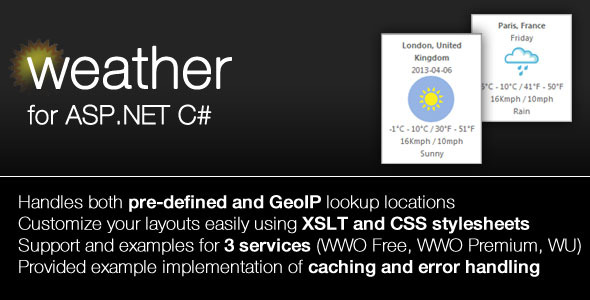
- Dual Location Detection: Retrieve weather for a manually configured city or automatically detect the user’s location via GeoIP. This enables personalized experiences without requiring user input.
- Multi-Provider Support: Seamlessly switch between World Weather Online (WWO Free and Premium) and Weather Underground (WU). The module handles API authentication and parameter mapping for all three services.
- Configurable Class Library: Modify core parameters like forecast days, city names, and API keys directly through .NET class properties. No hardcoding required.
- XSLT and CSS Enabled: Transform raw XML weather data into beautiful, custom HTML using the included XSLT stylesheet. Further refine the visual presentation with the provided CSS stylesheet.
- Complete Source Code & Assembly: Receive both the compiled .NET Class Library Assembly and the full C# source code. This grants total control over customization and debugging.
- Built-in Demo Project: A ready-to-run C# demo application demonstrates file system caching, error handling, and proper integration patterns.
- IP Calculation & GeoIP Handling: The module automatically calculates and processes the client’s IP address to determine location, ensuring accurate weather data delivery.
Who Is This For? Use Cases
The ASP.NET Weather Module is engineered for .NET developers, system integrators, and businesses building web applications that require dynamic weather context. It eliminates the complexity of managing multiple APIs while providing professional-grade customization.
Corporate Dashboards & Intranet Portals
Enterprise teams often need localized weather data for logistics, field operations, or travel planning. This module integrates into ASP.NET dashboards via GeoIP, instantly showing weather for each user’s office or project site. The configuration options allow administrators to set default cities for branch offices.
Travel & Tourism Websites
If you run a travel booking platform or a local tourism site, you can display weather for thousands of destinations. The multi-provider support ensures you can switch between free and premium APIs as traffic scales, without changing code. The XSLT engine lets you match weather widgets to your brand’s exact design language.
Internal Tools for Event Planners
Event management systems benefit from real-time weather forecasts. Use the module to show a 5-day forecast for event venues. The file system caching demo ensures your app doesn’t hammer the weather API on every page load, keeping response times fast and costs low.
Educational & Research Projects
Students and researchers building weather-related applications can use this module as a robust starting point. The included source code makes it an excellent learning tool for understanding GeoIP processing, API abstraction, and XSLT transformation in .NET.
Technical Details & Compatibility
This module is built for the .NET Framework and is compatible with ASP.NET Web Forms, MVC, and .NET Core environments (with minor adaptations). Version 1.1 includes fixes for XSLT inconsistencies in the premium World Weather Online service and improves display formatting for wind values. The module requires an API key from either World Weather Online or Weather Underground—both offer free tiers suitable for development and low-traffic sites.
System Requirements: Windows Server or hosting environment supporting .NET 4.5 or higher. The module is delivered as a .NET Class Library (DLL) with full C# source code. No server-side weather software or database is required—everything runs via HTTP requests to the weather providers. The demo project targets Visual Studio 2013 and above, but the compiled assembly works with any compatible IDE.
Pros and Cons
Pros
- Complete control over code and presentation, unlike closed-source weather widgets.
- Multiple data sources reduce vendor lock-in and provide redundancy if one service goes down.
- GeoIP detection is built-in, saving days of development work.
- XSLT & CSS allow full visual customization without touching business logic.
- Source code included—ideal for security audits and custom modifications.
- Demo project accelerates implementation with proven caching and error-handling patterns.
- Lightweight and fast—no heavy frameworks or external dependencies beyond standard .NET libraries.
Cons
- Requires separate API keys from World Weather Online or Weather Underground—no built-in weather data.
- Limited to .NET ecosystem; not suitable for PHP, Python, or JavaScript applications without a bridge.
- Visual Studio or C# knowledge required for initial setup and customization.
- GeoIP accuracy depends on the quality of the user’s IP address database (standard libraries included, but may need updates for precision).
- No automatic updates for weather API changes—you may need to adjust the module if providers update their endpoints.
Frequently Asked Questions
Is the ASP.NET Weather Module compatible with MVC and .NET Core?
The module is built as a standard .NET Class Library and works with ASP.NET MVC and Web Forms in the .NET Framework. For .NET Core or .NET 5+, you may need to recompile the source code using the appropriate target framework. The core logic—GeoIP, API calls, and XSLT transformation—is platform-agnostic and can be adapted with minimal effort.
Do I need to pay for a weather API key to use this module?
Yes. The module acts as a client to external weather services. You will need a free or premium API key from World Weather Online (developer.worldweatheronline.com) or Weather Underground (wunderground.com/weather/api). The free tiers from both providers are sufficient for development, testing, and low-traffic production sites.
Can I customize the weather data output (units, icons, forecast days)?
Absolutely. The module exposes configurable properties for forecast days, city/location, and measurement units (metric/imperial). The XML output can be completely restyled using the included XSLT stylesheet, and your own CSS can override the default visual styles. You have full control over what data appears and how it looks.
Final Verdict
The ASP.NET Weather Module is a pragmatic, well-engineered solution for any .NET developer who needs to integrate weather data without reinventing the wheel. Its strength lies in its developer-first architecture—full source code, multi-provider flexibility, and mature XSLT/CSS rendering pipeline. You are not locked into a single weather service, nor are you forced to use a generic widget that clashes with your design.
With support for GeoIP detection, file system caching, and three different API providers, this module gives you a professional head start on projects that would otherwise require weeks of development and debugging. The version 1.1 update shows the author’s commitment to refinement, fixing display inconsistencies and polishing the user experience.
If you value code ownership, customization freedom, and rapid integration, this module is a smart investment. Buy the ASP.NET Weather Module today and skip the pain of building weather features from scratch. Your users will thank you for the accurate, localized weather data—and your development team will thank you for the clean, documented code. Click the purchase button now and gain immediate access to the full source code, demo project, and premium support from an experienced .NET developer.