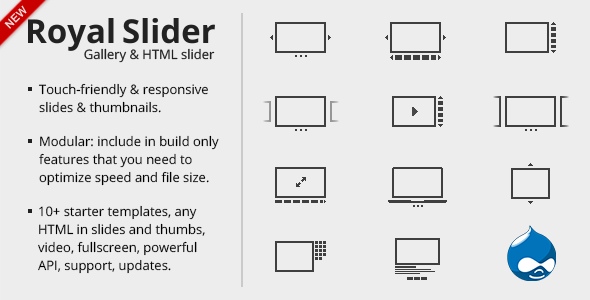
For web designers, developers, and content creators who need a reliable, feature-rich way to showcase visual content, finding a slider that balances aesthetic flexibility with technical performance is a constant challenge. Royal Slider meets this demand head-on, offering a comprehensive jQuery image gallery and content slider plugin that goes far beyond basic slideshow functionality. Built for modern websites, it provides a robust platform for everything from portfolio showcases and eCommerce product displays to full-screen banners and video galleries. Designed with responsive layouts, touch-enabled navigation, and hardware-accelerated animations, this tool ensures that your visual content looks stunning on any device while maintaining smooth, professional-grade transitions. Whether you are a freelance developer building client sites or a business owner managing your own online presence, Royal Slider delivers the control and polish required to create a memorable user experience that keeps visitors engaged.
Key Features
- Multiple Navigation Modes: Choose from thumbnails, tabs, or bullets to give users intuitive control over their browsing experience. This flexibility allows you to tailor the interface to your specific content—thumbnails for image galleries, tabs for presentations, and bullets for clean, minimalist sliders.
- Animated Captions with Rich HTML Support: Captions are not limited to plain text. You can embed HTML formatting, links, buttons, and even videos directly into slide captions, enabling dynamic call-to-action overlays, descriptive text, and interactive elements that drive conversions.
- Responsive & Mobile-Optimized: Every slider built with Royal Slider is fully responsive, adapting fluidly to any screen size from desktop monitors to smartphones. It includes dedicated touch support for swipe gestures, ensuring a native feel on tablets and mobile devices without compromising desktop usability.
- HTML5 & CSS3 Transitions with Fallback: Animations are powered by modern HTML5 and CSS3 transitions for smooth, hardware-accelerated performance on capable browsers. For older browsers, a JavaScript fallback ensures that your slides remain functional and visually acceptable.
- Versatile Content Types: Use Royal Slider as a pure image gallery, a full-screen banner rotator, a video gallery (supporting YouTube, Vimeo, and self-hosted videos), an HTML content slider, or even a presentation tool with slide-by-slide navigation.
- Lightweight & Fast Loading: Despite its extensive feature set, the plugin is built with performance in mind. It minimizes load times by loading only the assets needed for the current slide and deferring off-screen content, which is critical for maintaining good Core Web Vitals scores.
- Customizable Skins & Appearance includes multiple pre-built skins, but you can easily customize colors, fonts, arrows, and navigation bars via CSS or the intuitive admin panel to match your brand identity.
- Deep Integration with WordPress & Other CMS: While designed as a standalone jQuery plugin, Royal Slider offers dedicated WordPress plugins for seamless integration with your themes via shortcodes and widgets. It also works natively with any PHP or HTML-based site.
Who Is This For? Use Cases
Web Designers & Freelancers Building Client Sites
If you are a web designer managing multiple client projects, you need tools that are both powerful and time-efficient. Royal Slider allows you to quickly create stunning, responsive sliders without writing complex code from scratch. You can present clients with a polished, professional gallery for their photography portfolio, a dynamic banner rotator for their hotel website, or a video showcase for their creative agency. The admin panel makes it easy for clients to update images or text themselves later, reducing your maintenance workload.
eCommerce Store Owners
Product presentation is a direct driver of sales. Use Royal Slider to create product image galleries with zoom effects, showcase multiple product angles, and embed demonstration videos. The thumbnail navigation is perfect for letting customers browse through product variations (colors, sizes) quickly. You can also integrate it with WooCommerce (via the dedicated plugin) to replace default gallery layouts with a more engaging, conversion-focused slider.
Content Creators & Bloggers
Bloggers and content marketers can use Royal Slider to turn static posts into engaging visual stories. Create a slideshow recap of a tutorial, a before-and-after transformation series, or a carousel of infographics. The HTML caption feature is ideal for adding context, links to related articles, or social sharing buttons directly on the slide.
Corporate & Agency Websites
For corporate sites that need to communicate multiple value propositions quickly, a full-width banner rotator with animated text overlays is highly effective. Royal Slider supports full-screen and boxed layouts, making it suitable for hero sections on landing pages. Use it to cycle through client logos, case study highlights, or key product features, all with smooth transitions that maintain a premium feel.
Technical Details & Compatibility
Royal Slider requires jQuery 1.7 or higher and is compatible with all modern browsers including Chrome, Firefox, Safari, Edge, and Opera. It fully supports Internet Explorer 8 and above with graceful degradation. The plugin is responsive by default, but also offers options for fixed-width or full-screen modes. It includes built-in support for touch events (swipe on mobile) and keyboard navigation (arrow keys on desktop). The plugin is regularly updated to ensure compatibility with the latest versions of WordPress and jQuery. It is available in both a standard jQuery version and a WordPress plugin version on CodeCanyon, with the WP version offering deep integration via shortcodes and an admin panel. The video of the admin panel provides a walkthrough of the intuitive backend interface.
Pros and Cons
Pros
- Exceptional flexibility – works for images, videos, HTML content, and presentations.
- Multiple navigation options (thumbnails, tabs, bullets) give you control over UX.
- Strong mobile performance with native touch support and responsive scaling.
- Lightweight code that doesn’t bloat page load times when used correctly.
- Active support and updates from the developer, with a proven track record on ThemeForest.
- Easy to customize via CSS or the admin panel, even for non-developers.
Cons
- Learning curve for advanced customizations – while basic usage is simple, deep custom CSS modifications may require some coding knowledge.
- Not a free plugin – unlike some basic slider alternatives, Royal Slider is a premium purchase, though its feature set justifies the cost for professional use.
- Dependency on jQuery – if your theme or other plugins conflict with jQuery versions, you may need to troubleshoot compatibility.
- Limited pre-built templates – some competitors offer dozens of pre-made skins; Royal Slider focuses more on flexibility than a vast library of out-of-the-box designs.
Frequently Asked Questions
Is Royal Slider compatible with the latest version of WordPress?
Yes. The WordPress version of Royal Slider is actively maintained and tested for compatibility with the current WordPress release. The developer regularly updates the plugin to ensure smooth integration with WordPress’s evolving standards, including the block editor (Gutenberg). You can also use the standalone jQuery version in any non-WordPress CMS or static HTML site.
Can I use Royal Slider for video galleries?
Absolutely. Royal Slider natively supports embedding videos from YouTube, Vimeo, and self-hosted MP4 files. You can mix video slides with image and HTML content slides in the same slider. The player controls are automatically styled, and videos can be set to autoplay or play on click. This makes it an excellent choice for video portfolio sites or product demo pages.
Does Royal Slider include customer support?
Yes, purchasing Royal Slider from CodeCanyon or ThemeForest grants you access to the developer’s dedicated support forum for six months (extendable). The support team typically responds within 24–48 hours, addressing installation issues, customization questions, and bug reports. Additionally, the plugin comes with comprehensive documentation and a video walkthrough of the admin panel to help you get started quickly.
Final Verdict
Royal Slider stands as a mature, battle-tested solution for anyone who needs more than a basic image carousel. Its combination of multiple navigation modes, responsive design, touch support, and rich HTML captions makes it a standout choice for professional web projects. With thousands of sales and a strong reputation on ThemeForest, it has proven its reliability across countless websites, from creative portfolios to high-traffic eCommerce stores. The developer’s commitment to regular updates and responsive support further solidifies its value. If you are serious about delivering a visually compelling, conversion-oriented user experience, this plugin provides the tools to do exactly that. Don’t settle for a slider that limits your creativity. Invest in Royal Slider today and elevate your website’s visual storytelling with a plugin designed to perform under pressure, delight users, and help you achieve your business goals.