Key Features
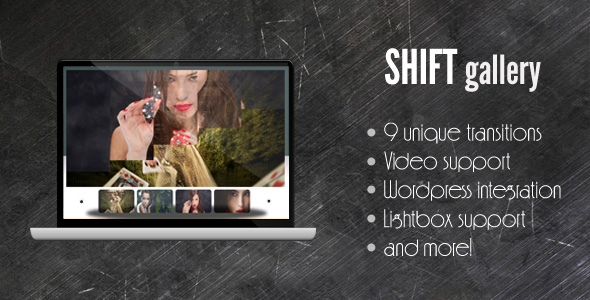
The SHIFT Gallery plugin is engineered to deliver a premium, versatile media presentation experience. Its core strength lies in the seamless integration of diverse media types and the implementation of visually striking transitions. Below is a detailed breakdown of its most compelling capabilities.
- Unified Multi-Media Support: Unlike standard image-only galleries, this plugin supports images, videos, SWF files, and even plain text within a single, cohesive showcase. This eliminates the need for separate plugins for different content types, streamlining your workflow and creating a unified visitor experience.
- Dynamic Ken Burns Effect: The gallery is designed to support a Ken Burns effect, which adds a cinematic pan-and-zoom animation to your images. This transforms static pictures into engaging, motion-filled storytelling elements, significantly increasing visual dwell time and viewer captivation.
- Flexible Slideshow Mode: The entire gallery can function as an automated slideshow. This enables a “hands-free” viewing experience for portfolios, digital signage, or background presentations, where content cycles automatically without user interaction.
- Lightbox Integration: For deeper engagement, the plugin includes lightbox support. Clicking on a thumbnail or image triggers a full-screen overlay view, allowing users to examine high-resolution details without leaving the page context. This is a standard for high-converting creative portfolios.
- Customizable Thumbnails and Navigation: You retain full control over the user interface. The number of visible thumbnails is adjustable, and all structural parameters—from container sizes to directional buttons—can be easily configured. The plugin also allows for custom button images, enabling you to match the gallery’s visual style to your brand identity.
- Rich Caption and Description System: Each thumbnail can have its own editable caption, and each full-size media item can feature a different text description. Descriptions can be aligned to the top or bottom and support animated entrance effects, adding a layer of narrative depth to your visual content.
- Variety of Transition Effects: The plugin ships with 9 distinct transition effects for switching between media items. These effects can be modified easily, giving you a palette of visual tools to control the pacing and style of your gallery presentation.
- JavaScript Fallback and Performance: The gallery remains viewable without JavaScript, ensuring accessibility for all users. Multiple galleries can be placed on a single page, and the inclusion of both minified and uncompressed JavaScript files provides options for developers seeking performance optimization or code readability.
Who Is This For? Use Cases
SHIFT Gallery is not a one-size-fits-all plugin; it is a specialized tool for users who require a professional, multi-format visual presentation. Its feature set makes it ideal for several specific groups.
Professional Photographers and Digital Artists
For a photographer, the portfolio is the primary sales tool. This plugin allows you to showcase high-resolution images with the cinematic Ken Burns effect, creating a memorable viewing experience that sets your work apart. The lightbox feature enables clients to inspect images in detail, while the slideshow mode can serve as a stunning automated reel for exhibitions or client meetings. The ability to include video behind a thumbnail allows you to add behind-the-scenes footage or client testimonials directly into your portfolio stream.
Media Agencies and Digital Signage Providers
Agencies that manage digital displays for retail, hospitality, or corporate lobbies need a reliable, visually sophisticated solution. SHIFT Gallery excels here by supporting SWF files and videos, enabling the creation of dynamic advertisements or information loops. The automated slideshow mode ensures continuous, interruption-free playback, while the flexible configuration allows for custom sizing to fit any screen resolution.
Web Developers and Freelancers Building Client Sites
Developers seeking a lightweight, customizable gallery plugin for client projects will value the plugin’s clean codebase and straightforward installation (via a simple script tag and div). The inclusion of both minified and uncompressed source files is a boon for performance tuning and potential feature extensions. This plugin provides a professional output without the overhead of a bloated multi-purpose slider, making it ideal for niche use cases where multi-media support is a key requirement.
E-commerce and Product Showcase Designers
While not a full e-commerce plugin, SHIFT Gallery can be repurposed for product showcases. By combining product images with embedded demonstration videos and descriptive text captions, you can create an immersive product detail experience. The adjustable thumbnails and description alignment allow for a structured, easy-to-navigate presentation of product lines.
Technical Details & Compatibility
This plugin is designed for practical, straightforward integration. The core functionality is delivered via a single JavaScript file (shiftgallery.js), which can be included in the <head> tag of your HTML document. The gallery container is then rendered within a <div> element, making it compatible with most content management systems and static sites.
The plugin ships with a WordPress integration pack, confirming its primary platform is WordPress. Regarding browser compatibility, the UPDATE 1.1 notes specific fixes for Internet Explorer, indicating support for legacy browsers was historically targeted. As an older yet proven asset from the early era of premium WordPress plugins, it is optimized for standard web browsers (Chrome, Firefox, Safari) but may require testing on the latest browser versions. It supports multiple instances on a single page, which is a key technical advantage for complex site layouts.
Pros and Cons
Pros
- Unique Multi-Media Support: The stand-out feature is the native support for images, videos, SWF, and text in one gallery, a rare combination that solves a specific, high-value problem.
- Cinematic Presentation Quality: The Ken Burns effect and 9 transition effects provide a premium, production-grade visual experience that outperforms standard grid galleries.
- Developer-Friendly Code: The inclusion of uncompressed JS files and a simple API makes it highly customizable for developers who want to extend functionality or tweak behavior.
- Accessible Foundation: The JavaScript fallback ensures content is always visible, which is a strong signal for usability and SEO best practices.
- Lightweight Footprint: For a feature-rich gallery, the core script file is relatively small, leading to faster page load times compared to heavier slider plugins.
Cons
- Older Asset: The plugin appears to be a legacy product. It may not receive updates for modern web standards, security patches, or compatibility with the latest WordPress core versions.
- Manual Installation: Unlike modern plugin repositories, installation requires manual script enqueuing. This is a barrier for non-technical beginners who are accustomed to one-click WordPress plugin installs.
- No WooCommerce Native: While it can be used for product showcases, it has no direct WooCommerce integration. You will need to manually embed it into product pages using shortcode or custom PHP.
- Limited Community Support: As an older item on CodeCanyon with a specific niche, community forums and third-party tutorials may be sparse compared to more popular, actively maintained plugins.
Frequently Asked Questions
Is this plugin compatible with the latest WordPress version?
The plugin includes a dedicated WordPress integration pack and was originally built for the WordPress ecosystem. However, as a legacy asset, you should test it on your specific WordPress version (especially 5.0+ with the block editor). The core JavaScript functionality is independent of WordPress core, so it typically works well as a custom script, but the provided integration pack may require adjustments for modern theme hooks and WordPress coding standards.
Does this plugin include technical support and updates?
As a CodeCanyon item, the author (ZoomIt) typically provides item support for a period (usually 6 months) from the purchase date. This support covers bugs and basic questions regarding the plugin’s core functionality. Updates are released at the author’s discretion. Given the UPDATE 1.1 historical note, it is a relatively stable release, but future updates are not guaranteed. You should review the author’s support policy on the product page before purchasing.
Can I use this gallery for video backgrounds or hero sections?
Yes, SHIFT Gallery supports video and SWF files within its media stream. By using the gallery’s slideshow mode and disabling navigation, you can effectively create a looping video background or a dynamic hero section. The container size is resizable, allowing you to set dimensions to 100% width for full-screen effects. This makes it a versatile tool for creating immersive headers, not just traditional galleries.
Final Verdict
SHIFT Gallery is a niche yet powerful tool that delivers on its core promise: a stunning, multi-format media showcase that stands out from the crowd. Its unique selling point—the native support for images, videos, SWF, and text within a single, Ken Burns-enhanced gallery—is a feature highly sought after by professional photographers, media agencies, and creative developers. While it may be an older asset without modern, auto-updating conveniences, its lightweight codebase, developer-friendly structure, and cinematic presentation quality make it a valuable addition for specific projects.
If your goal is to create a portfolio, digital signage, or product showcase that commands attention and tells a story through motion, this plugin offers that capability out of the box. The author’s presence on CodeCanyon, with a history of delivering functional products, provides a baseline of trust. For anyone who values visual impact over automated updates and is comfortable with a manual setup, SHIFT Gallery is a worthy investment. Try it today and transform how you present your visual content online—your audience will notice the difference.