Overview
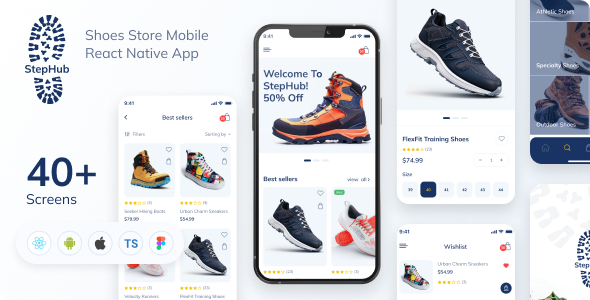
Unlock a complete, production‑ready mobile application template that runs seamlessly on both Android and iOS. Developed with the latest React Native CLI 0.73.2 and TypeScript, this package delivers a modern, functional‑component architecture powered by hooks and a clean component hierarchy. All visual assets are supplied in SVG format, and the accompanying Figma design file ensures a smooth handoff for developers and designers alike.
Key Features
- Built using React Native CLI 0.73.2 – the freshest stable release
- Pure functional components with React Hooks for optimal performance and readability
- Scalable, well‑structured component tree that’s easy to extend
- Full SVG icon set for crisp, resolution‑agnostic graphics
- Cross‑platform compatibility: Android & iOS out of the box
- Pre‑integrated Redux Toolkit and Redux‑Persist for robust state management
- AsyncStorage, Clipboard, and more – all included in the dependency list
- Smart image loading with a preloader and
react-native-fast-image - Ready for backend integration – no boilerplate left behind
- Comprehensive video tutorial and detailed documentation built in
- Free Google Fonts (Mulish) applied for a polished UI
Technologies & Dependencies
This template is powered by the following core technologies and libraries:
- React Native & React 18.2.0
- TypeScript for type safety across the codebase
- Redux Toolkit & Redux Persist for state management
- Navigation: React Navigation 6+ with native stack
- Utilities: Axios, AsyncStorage, Clipboard, Fast Image, Flash Message, Modal, and more
- Responsive helpers:
react-native-responsive-dimensions, orientation lock, and safe area context - SVG support:
react-native-svgfor vector graphics
Installation & Setup
Getting the project up and running is straightforward. Follow these steps in your terminal:
- “`npm install“` – Install all dependencies
- “`npx react-native eject“` – Create native project folders
- “`npx pod-install“` – Install iOS pods
- “`npx react-native-asset“` – Link static assets
- “`npx react-native run-ios“` – Launch the iOS simulator
- “`npx react-native run-android“` – Start the Android emulator or device
Design & Typography
The application employs the Mulish font family for a fresh, readable style across screens. All scalable icons are pre‑converted to SVG, ensuring sharp visuals on any device.
Need Help?
Questions, custom features, or support—connect with us on Telegram for quick assistance.