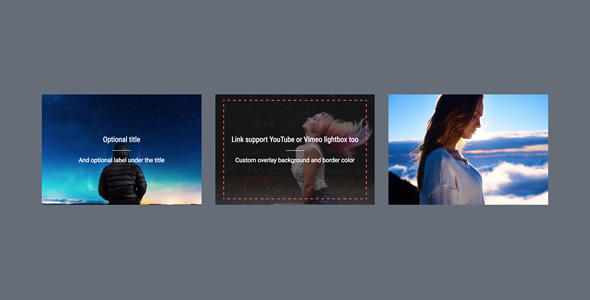
WPBakery Page Builder Add-on – Border Hover is a small extension for the WPBakery Page Builder that adds animated border effects to images on hover. It is aimed at site owners and freelancers who already build pages with WPBakery and want a decorative image treatment without writing custom CSS. The add-on is listed on ThemeForest at $11 and requires WPBakery Page Builder to be installed and active before it does anything at all.
The product sits in the crowded WPBakery Page Builder Add-on Add Ons category, where dozens of small single-purpose plugins compete on price and convenience. What separates this one from most of that field is its narrowness: it does one visual trick, does it in four variations, and bundles a lightbox and a label field alongside it. Whether that narrowness is a virtue or a limitation depends entirely on what a project needs.
What the Border Hover Add-on Actually Adds to WPBakery Page Builder Add Ons
The core mechanic is a hover-triggered border animation. When a visitor moves a pointer over an image, a border draws itself around the frame using one of four transition styles the vendor labels cross hand 1, cross hand 2, clock wise and anti clock wise. The naming is idiosyncratic rather than descriptive, but the underlying behaviour is a CSS3 transition that reveals a border along a defined path. In practice this produces a framing effect that draws attention to a thumbnail without moving or scaling the image itself, which is a lighter touch than the zoom-on-hover pattern most grid layouts default to.
Border styling is configurable rather than fixed. The add-on supports solid, dashed and dotted border types, and the border colour is set independently, so the effect can be matched to a brand palette instead of accepting a default. A background colour can also be applied on hover, which matters for images with transparent areas or for layouts where the border alone would be too subtle against a busy photograph.
Beyond the border itself, each item can carry a title or label with configurable font size and colour. That turns the element into something closer to a captioned tile than a plain image, and it removes the need to stack a separate heading block underneath every thumbnail.
Lightbox and link behaviour
Hovered items can link out, or open in a lightbox. The add-on handles both YouTube and Vimeo video lightboxes as well as image lightboxes, and it offers two image lightbox engines, boxer and prettyPhoto. Offering a choice of lightbox library is unusual at this price point and is genuinely useful on sites that already load one of the two for other plugins, since it avoids pulling in a second script.
Performance and maintenance details
The vendor states that JavaScript and CSS are enqueued only when the element is actually used on a page. That is the correct approach for a WordPress extension and is worth calling out, because many small add-ons load their assets sitewide regardless. The listing also claims compatibility with current jQuery and current WordPress versions, and states that FAQ documentation and source code ship in the package with free future updates. Those are vendor claims rather than independently verified facts, and the listing gives no version history or changelog detail to assess how promptly updates have been issued.
Where This Add-on Fits and Where It Does Not
The strongest fit is a portfolio, photography site or agency showcase built on WPBakery where the design calls for restrained motion. A grid of project thumbnails with a border that traces itself on hover reads as more considered than the standard scale-up effect, and the label field means each tile can carry a client name or project type without extra markup. Wedding and event photographers, design studios and small architecture practices are the kinds of sites where this pattern lands well.
It also suits freelancers maintaining client sites who need a specific hover treatment quickly and do not want to hand-write transition keyframes, vendor prefixes and lightbox initialisation for a single element. At $11 the cost is easier to justify than an hour of custom development, and the source code inclusion means the effect can be adapted later if the client’s brand changes.
There are clear cases where it is the wrong purchase. Anyone not already running WPBakery Page Builder should stop here, because the add-on is inert without the parent builder and buying both to obtain a hover border is poor value. Sites built on the block editor, Elementor or a block-based theme have no use for it. Projects with strict performance budgets and a large number of image grids may also find that a handful of lines of custom CSS achieves the same border transition with less overhead than an additional plugin. And designers who want a hover effect with depth, shadow or image movement will find the four supplied transitions too limited.
Strengths and Limitations of This WPBakery Page Builder Add-on
Strengths
- Genuinely focused scope: the border transition, label and lightbox options cover a complete image tile without extra plugins.
- Conditional asset loading keeps the plugin from adding weight to pages that do not use it.
- Choice of two image lightbox libraries reduces the chance of a duplicate script conflict on an existing site.
- Colour controls for border and hover background allow the effect to match a theme rather than clash with it.
- Source code and documentation included, which is more than many $11 add-ons provide.
- Low price relative to the development time needed to replicate the effect by hand.
Limitations
- Hard dependency on WPBakery Page Builder, with no standalone or shortcode-only mode described.
- Only four transition styles, none of which is described in the listing in terms a buyer can visualise before purchase.
- The listing discloses no sales figures or customer ratings, so there is no independent evidence of reliability or support responsiveness.
- No stated changelog, last-updated date or tested-up-to WordPress version, which makes long-term maintenance hard to judge.
- Vendor recommends the bundled All In One Addons package instead, which suggests this standalone item may receive less attention over time.
- Hover-only interaction means the effect is invisible on touch devices, where most traffic now originates.
How It Compares With Other WPBakery Page Builder Add Ons
The general category of WPBakery Page Builder Add-on Add Ons splits into two groups: large multi-purpose bundles that add dozens of element types, and single-purpose extensions like this one. Bundles win on breadth and usually on update cadence, since a commercial bundle has more incentive to stay current with the builder. Single-purpose add-ons win on weight and clarity, because a site only loads what it uses and the settings screen stays short.
Judged against the bundle group, this add-on is the more surgical choice for a site that needs one hover treatment and nothing else. Judged against the custom-code alternative, it trades a small amount of control for a settings interface and a maintained codebase. The honest positioning is that it is a convenience purchase: it saves development time on a specific, narrow effect, and it offers no advantage to anyone who does not specifically want that effect inside WPBakery.
Buyers comparing on capability should note that the feature set here is deliberately small. There is no image filter, no grid builder, no masonry layout and no hover effect beyond the border transition. Products that bundle those features are a different purchase with a different price and a different maintenance profile.
Frequently Asked Questions
Do I need WPBakery Page Builder to use this add-on?
Yes. The add-on is an extension for WPBakery Page Builder and will not function without the parent plugin installed and activated. The vendor states this explicitly in the listing. Budget for the cost of WPBakery Page Builder itself when assessing the total price, since the $11 add-on is only part of the outlay.
Does the border hover effect work on mobile phones and tablets?
No, not as a hover effect. The transitions are triggered by pointer hover, and touchscreens have no hover state, so the border animation will not appear on phones or tablets. The image, label and lightbox still function on touch devices. Sites with majority mobile traffic should treat the effect as a desktop enhancement rather than a core design element.
Can the add-on open YouTube and Vimeo videos in a popup?
Yes. Each item can be set to open a YouTube or Vimeo video in a lightbox instead of linking away from the page. Image lightboxes are also supported, with a choice between the boxer and prettyPhoto libraries. Choosing the library already loaded elsewhere on the site avoids enqueuing a duplicate script.
Is this the same as the All In One Addons package for WPBakery?
It is one component of it. The vendor notes that this add-on can be obtained as part of the All In One Addons for WPBakery Page Builder package, and recommends the bundle because it includes other add-ons and future additions. Buying the standalone item gets the border hover element only, without the rest of the collection.
Verdict on This WPBakery Page Builder Add-on
This is a sensible buy for one specific person: a developer or site owner already running WPBakery Page Builder who wants a restrained, configurable border hover on image tiles and would rather pay $11 than write the CSS and lightbox wiring. The conditional asset loading, dual lightbox support and included source code make it a tidy piece of work rather than a throwaway.
It is the wrong purchase for anyone outside WPBakery, for anyone who needs hover effects with more depth or variety, and for anyone who requires visible proof of update history and support quality before committing. The absence of disclosed sales and ratings in this WPBakery Page Builder Add-on Add Ons listing is a genuine reason for caution rather than a detail to gloss over. Buyers who want the broader element library should go straight to the vendor’s bundle instead.