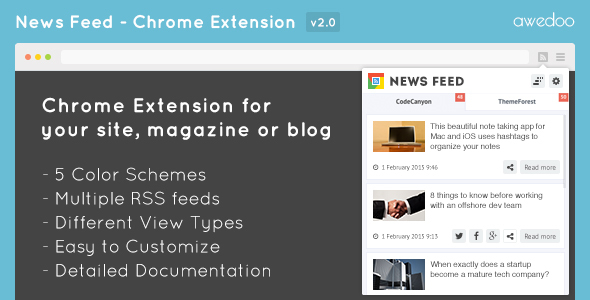
Launching a website, magazine, or blog is only half the battle. The real challenge is keeping your audience engaged and driving consistent traffic back to your content. While social media and email newsletters are effective, they rely on users actively checking those platforms. There is a more direct, always-on channel that sits right inside your audience’s browser: the Google Chrome Extension. News Feed – Chrome Extension offers a seamless way to transform your site’s standard RSS or Atom feed into a dedicated, branded browser extension. This tool enables your users to receive your latest news instantly, directly from their browser toolbar, turning casual visitors into loyal, returning readers.
By placing your own extension in the Chrome Web Store, you tap into an ecosystem of over 200 million active users. This is not just a notification tool; it is a powerful growth hack for your digital presence. You gain a persistent foothold on your audience’s desktop, ensuring your content is always just one click away. Best of all, the setup is remarkably simple. You can go from zero to a fully functional, customized Chrome extension in under ten minutes. This means you can stop worrying about complex development and start focusing on what you do best: creating great content.
Key Features
- Instant News Delivery: The extension automatically fetches the latest headlines and snippets from your site’s RSS or Atom feed. Users see new content the moment you publish it, eliminating the need for them to manually visit your site to check for updates.
- Multiple RSS Feed Support: If you manage a complex site with multiple categories—such as tech, lifestyle, and business—you can aggregate all your feeds into one extension. This allows you to segment your content or offer a comprehensive view of your entire publication.
- Customizable View Types: The extension is not a one-size-fits-all solution. It includes multiple layout options, allowing you to choose how your content is displayed in the popup. Whether you prefer a clean list view or a richer, image-heavy display, you have the control to match your brand’s aesthetic.
- Advanced Color Schemes: Maintain brand consistency with customizable color schemes. You can match the extension’s look and feel to your website’s palette, creating a cohesive brand experience that builds trust and recognition.
- YouTube RSS Feed Support: For video bloggers and multimedia creators, this feature is invaluable. You can integrate your YouTube channel’s RSS feed directly into the extension, ensuring your video content reaches your audience right alongside your written articles.
- Counter of Unread News: A dynamic badge displays the number of unread items on the extension icon. This subtle visual cue creates a sense of urgency and encourages users to click and catch up on content they might have missed.
- Individual Settings for Each Feed: When using multiple feeds, you can assign distinct settings per feed. This includes custom icons, separate update intervals, and unique display preferences, allowing for a highly organized and tailored user experience.
- Retrieves Images from Content: The extension is smart enough to pull images directly from your feed’s
content:encodedanddescriptiontags. This ensures your news items are visually engaging and stand out in the extension’s popup, increasing click-through rates.
Who Is This For? Use Cases
Independent Bloggers and Publishers
If you run a personal blog or a niche publication, your audience is your most valuable asset. A News Feed – Chrome Extension helps you build a direct relationship with your readers. Instead of competing for attention on crowded social feeds, your content appears in a dedicated space on their browser. For a food blogger, this means your latest recipe is always visible. For a tech reviewer, your newest gadget analysis is just a click away. It turns your blog into a daily habit for your readers, drastically increasing your repeat traffic and page views.
Online Magazines and News Portals
High-volume publishers with daily or hourly updates will find this tool essential for user retention. With multiple RSS feed support, a magazine covering fashion, travel, and culture can have a single extension that serves all sections. Editors can curate specific feeds to ensure the most important stories are highlighted. The unread counter is particularly powerful for news portals, as it encourages readers to return multiple times a day to stay informed, transforming your site into their primary news source.
Businesses and Corporate Blogs
Companies use blogs to share company news, product updates, and industry insights. A Chrome extension ensures that your employees, partners, and loyal customers stay in the loop. For a SaaS company, this could mean instantly notifying users about a new feature rollout or a critical security update. It serves as a private, branded communication channel that bypasses email filters and social media algorithms, delivering high-priority information directly to your stakeholders’ browsers.
Theme and Plugin Developers on Envato Market
If you sell digital assets on ThemeForest or CodeCanyon, you know the importance of announcing new items and updates. This extension, originally designed for showcasing “Themeforest New Items,” is perfect for developers. You can set up an extension to display your latest product releases, updates, and tutorials. This keeps your customer base engaged and drives direct sales from the Chrome Web Store, which already hosts millions of potential buyers.
Technical Details & Compatibility
This product is built for simplicity and broad compatibility. It requires a standard RSS 2.0 or Atom feed, which is automatically generated by virtually every modern Content Management System including WordPress, Joomla, Drupal, and Squarespace. The extension is fully compatible with the latest versions of the Google Chrome browser. While the initial release dates back to February 2015, the product has seen significant updates, including a major global update in February 2016 that added multiple RSS feed support, YouTube integration, and advanced user options. The change log indicates that the developer is responsive to issues, with fixes for JavaScript library minification and counter value problems. The setup is entirely configuration-based, requiring no coding knowledge. You simply edit a single settings file, upload the extension, and publish it to the Chrome Web Store. The entire process, from download to publication, is designed to take no more than ten minutes.
Pros and Cons
Pros
- Extremely Fast Setup: The claim of a 10-minute setup is credible, making it accessible for non-developers and busy site owners.
- High Reach Potential: The Chrome Web Store has a massive, active audience of over 200 million users, providing a powerful distribution channel.
- Multiple Feed Support: The ability to aggregate multiple RSS feeds is a standout feature that allows complex sites to be fully represented in one extension.
- Brand Customization: Color schemes and view types give you control over the user experience, ensuring the extension looks like a natural part of your brand.
- Image Support: Automatically pulling images from feeds makes the extension visually appealing and increases engagement.
- YouTube Integration: This is a rare and valuable feature for multimedia creators, bridging the gap between written content and video.
- Active Development History: The change log shows the developer actively fixes bugs and adds requested features, signaling good long-term support.
Cons
- Update Recency: The most significant update listed is from February 2016. While the product may be feature-complete, the lack of recent updates could raise questions about compatibility with the latest Chrome API changes.
- Dependency on RSS Feeds: The extension’s functionality is entirely dependent on your site’s feed. If your feed is broken, slow, or poorly formatted, the extension will not work correctly.
- Limited Analytics: The description does not mention any built-in analytics or tracking for the extension. You would need to add your own Google Analytics tracking to measure click-through rates and user behavior.
- No Push Notifications: This is a “pull-based” extension that updates when the user clicks the icon. It does not provide background push notifications, meaning users miss updates if they don’t check the extension.
Frequently Asked Questions
Do I need coding experience to set up the News Feed – Chrome Extension?
No. The extension is designed for ease of use. The setup involves editing a single JavaScript configuration file, where you paste your RSS feed URL, choose your colors, and upload the extension to the Chrome Web Store. The documentation is described as excellent, and the entire process is aimed at anyone with basic computer skills. You do not need to know HTML, CSS, or JavaScript to get it running.
Can I use multiple RSS feeds from different websites in one extension?
Yes. One of the key features added in the February 2016 global update is support for multiple RSS feeds. This allows you to aggregate content from different sections of your site, or even from different sites you own, into a single, cohesive Chrome extension. Each feed can have its own individual settings for display and update frequency.
Is this extension compatible with all versions of Google Chrome?
Yes. The extension is built using standard Chrome extension APIs and is designed to work with the current stable version of Google Chrome. While the last major update was in 2016, the core functionality of reading RSS feeds and displaying them in a popup is a mature technology that remains fully compatible with modern Chrome browsers. You should test the extension after any major Chrome update to ensure continued performance.
Final Verdict
The News Feed – Chrome Extension is a pragmatic and effective tool for any content creator or publisher looking to build a direct, persistent channel to their audience. Its value lies in its simplicity and powerful feature set. The ability to support multiple feeds, customize the look, and integrate YouTube content makes it far more versatile than typical RSS readers. The strong testimonials from previous buyers highlight excellent documentation and superb support, which reduces the risk of purchase. While the lack of recent public updates may give some buyers pause, the core functionality remains robust and the setup is incredibly low-effort. If you are serious about increasing repeat traffic and making your content a daily habit for your readers, this is a cost-effective and highly efficient solution. Don’t let your content get lost in the noise of social media. Take control of your audience’s attention and get the News Feed – Chrome Extension today. With a ten-minute setup, you have nothing to lose and a dedicated user base to gain.