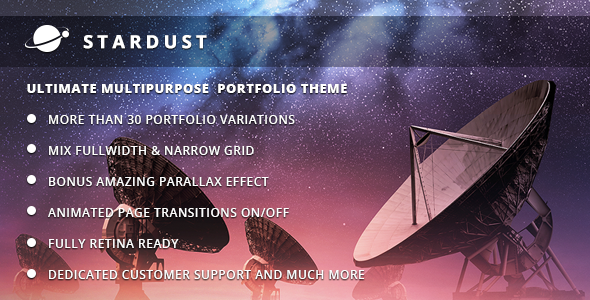
Stardust is a multi-purpose portfolio WordPress theme sold on ThemeForest for $39, built by the QODE team for designers, studios and agencies that want image-led pages with animated transitions. It ships with the Slider Revolution plugin, a modular shortcode system and per-page header controls, and it remains a reasonable option for portfolio and microsite work even though its most recent release dates from April 2023.
What Stardust Creative Actually Delivers
The theme’s central idea is that a portfolio site should feel composed rather than assembled from a template. QODE implements that through a set of layout controls that are more granular than the category norm. Headers, footers and content areas can each be switched independently between full-width and standard grid, which means a site can run an edge-to-edge hero above a boxed content column without custom CSS. Each page can also carry its own header height and background image or slider, and the fixed-header behaviour can be toggled on or off globally.
The AJAX layer is the other defining feature. Stardust creative sites can transition between pages using one of four animated effects, or AJAX can be disabled entirely for a conventional page-load experience. More usefully, the animation type can be set per page, so a studio can give a homepage an elaborate reveal while keeping contact and legal pages plain. Anyone who has tried to bolt AJAX navigation onto a theme after the fact will recognise how much friction this removes.
Parallax is handled as a first-class page type rather than a decorative section. The vendor describes it as a bonus feature suited to presentations, microsites and alternative homepages, and the admin allows unlimited parallax sections to be added to any page. Combined with the interactive element library — counters, horizontal and vertical graphs, charts, animated service blocks — this gives the theme a presentation-layer quality that suits campaign pages and one-off landing experiences as much as a traditional portfolio grid.
On the practical side, the package includes Slider Revolution, which the vendor values at $26 and which is genuinely useful for full-width, mobile-responsive hero sliders. The admin interface supports unlimited sliders and slides added while editing a post, page or portfolio item, plus unlimited portfolio images or videos per project. Multiple custom sidebars can be created and assigned globally or per post. Two dropdown menu styles are provided. The theme is WPML-ready for multilingual builds, translation-ready via po and mo files, retina-ready for high-density displays, and ships with a dummy child theme as a starting point.
Under the hood, the theme is written in HTML5, CSS3 and jQuery, and the vendor states the markup validates. SEO handling includes per-page meta keywords and description fields through the theme’s own panel, and the Slider Revolution integration keeps slide content readable to crawlers. The changelog shows sustained maintenance through the WordPress 5.x era and into 6.2, including PHP 8 compatibility work and a shift to generating static CSS and JS files instead of PHP-driven stylesheets — a change that matters for page speed on shared hosting.
Where Stardust Fits and Where It Does Not
Freelance designers and small studios building a single portfolio site are the clearest fit. The combination of a visual portfolio grid, per-project media galleries and animated page transitions produces the kind of site that reads as designed rather than templated, and the $39 price is trivial against a client budget. Agencies producing campaign microsites or product launch pages will get more out of the parallax and interactive element system, since those pages benefit from scroll-driven storytelling and animated statistics.
Photographers, illustrators and motion designers who need full-bleed imagery with minimal chrome are also well served, particularly because headers and content can be mixed between full-width and boxed independently. Multilingual studios get WPML compatibility without extra configuration.
Where Stardust is the wrong choice: content-heavy sites. Blogs with hundreds of posts, documentation portals, news sites or membership platforms will fight the theme’s assumptions. The AJAX transitions interfere with conventional pagination and analytics expectations, the layout controls are oriented around visual composition rather than information density, and a portfolio-first theme rarely provides the taxonomy and archive flexibility that editorial publishing needs. Anyone building a WooCommerce store should also look elsewhere — the listing makes no mention of e-commerce integration, and the feature set is clearly aimed at presentation rather than transactions.
Strengths and Limitations of This Portfolio Theme
Strengths
- Independent full-width or boxed control for header, footer and content, which is unusual at this price point and removes a lot of custom CSS work.
- Per-page AJAX animation selection, including the option to switch AJAX off entirely — a rare degree of control over page transitions.
- Slider Revolution bundled at no extra cost, saving the $26 the plugin normally retails for.
- Unlimited parallax sections, sliders and portfolio media, with no artificial caps in the admin.
- WPML and translation readiness built in, which matters for studios working across markets.
- Retina-ready assets and a static CSS/JS generation approach that avoids the PHP-rendered stylesheet overhead common in older QODE themes.
- A public changelog showing compatibility updates through WordPress 6.2 and PHP 8.
Limitations
- The most recent update is dated 6 April 2023. That is a meaningful gap, and buyers should verify current compatibility with their WordPress version before purchasing rather than assuming it.
- The demo images are licensed for presentation only. The vendor states plainly that they cannot be used on a live site without separate stock licences, which adds an unbudgeted cost for anyone expecting a turnkey look.
- SEO is handled through the theme’s own meta keyword and description fields. That is a legacy approach; modern sites rely on a dedicated SEO plugin, and duplicating meta output across both can cause conflicts.
- AJAX page transitions can complicate analytics tracking and browser back-button behaviour, and there is no indication in the listing that the theme addresses this.
- No e-commerce integration is described, so the theme is not a candidate for shops.
- Google Plus social sharing was removed in version 3.2, which is correct housekeeping but a reminder that the feature set has been trimmed rather than expanded in recent releases.
How Stardust Compares With Other Creative Portfolio Themes
In the multi-purpose creative category, themes generally split into two camps: page-builder-first products that hand layout control to Elementor, WPBakery or the block editor, and opinionated themes like Stardust that ship their own shortcode and options framework. Stardust sits firmly in the second camp. The advantage is coherence — the shortcodes, header controls and animation system were designed together, so the output looks consistent without configuration. The disadvantage is portability. A site built on Stardust’s modular shortcodes is tied to Stardust; migrating to a block-based theme later means rebuilding pages rather than copying content.
Against builder-first alternatives, Stardust also offers less raw layout freedom. There is no drag-and-drop canvas, and complex asymmetric grids will require custom CSS. What it offers instead is speed of setup for the specific patterns it was designed around: full-width hero, animated transition, portfolio grid, parallax section. For a studio producing several similar portfolio sites a year, that trade-off is usually worth taking.
On support and longevity, QODE is an established ThemeForest author with a large catalogue, and the theme’s 973 sales and strong rating indicate a settled, reviewed product rather than a new release. That said, buyers comparing against actively maintained competitors should weigh the 2023 update date carefully.
Frequently Asked Questions
Does Stardust work with the latest version of WordPress?
The vendor’s changelog lists compatibility up to WordPress 6.2, released alongside the theme’s April 2023 update. No later compatibility statement appears in the listing. Because WordPress has moved on considerably since then, buyers should confirm current compatibility with QODE support before purchase, or test the theme on a staging install first.
Can the AJAX page transitions be turned off?
Yes. AJAX animations can be switched off globally to produce a conventional page-load experience, and individual pages can be assigned their own animation type or none at all. This matters for contact forms, legal pages and any page where standard browser navigation is preferable to an animated transition.
Are the demo images included with the theme?
No. The vendor states explicitly that it does not own the copyright to the images used in the demos and that they are presentational only. Using them on a live site requires purchasing the appropriate stock licences separately. Budget for placeholder or licensed imagery on top of the $39 theme price.
Is Stardust suitable for an online store?
No. The feature list makes no mention of WooCommerce or any e-commerce integration, and the theme’s strengths are in visual presentation rather than product catalogues, carts and checkout flows. Sites that need to sell products should use a dedicated e-commerce theme or a general-purpose theme with confirmed shop support.
Verdict on Stardust Creative
Stardust creative is a well-constructed portfolio theme for designers, studios and agencies that want animated, image-led sites without assembling the look from a page builder. The independent full-width and boxed controls, per-page AJAX animation settings and bundled Slider Revolution justify the $39 for that audience, and the 973 sales with a strong rating suggest the product has held up in real use.
Buyers should not purchase it for content-heavy publishing, documentation or e-commerce — the theme is not built for those jobs and will resist them. The more serious concern is maintenance: the last update landed in April 2023, so anyone running a current WordPress release should verify compatibility with the developer before committing. For a portfolio or microsite project where the visual result is the priority, it remains a defensible choice; for a long-lived platform site, the update cadence is a real risk to weigh.