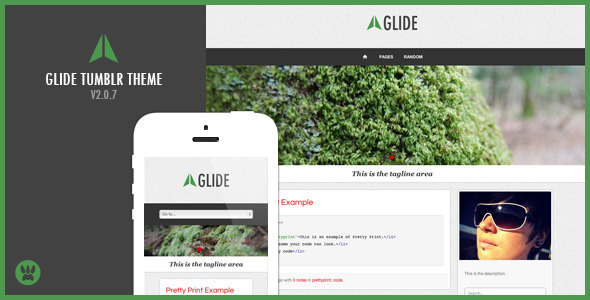
Glide Blog is a responsive Tumblr theme sold on ThemeForest for $32, built by developer ChristineWilde to adapt a Tumblog to phones, tablets and desktops without the pinch-and-zoom experience common to older Tumblr layouts. It suits photographers, designers and small businesses that want a customised, widget-heavy Tumblr presence, and it has attracted 344 sales since its last vendor update in September 2013.
What the Glide Blog theme actually delivers
The core proposition is fluid layout. The theme resizes with the browser viewport rather than serving a separate mobile template, and the vendor states it is retina ready, so uploaded imagery and interface icons stay sharp on high-density screens. Images and embedded video scale with the container, which matters on Tumblr because posts frequently mix full-width photography with Vimeo or YouTube embeds. The slider is built on FlexSlider and supports swipe gestures on iPad and iPhone, so touch users can move between slides without tapping arrow controls.
Customisation happens almost entirely through Tumblr’s Appearance panel rather than by editing templates. The vendor lists an unusually long set of toggles and fields for a theme at this price: the dropdown menu can be switched off or its label renamed, the image slider can be disabled or set to slide or fade, and the archive, RSS, Tumblr and random buttons can each be shown or hidden. A logo can be uploaded to the header, a larger profile picture can be uploaded and resized with the layout, and post and sidebar background colours can be changed without touching CSS. There is also a theme colour control, a custom tagline field, and a slot for a Google Analytics ID and a Disqus shortname.
Typography is handled through Google Web Fonts. The listing advertises 20 fonts in the Appearance panel while a separate feature line claims any Google Web Font can be used, which is a discrepancy worth noting — the practical answer is that the panel exposes a curated set, and swapping in others means editing the stylesheet. Social integration is broad: the theme ships with more than 25 social networking icons covering Tumblr, Twitter, Facebook, Google Plus, Pinterest, Flickr, YouTube, Vimeo, DeviantArt, Behance, Dribbble, Forrst, Stumbleupon, Delicious, Foursquare, Digg, Spotify, LinkedIn, Steam, eBay, WordPress, Github, Grooveshark, Skype and Soundcloud, with profile links entered in the header settings. ShareThis buttons provide Facebook Like and Share, Twitter, Google Plus and Pinterest sharing on posts.
Sidebar widgets go beyond the Tumblr defaults. There are feed widgets for Flickr, Instagram and Dribbble, a tag cloud that displays post counts per tag, a latest posts widget, and slots for a featured Vimeo or YouTube video. A Flickr bar can be enabled by entering a Flickr ID. For technical bloggers, Pretty Print styles code snippets so they render legibly rather than as unstyled monospace. The theme also supports Tumblr’s Panorama image type, added in version 2.0.4, which lets a wide image span the full post width.
Where Glide Blog fits, and where it does not
The strongest fit is a visual-first Tumblog: a photographer posting large images, a designer showing work alongside written posts, or a small business using Tumblr as a lightweight marketing site with a portfolio-adjacent layout. Anyone who wants a polished mobile experience without writing template code is squarely in the target audience, and the vendor explicitly positions it as a starting block for developers and designers of any skill level.
It also suits people who dislike plugin sprawl. Because the Flickr, Instagram, Dribbble, tag cloud and latest posts widgets are built in, there is no need to hunt for third-party Tumblr widgets or paste external JavaScript into the theme. For a freelancer building a client’s Tumblr presence on a modest budget, that consolidation is the main draw.
It is the wrong choice for anyone who needs a storefront. Tumblr themes in this category do not handle inventory, checkout or product variants, and nothing in the listing suggests commerce functionality. It is equally unsuitable for a site that depends on modern performance budgets or contemporary accessibility standards: the theme was last updated in September 2013, predating widespread adoption of responsive image srcset, lazy loading and current WCAG expectations. A publisher with strict Core Web Vitals targets or a legal accessibility requirement should treat this as a legacy product rather than a current one.
Strengths and limitations of the Glide Blog theme
Strengths
- Genuinely fluid responsive layout with retina-ready assets, so a single theme covers desktop and mobile without a separate template.
- Touch-enabled FlexSlider that responds to swipe gestures on iOS devices, which many Tumblr sliders of the same era did not.
- Unusually deep Appearance panel controls for the price, covering menu behaviour, slider animation, header buttons, logo and profile image uploads, colours and a custom tagline.
- Built-in feed widgets for Flickr, Instagram and Dribbble plus a tag cloud and recent posts widget, removing the need for external widget scripts.
- Broad social icon set and ShareThis integration, with profile links managed from the theme options rather than hard-coded.
- Google Analytics and Disqus fields in the panel, so tracking and commenting can be configured without editing HTML.
- Documentation is provided, and the vendor offers a support forum and after-sales support, with 344 sales and a rating history behind it.
Limitations
- The last vendor update was 19 September 2013. Tumblr’s platform, its post formats and its API have changed substantially since then, and the listing gives no indication of ongoing maintenance.
- The font options are described inconsistently: one line promises 20 Google Web Fonts, another claims any Google Web Font can be used. The vendor does not clarify which is accurate.
- Colour changes are limited to post and sidebar backgrounds plus a single theme colour. The listing notes that minimal graphics are used specifically so colours are easy to update through CSS, which effectively concedes that deeper restyling requires code editing.
- There is no stated support for modern image handling such as srcset or lazy loading, and no mention of accessibility features like focus states, skip links or ARIA landmarks.
- The feature list is broad but shallow in places — a Panorama image type, Pretty Print and a Dribbble widget are niche additions rather than capabilities that change what the theme can do.
- Buyers inherit whatever browser quirks existed in 2013. The listing makes no compatibility claims beyond responsiveness, so testing against current browser versions is advisable before committing a client project to it.
How Glide Blog compares with other Tumblr themes
Tumblr themes broadly fall into three groups: free themes from Tumblr’s own gallery, minimal paid themes that do one thing well, and feature-dense paid themes like this one. Free options cost nothing and are maintained alongside the platform, but they typically offer few Appearance panel controls, so customisation means editing HTML and CSS directly. Glide Blog sits firmly in the third group, trading a small one-off cost for a configuration panel that a non-technical owner can use.
Against minimal paid themes, the trade-off runs the other way. A stripped-back theme will usually load faster and be easier to reason about, because it carries fewer widgets, fewer icon assets and less JavaScript. Glide Blog’s value comes from bundling social feeds, a slider, sharing buttons and analytics into one package. A buyer who only needs clean typography and images is paying for features that will sit unused, and possibly slow the page down.
Against modern theme frameworks built for other platforms, the comparison is less favourable. Tumblr themes of this generation were not written with current performance and accessibility practices in mind, and a 2013 codebase will not match a recently maintained alternative on those measures. The honest framing is that Glide Blog competes on convenience and price within its own era, not on technical currency.
Frequently Asked Questions
Is the Glide Blog theme still supported and updated?
No. The vendor’s last recorded update was 19 September 2013, and the listing makes no claim of ongoing maintenance. The documentation, support forum and after-sales support described in the listing were offered at the time of sale, but there is no evidence of updates addressing Tumblr platform changes since then. Buyers should assume a static codebase.
Does Glide Blog work on mobile phones and tablets?
Yes. The theme is fully responsive and resizes with the browser viewport, and the vendor states images and video scale with the layout so no zooming is required. The FlexSlider supports finger swiping on iPad and iPhone. Retina-ready icons and logo support are included for high-density displays, though the theme predates modern responsive image techniques.
Can the Glide Blog theme be customised without editing code?
Mostly, yes. The Appearance panel covers the dropdown menu, slider behaviour, header buttons, logo and profile image uploads, social profile links, Google Analytics, Disqus, a custom tagline, background colours and a theme colour. Deeper changes to typography beyond the built-in font list or to the overall layout require editing the theme’s CSS or HTML directly.
What widgets and social networks does the Glide Blog theme include?
It includes Flickr, Instagram and Dribbble feed widgets, a tag cloud showing post counts, a latest posts widget, and slots for a featured Vimeo or YouTube video. More than 25 social icons are provided, covering Tumblr, Twitter, Facebook, Google Plus, Pinterest, Flickr, YouTube, Vimeo, Behance, Dribbble, LinkedIn, Spotify, Soundcloud and others, with ShareThis handling post sharing.
Verdict on the Glide Blog theme
Glide Blog is a sensible purchase for a hobbyist, photographer or small business owner who wants a configurable Tumblr presence with social feeds and a slider, and who values a one-time $32 cost over an ongoing subscription or template editing. The 344 sales and the vendor’s documented support history give it a reasonable track record within its category. It is not the right buy for anyone building a client site that must meet current performance, accessibility or security expectations, because a 2013 codebase cannot be assumed to satisfy them. Developers who want full control over markup should also look elsewhere, since the theme’s value lies in its options panel rather than its extensibility. Treat it as a well-featured legacy theme rather than a maintained modern product, and the decision becomes straightforward.