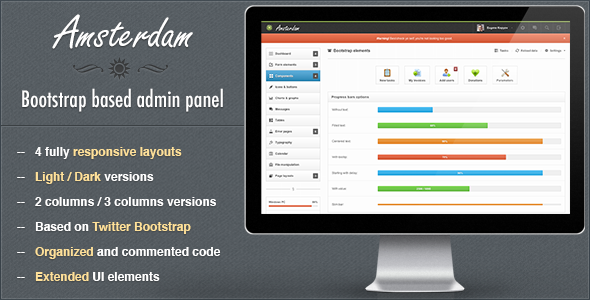
Amsterdam is a premium responsive admin template built on Twitter Bootstrap and sold on ThemeForest for $14. It provides the interface layer for backend panels — content management systems, web applications, billing dashboards, hosting control panels and similar internal tools — with four main layout variants in light and dark colour schemes. It is aimed at developers and small studios who want a working admin shell they can adapt rather than design from scratch, and it is best understood as a product of its era rather than a current-generation framework.
The template is authored by Kopyov, a seller with a long history of admin and dashboard products on the same marketplace. Amsterdam has accumulated 693 sales, which is a modest but real figure for the category and suggests a steady trickle of buyers rather than a breakout hit. The listing was last updated by the vendor in July 2013, and that date matters more than any single feature in the description.
What Amsterdam Admin Templates Actually Deliver
The core of the package is a twelve-column liquid grid that supports two- and three-column arrangements, with boxed and unboxed versions of each. Two of the four layouts ship with a three-column variant for wide screens, which is the configuration most useful for applications that need a persistent left navigation, a right-hand context panel and a working content area simultaneously. Switching between light and dark themes is handled at the layout level, and because the main content region stays structurally identical across variants, reskinning a project is largely a matter of swapping the wrapper and the navigation styling rather than rebuilding pages.
Form handling is where the template is unusually dense. The listing covers a full set of input fields with default styling, appended and prepended elements, textareas with character counters and elastic growth, tags input, HTML5 input types, masked inputs, iPhone-style toggle switches, styled dropdowns via the Uniform and Select2 plugins, styled and unstyled checkboxes and radios, stacked pills and tabs, dual multiple selects with filtering, and four form layouts (block, inline, transparent and horizontal) with two label positions. Three wizard implementations are included: one that submits via Ajax, one with standard submission and one with validation. For anyone building a multi-step configuration or onboarding flow, that is a meaningful head start.
Charting is handled through Flot, with line, bar (vertical and horizontal, with tooltips), pie, auto-updating, threshold and filled chart types. The auto-updating and threshold charts are the interesting ones — they cover live monitoring dashboards and alert-style visualisations that would otherwise require custom work. A jQuery slider set, jQuery UI datepickers in five configurations (default with input field, inline liquid, inline fixed, icon trigger and date range) and a colour picker supporting HEX and RGBa output round out the interactive components.
Navigation and feedback elements include five types of middle navigation — plain buttons, buttons with background, pie charts and two Font Awesome icon variants — plus styled Growl-like notifications for transient system messages. Font Awesome and Glyphicons are both bundled for iconography, and a set of ready-made error pages is included for 404 and similar states. The package also ships PSD files, but the vendor is explicit that these are partial: only two are provided, covering general UI components and the dark colour layout, because almost everything else was designed directly in the browser. Buyers expecting a complete layered source file will be disappointed.
Where Amsterdam Admin Templates Fit, and Where They Do Not
The strongest fit is a legacy or long-lived internal tool. If an organisation runs a PHP or server-rendered application with a Bootstrap 2-era front end, Amsterdam slots in without forcing a rewrite of the surrounding stack. Agencies maintaining multiple small client dashboards benefit from the four layout variants, since each project can take a different colour scheme and column arrangement while sharing the same component vocabulary. Freelancers building a billing panel, a hosting control panel or a CMS back office on a tight budget get a broad component set for $14, which is difficult to argue with on cost alone.
The wrong choice is any new project. A team starting a greenfield application in a modern JavaScript framework — React, Vue, Angular — will find nothing here that integrates cleanly, because the template is built around server-rendered markup, jQuery plugins and Bootstrap’s older grid conventions. The same applies to anyone who needs an actively maintained dependency chain, accessibility conformance work, or a design system with documented tokens. A dashboard that must pass a current WCAG audit should not begin from a 2013 Bootstrap baseline.
Strengths and Limitations of This Admin Template
Strengths
- Genuinely broad component coverage for the price — the form element inventory in particular is larger than most templates at this price point.
- Four layout variants with light and dark schemes, plus boxed and unboxed options, give real flexibility in matching an existing brand without redesign work.
- Three-column layouts for wide screens, which many competing templates omit entirely.
- Flot charting includes auto-updating and threshold types, not just static line and pie charts.
- Three wizard implementations cover the most common multi-step form patterns out of the box.
- Partial PSDs are included, and the vendor states plainly which two they are rather than overpromising.
Limitations
- The last vendor update was July 2013. Any Bootstrap or jQuery security advisory published since then applies to the bundled libraries, and buyers will need to audit and patch dependencies themselves.
- PSD coverage is explicitly incomplete — two files only, with the vendor noting that most design work happened in the browser. There is no full layered source.
- Support is limited to Monday to Friday, 09:00–20:00 CET, and is described as bug-fixing and suggestions rather than ongoing feature development.
- No accessibility documentation is provided. Keyboard navigation, focus management and ARIA roles are not addressed in the listing, and the Bootstrap generation in use predates modern accessibility expectations.
- The plugin stack (Uniform, Select2, Flot, jQuery UI) is dated, so third-party documentation and community answers increasingly refer to incompatible newer versions.
- No build tooling, package manifest or module bundler configuration is mentioned, which means asset management is manual.
How Amsterdam Compares to Other Admin Templates
The admin template category splits roughly into three tiers: free Bootstrap starters, mid-price premium templates like this one, and subscription-based UI kits with ongoing releases. Amsterdam sits firmly in the middle tier and competes on breadth of pre-built components rather than on maintenance or ecosystem. Against free starters, the advantage is volume — the form elements, wizards, chart configurations and error pages would take days to assemble independently. Against subscription kits, the disadvantage is everything else: no update cadence, no design tokens, no framework bindings, no component documentation site.
The comparison that matters most is not product against product but fit against project. A team that needs a jQuery-and-Bootstrap dashboard finished this month will get more usable surface area from Amsterdam than from a modern kit that requires learning a new build pipeline. A team that needs something to maintain for five years will get the opposite result. The 693 sales figure suggests a stable niche of buyers in the first group, and the 2013 update date tells the second group everything they need to know.
Frequently Asked Questions
Is Amsterdam Admin Templates compatible with modern browsers?
The template was built on Bootstrap and jQuery conventions current in 2013, so it targets browsers of that period. It will render in current Chrome, Firefox, Safari and Edge, but the bundled plugin versions predate modern CSS features and browser APIs. Expect to test and patch layout and interaction behaviour rather than assume it works unmodified.
Does the purchase include full PSD source files?
No. The vendor states that only two PSD files are included — one covering general UI components and one for the dark colour layout — because almost everything else was designed directly in the browser. Buyers who need complete layered source files for a design handoff should factor that gap into their decision.
Can Amsterdam be used for a React or Vue dashboard?
Not directly. The template is server-rendered HTML with jQuery-driven plugins, so there is no component library, no module exports and no framework bindings. It is possible to port the CSS and markup into a component framework manually, but at that point the value of buying a template is largely gone and the effort approaches building from scratch.
What kind of support is provided after purchase?
Support runs Monday to Friday, 09:00–20:00 CET, and the vendor describes it as handling bugs, visual issues and suggestions. That is bug-fix support rather than customisation or feature development. Given the 2013 update date, buyers should not expect new features or dependency upgrades to be delivered through the support channel.
Verdict on Amsterdam Admin Templates
Amsterdam Admin Templates suit developers maintaining Bootstrap-era applications who need a wide set of pre-built admin components at minimal cost, and who are comfortable auditing and patching the bundled libraries themselves. The form element inventory, three-column layouts and Flot chart variety deliver real value for $14, and the 693 sales indicate the product has found a durable audience. Buyers starting new projects, working in modern JavaScript frameworks, or requiring documented accessibility conformance should look elsewhere, because the 2013 update date is a structural constraint rather than a minor inconvenience. It is a competent, well-stocked template frozen at a point in time, and it should be evaluated as exactly that.