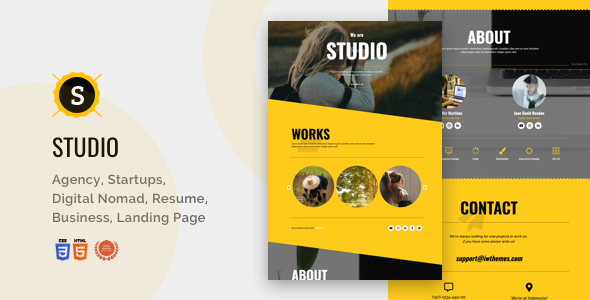
Studio is a single-page HTML landing template built on Bootstrap and sold on ThemeForest by the developer iwthemes for $11. It packages a responsive one-page layout aimed at photographers, freelancers, agencies and small businesses that need a promotional page rather than a full multi-page website. Buyers get the raw HTML theme plus documentation in a single download, with no CMS or build tooling attached.
The product has accumulated 433 sales since its initial release, which puts it in the modest-but-established bracket for a cheap HTML template. That figure matters less than the date attached to it: the last vendor update landed in April 2020, and the changelog shows most of the substantive work happened years earlier. Anyone evaluating this Studio creative template today is buying a frozen artefact, and the review below treats it that way.
What the Studio creative template actually gives you
At its core this is a static HTML and CSS package. There is no WordPress theme, no page builder and no admin panel. Editing means opening the files in a code editor and changing markup directly. For developers and confident front-end freelancers that is a feature, not a drawback — there is no plugin layer to maintain, no database, and no security surface beyond whatever the host provides. The trade-off is that every content change, however small, requires file access and a redeploy.
The layout system rests on Bootstrap, which is the single most consequential fact about the product. Because the grid, typography scale and responsive breakpoints come from Bootstrap, anyone who already knows that framework can predict how the template behaves at different viewport widths without reading much documentation. The vendor shipped a Bootstrap version update in the 1.3 release, so the bundled framework is more recent than the original 2013 codebase, though the vendor does not state which Bootstrap major version is included.
The one-page structure is the organising principle. Navigation anchors jump between sections rather than loading separate documents, which suits a scrolling pitch: hero, services or gallery, about, contact. The vendor tags mention gallery, photography, portfolio, apps, corporate and agency, and the changelog references a parallax version, a 404 page, centred-title variants, additional colour skins and a revised menu. In practice that means the download contains more than one starting point — several visual treatments of the same skeleton rather than a single fixed design.
Two smaller details are worth noting because they are unusual at this price. The first is a Spanish-language support commitment, which the vendor lists as a feature; buyers who need assistance in Spanish rather than English have a stated channel. The second is documentation bundled inside the zip alongside the theme files. Neither is remarkable on its own, but both reduce the friction of getting a first version live.
Where a one-page HTML template fits, and where it does not
The clearest fit is a promotional page for a person or a small studio: a photographer building a scrolling portfolio, a consultant establishing a single-page presence, an app or product launch that needs one persuasive screen rather than a content site. Because the files are plain HTML, the template can be dropped onto almost any shared host, a static host, or folded into an existing site as a landing page alongside a separate application. That portability is the main reason a template like this still has a market despite its age.
A second fit is agency or freelance work where the deliverable is a fixed-scope page. A designer who needs to hand over a finished promotional page without committing the client to a CMS licence or a maintenance contract can use this as the starting point and bill for customisation. The low purchase price keeps the cost line trivial relative to the labour.
It is the wrong choice in several common scenarios. Anyone who needs a blog, multiple service pages, e-commerce, user accounts or regularly updated content should not start here — a static single page has no mechanism for any of that, and bolting a CMS onto it later costs more than choosing a CMS-native theme from the outset. Buyers who cannot read HTML or CSS will find the editing model obstructive; the vendor markets it as easy to edit, but that claim assumes familiarity with markup. And projects with modern accessibility, performance or browser-support requirements should be assessed carefully, because the changelog’s most recent substantive entries date from 2017 and the code predates several shifts in front-end practice.
Strengths and limitations
Strengths
- Genuinely lightweight: static HTML and CSS with no runtime dependencies, database or plugin stack to maintain or secure.
- Bootstrap foundation makes the responsive behaviour predictable for anyone already fluent in that framework.
- Multiple bundled variants — parallax, centred titles, colour skins and a 404 page — give more than one design direction from a single purchase.
- Documentation ships inside the download, and the vendor provides both a discussion board and a direct email address for support.
- Spanish-language support is explicitly offered, which is uncommon among budget ThemeForest items.
- At $11 the financial risk is minimal relative to the hours saved on layout and responsive styling.
Limitations
- The last vendor update was April 2020, and the changelog shows no substantive feature work since 2017. The template is effectively unmaintained.
- The vendor does not state which Bootstrap major version is bundled, which makes dependency auditing harder than it should be.
- No CMS integration, page builder or templating layer is included, so all content editing happens in source files.
- Accessibility is not mentioned anywhere in the listing — no WCAG conformance claim, no keyboard-navigation notes, no contrast documentation. Buyers with compliance obligations must audit it themselves.
- Performance characteristics are undocumented: no stated asset sizes, no optimisation notes, no Core Web Vitals guidance.
- Browser support is only referenced historically, via an Internet Explorer 8 compatibility note from the 2013 changelog, which says nothing useful about current browsers.
- The listing’s feature copy is thin and partly promotional, so the practical scope of the download has to be established by inspecting the files.
How it compares with the wider category
The realistic alternatives fall into three groups. The first is modern multipurpose HTML templates, which typically ship with build tooling, a Sass architecture, current framework versions and active maintenance. They cost more and carry more dependencies, but they are updated and documented to a standard this product does not meet. The second is WordPress or another CMS theme at a similar price point, which trades the simplicity of static files for a content-editing interface and a much larger maintenance surface. The third is a custom build, which costs far more in labour but produces exactly the markup required.
Studio competes on simplicity and price rather than capability. Against a modern template it loses on maintenance, documentation depth and framework currency, and wins on weight and the absence of a toolchain. Against a CMS theme it wins on hosting flexibility and loses on everything related to content management. The decision therefore hinges less on features than on whether the buyer wants a static artefact or a living system — and on whether an unmaintained codebase is acceptable for the project at hand.
Frequently Asked Questions
Is Studio a WordPress theme?
No. Studio is a static HTML and CSS landing page template, not a WordPress theme. It cannot be installed through the WordPress admin or activated like a theme. Using it on a WordPress site would mean converting the markup into a theme manually or embedding it as a standalone page outside the CMS.
Can the Studio creative template be used for a multi-page website?
Not without significant work. The template is designed as a single scrolling page with anchor navigation between sections. There is no built-in routing, no secondary page templates beyond the included 404 page, and no content structure for separate articles or service pages. Adding those means writing them from scratch.
Does the template still receive updates?
The vendor’s last recorded update was April 2020, and the changelog shows the most substantial changes occurred in 2017 and earlier. No future release schedule is stated. Buyers should treat the current version as final and plan for any framework or security updates to be handled in-house.
What level of technical skill is needed to edit it?
Comfort with HTML and CSS is effectively required. Content changes are made by editing source files directly, and there is no visual editor or admin interface. The bundled documentation helps with structure and setup, but it does not remove the need to understand markup, and the vendor’s “easy to edit” claim assumes that baseline.
Verdict
Studio creative template is a reasonable purchase for a developer, freelancer or agency that needs a cheap, lightweight, static one-page layout and is comfortable working directly in HTML and CSS. The Bootstrap foundation, multiple bundled variants and low price make it a defensible starting point for a fixed-scope promotional page, and the 433 sales suggest it has satisfied enough buyers to remain a known quantity in its niche.
It is the wrong purchase for anyone who needs a CMS, ongoing content updates, documented accessibility compliance, or assurance that the codebase is actively maintained. The 2020 last-update date and the absence of any modern framework, performance or accessibility information are real risks, not formalities. Buyers should inspect the files before committing to a client project, and should budget for the possibility that they are adopting a legacy codebase rather than a supported product.