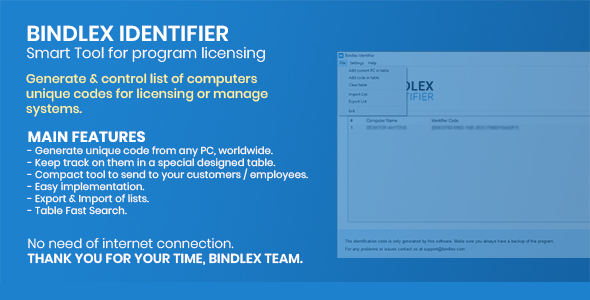
Bindlex Identifier Apps is a two-part Windows licensing utility sold on ThemeForest for $559. It generates a hardware-derived machine code for each computer, then lets an administrator collect those codes into a licence table that can be imported and exported. It is aimed at software vendors and IT administrators who need to tie a desktop application to specific machines without running a licence server.
The package is deliberately small in scope: one executable acts as the administrator’s console, the other is a stripped-down detector that can be handed to end users. There is no cloud dashboard, no subscription billing, and no activation API. The vendor does not disclose sales figures, so there is no adoption data to weigh.
What Bindlex Identifier Apps actually does under the hood
The core mechanism is machine fingerprinting. When the detector runs on a target PC, it derives a code from that machine’s hardware profile. The vendor states the code survives an operating system reinstall and does not require an internet connection. That combination matters more than it first appears: it means a customer can wipe a drive, reinstall Windows, and still be recognised as the same licensed seat, and it means the whole scheme works on air-gapped machines in a factory floor, a laboratory, or a field laptop with no connectivity.
Two executables with deliberately different jobs
The administrative console is where the real work happens. It maintains a table of licence records that pairs each generated code with a computer name, so an administrator can identify a seat by something more human-readable than a long alphanumeric string. Lists can be imported and exported, which is the feature that makes the tool usable at scale — records can be moved between machines, backed up, or handed to a colleague as a file rather than retyped. A quick filter sits on top of the table for searching once the list grows past a few dozen entries.
The second executable, the Code Detector, does one thing: it displays the machine code for the computer it runs on. The vendor describes it as compact and notes that it writes no files to disk. That last point is the practical one. A detector that creates no files and requires no installation is far easier to email to a customer or drop onto a USB stick than a full installer, and it avoids leaving artefacts on a client’s machine that a cautious IT department might object to.
Offline operation as a design constraint
Because nothing phones home, there is no server to provision, no uptime to monitor, and no per-seat hosting cost. For a small software vendor selling to organisations that block outbound traffic, that is a genuine advantage over hosted licence management platforms. The trade-off is that revocation and reissue are manual processes handled through the console’s table rather than pushed remotely.
Where Bindlex Identifier Apps fits, and where it does not
The clearest fit is an independent developer or small studio shipping a desktop application — an engineering tool, a point-of-sale utility, a data-processing script wrapped in a GUI — to business customers who expect a permanent licence rather than a subscription. The workflow is straightforward: the customer runs the detector, sends back a code, the vendor adds a row to the table, and a licence is issued. No account creation, no onboarding email sequence, no dependency on a third-party service staying online.
A second fit is internal IT. An organisation that manages a fleet of workstations and needs to track which machine is which, or restrict an internally built tool to approved hardware, can use the console as a lightweight asset register keyed on hardware rather than on hostname, which users change freely.
The wrong choice is any product with a modern commercial model. If the business needs subscription billing, seat-count enforcement in real time, self-service licence portals, trial expiry, or usage analytics, this package does none of that. It is also a poor fit for cross-platform software: the vendor describes two executables with no mention of macOS or Linux builds, so anyone shipping beyond Windows should confirm platform support before purchase. And a team wanting a documented REST API to integrate licensing into an existing e-commerce checkout will find nothing here to integrate with.
Strengths and limitations of this licensing tool
Strengths
- Survives OS reinstalls. The machine code is tied to hardware rather than to an installation, which removes the most common support request in desktop licensing.
- Fully offline. No server, no network dependency, and no hosting bill — workable in restricted or air-gapped environments.
- Clean end-user handoff. The detector writes no files and needs no installation, so sending it to a customer carries little friction or support risk.
- Portable records. Import and export of the licence table means the data is not locked inside the tool and can be backed up or migrated.
- Searchable at scale. The quick filter is a small feature that becomes essential once a table holds hundreds of machines.
Limitations
- Price relative to scope. At $559 this is a significant outlay for two small executables with no server component, no updates roadmap stated, and no published sales history to gauge longevity.
- Windows-centric by implication. The vendor refers only to executables and does not state support for macOS or Linux, which rules it out for cross-platform titles until confirmed.
- No automation layer. There is no API, webhook, or command-line interface described, so licence issuance stays a manual, human-driven step.
- Hardware changes are unaddressed. The vendor says the code survives a reinstall but does not state what happens after a motherboard swap or major component upgrade — a realistic scenario that would presumably require a manual reissue.
- No revocation tooling. Because there is no online check, a leaked or misused code cannot be switched off remotely; the vendor’s table is the only control point.
- Thin documentation signal. The listing describes two executables and their functions but does not detail the fingerprinting method, the code format, or the export file format, all of which a buyer would want before committing.
How Bindlex Identifier Apps compares with the wider licensing category
Desktop licensing tools generally fall into three groups. Hosted licence-management platforms offer dashboards, APIs, trial management and analytics, usually on a recurring per-seat or per-product fee; they are more capable but introduce an external dependency and an ongoing cost. Open-source licensing libraries are free and flexible but require development work to build a console, a table, and an export format around them. Single-purpose offline key generators sit in the third group, trading features for simplicity.
Bindlex Identifier Apps belongs firmly in that third group, and it is a reasonably complete example of it: the console, the searchable table, the import/export, and the no-install detector together cover the whole manual workflow rather than just the code-generation step. Against hosted platforms it wins on cost predictability and offline reliability, and loses on automation, revocation, and reporting. Against building on an open-source library it wins on time-to-market — there is no development work — and loses on flexibility, since the fingerprinting logic and file formats are fixed. The honest framing is that this is a tool for vendors whose licensing model is genuinely simple, and it becomes the wrong purchase the moment the model needs to be dynamic.
Frequently Asked Questions
Does Bindlex Identifier still work after a customer reinstalls Windows?
Yes. The vendor states the generated machine code persists through an operating system reinstall, because it is derived from hardware rather than from the installation itself. That removes the most common cause of licence reissue requests. What the vendor does not state is how the code behaves after a motherboard or disk replacement, so that scenario should be tested before relying on it.
Does the licence check require an internet connection?
No. The entire scheme runs offline: the detector generates a code locally and the administrator adds it to a table on their own machine. Nothing contacts a remote server. This makes the tool suitable for air-gapped or restricted networks, but it also means licences cannot be revoked or validated remotely once issued.
Can the code detector be sent to clients safely?
Yes, within reason. The vendor describes the detector as a compact executable that generates a code and writes no files to disk, so it can be emailed or copied to a customer without an installation step. It should still be distributed over a trusted channel and with a checksum, since recipients are being asked to run an unsigned executable.
Is Bindlex Identifier Apps suitable for cross-platform software?
Probably not. The package consists of two executables and the vendor makes no mention of macOS or Linux builds, which points to a Windows-only toolchain. A vendor shipping a cross-platform application should confirm platform support directly with the developer before buying, because a licensing scheme that only covers one platform leaves the rest of the customer base unlicensed.
Verdict: who should buy Bindlex Identifier Apps
This is a sensible purchase for a solo developer or small software house selling a Windows desktop application on perpetual licences to organisations that block outbound traffic, where the licensing model is genuinely as simple as one code per machine. It also suits an IT team wanting a lightweight hardware-keyed register of workstations. It is not the right buy for anyone who needs subscription billing, remote revocation, usage analytics, an integration API, or coverage beyond Windows — those requirements point to a hosted platform or a custom build. At $559 the decision rests less on capability, which is narrow but complete for its niche, than on whether the manual workflow matches the business model. Buyers should request a trial or a live demonstration of the detector and the export format before committing, since the vendor’s listing leaves the fingerprinting method and file formats unspecified.