Dr. Assistant PRO php-scripts is a self-hosted patient management and prescription writing application built on Laravel and Vue.js, sold on ThemeForest for $179. It combines appointment scheduling, a drag-and-drop prescription builder, drug and treatment libraries, invoicing and a patient-facing portal in a single installable package aimed at individual doctors and multi-doctor diagnostic centres. It suits clinics that want to own their data on their own server and are comfortable running a PHP application, rather than buyers looking for a managed SaaS booking tool.
What Dr. Assistant PRO php-scripts Actually Does
The product is best understood as a small practice operating system rather than a single-purpose booking widget. Its capabilities cluster into four areas, and the value of each depends heavily on how a clinic already works.
Appointment scheduling and the dynamic scheduler
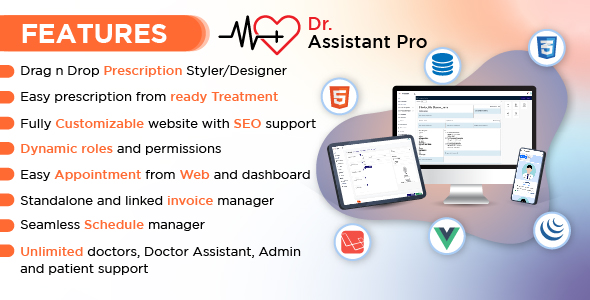
Appointments can be created either from the admin dashboard or from the public-facing website, which matters because reception staff and patients rarely work through the same interface. The vendor describes a dynamic scheduler, which in practice means the system models doctor availability as configurable time slots rather than a fixed calendar grid. For a diagnostic centre where several doctors hold separate chamber hours, that distinction is the difference between a workable roster and a spreadsheet bolted onto a booking form.
Prescription writing with reusable building blocks
The prescription builder is the centrepiece. Drugs are stored in the system grouped by type, so a doctor opening the drug picker can filter to a category and select from a short list instead of typing free text each time. Separately, a doctor can save an entire prescription as a reusable template — the vendor calls these ready treatments — and load it into a new consultation before adjusting the details. For high-volume outpatient work, particularly follow-up visits for chronic conditions, that combination removes most of the repetitive typing that makes digital prescribing slower than handwriting.
Prescription layout and site design without code
Two drag-and-drop designers ship with the product: one for the printed prescription layout and one for the public website, the latter with SEO fields attached. A clinic can therefore change its letterhead, logo placement and prescription structure without editing Blade templates, and can build marketing pages for services and doctors without a separate WordPress install. The page builder is not a general-purpose site builder, so expectations should be set accordingly.
Shared patient records across doctors
Doctors on the same installation can share patients with one another and view each other’s prescriptions, uploaded reports and diagnosis status. This is the feature that justifies the “diagnosis centre” positioning: a patient seen by three consultants at the same facility gets one continuous record rather than three disconnected ones. A patient panel gives the patient read access to their own prescriptions and appointment history.
Roles, invoicing and file handling
Roles and permissions are unlimited and configurable, with a sidebar styler so each role sees a relevant menu. Billing is handled by an invoicing module that works either standalone or linked to appointments. A file manager handles uploads — the vendor specifically claims large files can be uploaded without reconfiguring PHP or web server limits, which is a real pain point for clinics scanning multi-page reports.
Where Dr. Assistant PRO Fits, and Where It Does Not
The strongest fit is a single-location clinic or diagnostic centre with between roughly two and twenty doctors who share patients. The shared-history model, the per-doctor scheduling and the role system all assume an organisation with staff, not a solo practitioner working from a phone. A solo doctor with a fixed daily list will find the sharing and permission layers surplus to requirements.
It also fits buyers who specifically need data residency. Because the application is self-hosted, patient records sit on infrastructure the clinic controls, which is often a hard requirement in jurisdictions with strict health data rules. Any clinic that has been told by a compliance adviser that cloud SaaS is off the table has a genuine reason to look here.
The wrong choice is a clinic without technical support. This is a PHP script, not a managed service. Someone has to provision a server with the right PHP and database versions, run the web installer, configure backups, apply updates and handle TLS. A practice manager who expects to sign up and start booking patients the same afternoon should be looking at hosted scheduling software instead. The same applies to any clinic that needs certified integration with national e-prescribing networks, laboratory systems or insurance clearinghouses — nothing in the listing suggests those connectors exist.
Strengths and Limitations of This Patient Management Script
Strengths
- Genuine multi-doctor model. Patient sharing, per-doctor chambers and granular roles are designed in from the start rather than patched on, which is unusual at this price point.
- Prescription templates and typed drug libraries directly reduce consultation time for repeat visits, the highest-volume case in most outpatient practices.
- Self-hosted with a browser installer. The setup wizard lowers the barrier compared with scripts that require manual database seeding and config editing.
- Patient-facing portal included. Prescription and appointment history for patients is bundled rather than sold as an add-on.
- Documented support channel. The developer, Binary Castle, publishes a public issue tracker and states a five-working-day fix target, which is more transparency than most ThemeForest script vendors offer.
- Reasonable price for the scope. At $179 with no per-seat licensing, the cost does not scale with headcount the way SaaS subscriptions do.
Limitations
- No disclosed sales history. The listing shows no sales count, so there is no installed base to infer stability or community support from. Buyers are effectively early adopters.
- Support is best-effort, not contractual. A five-day target published on a GitHub issue tracker is a statement of intent, not a service-level agreement, and there is no stated policy on how long updates are provided after purchase.
- No named integrations. The listing does not mention payment gateways, SMS or email reminder providers, lab systems or accounting exports. Clinics that depend on automated reminders will need to build or commission that work.
- Compliance is the buyer’s problem. Self-hosting shifts responsibility for encryption at rest, audit logging, access reviews and breach procedures onto the clinic. The vendor does not claim HIPAA, GDPR or any other certification.
- Two design systems to maintain. The bundled website builder is convenient but ties the public site to the application’s release cycle, which is awkward if the clinic already runs a separate marketing site.
- Customisation requires Laravel and Vue skills. The drag-and-drop tools cover layout, not logic. Any change to workflow, billing rules or report formats means editing the codebase.
How It Compares With the Broader Category
Practice management software splits into three rough groups, and Dr. Assistant PRO sits firmly in the middle one.
Hosted SaaS platforms dominate on convenience: no server, automatic updates, built-in reminder delivery and often native mobile apps. They charge per practitioner per month, and they hold the data. For a small clinic without IT capacity, that trade is usually correct, and no self-hosted script beats them on day-one simplicity.
Enterprise practice management suites sit at the other end, with certified integrations, billing engines and implementation consultants. They cost orders of magnitude more and are sold with contracts. A clinic that needs to bill insurers electronically is not choosing between this script and a $179 alternative; it is choosing between enterprise vendors.
Self-hosted scripts occupy the gap. Compared with other ThemeForest medical scripts, this one leans harder into the multi-doctor sharing model and the prescription builder than most, which typically focus on a single-practitioner booking calendar. Compared with open-source medical record systems, it offers a more polished interface and a lower setup burden but a far smaller ecosystem and no third-party module market. The honest summary is that Dr. Assistant PRO competes on ownership and prescription workflow, and concedes on integrations, managed hosting and long-term support guarantees.
Frequently Asked Questions
Is Dr. Assistant PRO a SaaS subscription or a one-time purchase?
It is a one-time purchase of a self-hosted PHP script, currently priced at $179 on ThemeForest. There is no recurring licence fee from the vendor, but the buyer pays separately for hosting, domain and any customisation work. Ongoing costs therefore shift from a subscription to infrastructure and maintenance labour, which suits clinics with in-house technical capacity.
Can several doctors at the same clinic share patient records with it?
Yes, patient sharing between doctors is a core feature. Doctors on the same installation can grant each other access to a patient’s prescriptions, uploaded reports and diagnosis status, so a patient seen by multiple consultants at one facility keeps a single continuous history. Access is governed by the role and permission system, which the administrator configures.
Does it work for a solo practitioner, or is it overkill?
It works, but much of the product is wasted on a single-doctor practice. The sharing, multi-role permissions and multi-chamber scheduling are built for organisations. A solo practitioner mainly gains the prescription builder and patient portal, and may find a simpler hosted booking tool cheaper once hosting and maintenance time are counted.
What technical requirements does the script have?
The vendor identifies it as a Laravel and Vue.js application with a browser-based installer, so it needs a PHP-capable web server and a MySQL-compatible database. The listing does not state minimum PHP or database versions, so the specific version requirements should be confirmed with the developer before purchase. File uploads are handled without changing server configuration limits.
Verdict on Dr. Assistant PRO php-scripts
Buy it if the practice is a multi-doctor clinic or diagnostic centre that shares patients internally, wants prescription templates and a structured drug library to speed up consultations, and has someone who can run a Laravel application on its own server. The combination of shared records, drag-and-drop prescription design and a bundled patient portal is a lot of capability for $179, and the public issue tracker is a reasonable signal of good faith from Binary Castle.
Do not buy it if the clinic has no technical owner, needs certified e-prescribing or laboratory integrations, or requires a contractual support guarantee. With no disclosed sales figures, buyers should also treat this as an early-adopter purchase: budget time for a staging install and a thorough test of the prescription and scheduling workflows before any real patient data goes near it.