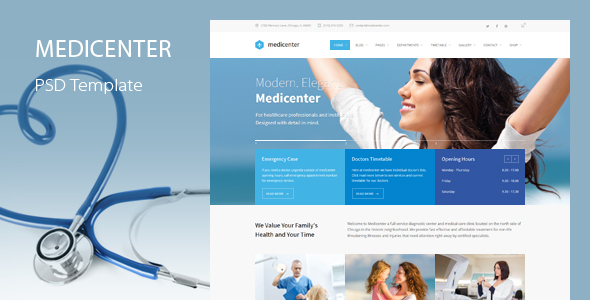
MediCenter is a Photoshop design template (PSD) for health, medical and beauty websites, sold on ThemeForest for $12 under the health-beauty category. It ships as layered, editable PSD files covering 39 page layouts, from hospital homepages and department listings to doctor profiles, galleries and contact pages. It is aimed at designers and agencies who build medical or wellness sites from scratch in Photoshop and want a ready-made visual system rather than a finished WordPress theme.
Because it is a design file and not a working site, the MediCenter health-beauty template occupies a specific niche: it is a starting point for custom front-end work, not a plug-and-play product for someone who wants a live website within an afternoon. Understanding that distinction is the single most important thing before buying.
What the MediCenter health-beauty template actually includes
The download is a ZIP file containing two PSD documents, both fully layered and organised, with no rasterised layers. That matters because rasterised mockups are effectively dead files — they look right in a preview but cannot be edited. Here, every element can be moved, recoloured, resized or deleted, which is the baseline expectation for a professional design template and one the vendor explicitly meets.
The page count is the headline number: 39 distinct layouts. These break down into eight home page styles (seven numbered variants plus a small-slider version), two about pages, a healthcare page, several service layouts including single-service and sidebar variants, department pages for general information, services and doctors, a timetable, five gallery configurations, doctor listing and single-doctor pages, blog and post templates, three contact layouts and a 404 page. For a project that needs a coherent visual language across a large site, that breadth removes a lot of repetitive layout work.
Beyond full pages, the file includes a component library: feature lists, carousels, testimonials and announcement boxes, accordions and notification boxes, tabs and quotes, list and table styles, buttons, headings and icons. Designers who work from a component sheet rather than redrawing each section will find this the most practically useful part of the package, because it lets new page types be assembled without inventing new visual rules.
Typography and iconography are handled with commercial-free assets. The template uses Open Sans, Source Sans Pro and PT Serif — all open-licence Google fonts — plus three icon fonts: 106 premium featured icons, 31 template icons and 33 social icons. Because the icons are font-based rather than image-based, they scale cleanly, can be recoloured with a single style change and stay sharp on high-density displays. The vendor states that placeholder images are included for each instance, while the premium photography shown in the live preview is not part of the download.
Where this template fits, and where it does not
The obvious fit is an agency or freelance designer building a bespoke site for a clinic, dental practice, hospital department, private practitioner or wellness and beauty business. The layout range covers the content these organisations actually publish: service descriptions, department structures, staff directories, opening timetables, treatment galleries and appointment or enquiry pages. A designer can hand a client a Photoshop comp built on these layouts, get sign-off, then slice or rebuild it in whatever CMS or framework the project requires.
It also suits a design team that needs a consistent visual system across multiple medical clients. Reusing one component library across several practices, with colour and typography swapped per brand, is faster than starting each project from a blank canvas.
The wrong choice is anyone who needs a functioning website rather than a design. There is no HTML, CSS, JavaScript, WordPress theme or CMS integration in this package — the vendor does not claim otherwise. A solo practice owner with no design or development skills will not be able to turn these files into a live site without hiring someone. Similarly, a project that must launch on a tight budget and timeline is better served by a coded theme, even if the visual result is less tailored.
A second mismatch is a project that needs a design language the template does not already speak. The layouts are conventional medical-site structures — hero, services grid, staff cards, contact form — and there is limited room to invent something unusual without effectively redrawing the file.
Strengths and limitations of the MediCenter health-beauty PSD
Strengths
- Thirty-nine page layouts in one package, covering the full range of pages a medical or wellness site typically needs, including less common ones such as timetables and expandable doctor details.
- Fully layered, non-rasterised PSD files, so every element remains editable rather than being flattened into an image.
- A reusable component library — carousels, tabs, accordions, tables, testimonials — that supports building new pages beyond the 39 supplied.
- Font-based icon sets totalling 170 icons, which scale and recolour cleanly and stay sharp on retina and mobile displays.
- All fonts are free for commercial use, removing licensing cost and legal ambiguity from client work.
- Placeholder images are included, so the layouts can be presented to a client without sourcing photography first.
- At $12, the cost is negligible against the hours saved on layout and component design.
Limitations
- It is a design file only. There is no coded output of any kind, so the entire build still has to be done by a developer or in a page builder.
- The last vendor update was 20 June 2022, and the version history shows a long gap before that — v1.0 in November 2013, v1.1 in February 2014, then v2.0 in February 2019. Buyers should not expect an actively evolving product.
- Premium photography in the preview is not included, so the visual quality of the demo depends partly on assets the buyer must license separately.
- The layouts follow established medical-site conventions. That is efficient but not distinctive, and a brand needing an unusual structure will end up redrawing significant portions.
- Because the deliverable is PSD, the workflow is tied to Adobe Photoshop and its licensing cost.
- Sales sit at 316, a modest figure for a ThemeForest item, so the community and third-party resources around it are thin.
How the MediCenter health-beauty template compares with alternatives
The realistic alternatives fall into three groups. The first is coded WordPress themes for medical practices, which cost more but produce a working site out of the box; they win on speed to launch and lose on design freedom. The second is general-purpose multipurpose themes with medical demo imports, which offer more flexibility across industries but usually less depth in medical-specific pages such as department structures and doctor timetables. The third is starting from a blank canvas or a generic UI kit, which offers maximum originality at the cost of considerably more design time.
MediCenter sits between the second and third options. It is more specialised than a multipurpose theme’s medical demo, and faster than a blank canvas, but it stops short of delivering anything a browser can render. The trade-off is deliberate: a designer gets a medical-specific visual system with no CMS constraints, in exchange for doing all the implementation work. Anyone comparing on “time until the site is live” will find coded themes ahead; anyone comparing on “control over the final design” will find this template ahead.
The category also includes Figma and Sketch UI kits, which are increasingly common alternatives to PSD files. Those offer better collaboration and version control, but they are separate products — this package is Photoshop-only, and buyers committed to a modern design-tool workflow should factor that in.
Frequently Asked Questions
Is MediCenter a WordPress theme or a PSD template?
It is a PSD template only. The download contains two layered Photoshop files plus the fonts used in the design, with no WordPress theme, HTML, CSS or JavaScript. Anyone needing a working website must either code the design or rebuild it in a page builder after purchase.
Can the MediCenter health-beauty template be used for a dental or beauty clinic site?
Yes. The layouts cover services, staff profiles, galleries, timetables and contact pages, which suit dental practices, private clinics, wellness studios and beauty businesses as well as hospitals. The vendor tags include dentist, clinic and beauty, and the component library is generic enough to adapt to any of them.
Are the images and fonts in the MediCenter template free to use commercially?
The fonts are free for commercial use, including Open Sans, Source Sans Pro and PT Serif. The premium photography shown in the live preview is not included in the download and must be licensed separately. Placeholder images are supplied for each instance so layouts can be built and presented before final photography is chosen.
How many page templates come with the MediCenter health-beauty PSD?
Thirty-nine page templates are included. These cover eight home page styles, about and healthcare pages, multiple service and department layouts, a timetable, five gallery variants, doctor listing and single-doctor pages, blog and post templates, three contact layouts and a 404 page, plus a separate component library.
Verdict on the MediCenter health-beauty template
This is a well-organised, genuinely comprehensive design package for medical, dental and wellness projects, and at $12 it is easy to justify for anyone who already works in Photoshop. The layered files, the 39 layouts and the font-based icon sets are the real value; the component library in particular saves meaningful time on larger builds. The MediCenter health-beauty template is the right purchase for designers and agencies who want a medical-specific visual system they can adapt freely.
It is the wrong purchase for practice owners without design or development support, for teams that need a live site quickly, and for anyone who expects ongoing updates — the vendor’s last release was in 2022 and the version history shows long dormant periods. Buyers should also be comfortable that the final website still has to be built from scratch once the design is approved.