The React Native LMS App Template Mobile is a $39 source-code template from ThemeForest that provides a complete course-app interface built with React Native and Expo, covering both Android and iOS from a single codebase. It ships with the screens a learning platform typically needs — onboarding, authentication, course browsing, video playback, payments, search, wishlist, notifications and account settings — plus multi-language support and RTL layout. It is aimed at developers and agencies who want a head start on the front end of an e-learning app rather than a finished, backend-connected product.
What the React Native LMS App Template Mobile actually includes
The package is a UI template, not a hosted learning platform. Buyers receive the full React Native source code, a documentation file, and free version upgrades after purchase. The vendor, CamelCaseTechnology, has published a version history showing four upgrades since the initial 2022 release, with the most recent in February 2025 updating to a current React Native and Expo baseline and an earlier release switching navigation to expo-router. That maintenance trail matters more than any single feature bullet, because a template pinned to an outdated React Native version costs more in upgrade work than it saves.
Screen coverage and navigation patterns
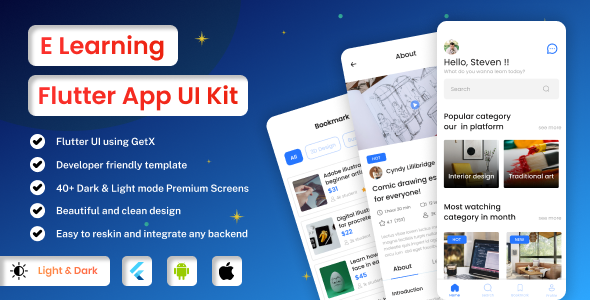
The template organises each page and component into separate files, which is the practical detail that determines whether a codebase is workable on a real project. A splash screen and an animated onboarding flow handle first launch. Login, sign-up and forgot-password screens are included and animated. The main app shell uses a bottom bar for primary navigation, a sliver app bar for scroll-responsive headers, and a carousel slider for promotional or featured content. Course pages, a payment screen, search, notifications, wishlist, account settings and app settings round out the flow. A video play screen is present, which is the single most important screen for any course app and the one most templates handle badly.
Cross-platform output, localisation and RTL
Because the interface is written in React Native with Expo, one codebase targets both Android and iOS. Multi-language support and right-to-left layout are built in, which is unusual at this price point and directly relevant to vendors targeting Middle Eastern, North African or South Asian markets. RTL support in particular is frequently bolted on badly, so its inclusion as a stated feature is worth verifying in the demo build before purchase.
What is not in the box
The listing does not mention a backend, API layer, admin dashboard, payment gateway integration, video hosting, DRM, push notification service or user authentication provider. The screens exist; the logic behind them is the buyer’s responsibility. This is normal for a UI template, but it is the distinction that most often disappoints first-time buyers of course app templates.
Where this course app template fits, and where it does not
The strongest fit is a development team or freelancer who has been asked to build a Udemy-style, Byju’s-style or Unacademy-style learning app and needs the front end accelerated. The vendor explicitly positions it for those clone use cases, and the screen inventory supports that: catalogue browsing, video lessons, wishlists and in-app purchase flows are all present. An agency producing multiple white-label learning apps would get repeated value from the multi-language and RTL support, since those are the features most often rebuilt per client.
A second good fit is a startup validating an e-learning concept. Building a clickable, installable prototype from this template is faster than designing screens from scratch, and the APK the vendor provides lets stakeholders test the feel on a real device before any backend work begins.
It is the wrong choice for anyone who needs a working product out of the box. A solo founder with no React Native experience expecting to publish a functioning course marketplace will find that every screen is a shell awaiting an API. It is also a poor fit for teams already committed to Flutter, native Swift/Kotlin, or a no-code platform, since the template’s value is entirely in its React Native codebase. Buyers should also note the vendor’s refund policy: no refunds once the item is downloaded, with exceptions only at the vendor’s discretion for valid reasons, so the demo APK should be tested thoroughly first.
Strengths and limitations of this learning app UI kit
Strengths
- Genuine cross-platform coverage. A single React Native and Expo codebase serves Android and iOS, avoiding a duplicate build.
- Complete screen inventory. The flows a course app needs — onboarding, auth, catalogue, video, payment, wishlist, settings — are all accounted for, so no major screen has to be designed from zero.
- Multi-language and RTL support. Rare at this price and directly useful for regional markets.
- Current tooling. The February 2025 release updated to recent React Native and Expo versions, and navigation moved to expo-router, which is the modern Expo convention.
- Separate files per page and component. A codebase structured this way is far easier to hand to another developer or extend than a monolithic one.
- Low entry cost. At $39 with free future updates, the financial risk is minimal relative to the hours saved on UI work.
Limitations
- No backend or API layer. Every screen is presentation only. Connecting authentication, course data, payments and video delivery is entirely the buyer’s work, and that work typically dwarfs the cost of the template.
- No stated payment gateway. A payment screen exists, but the vendor does not name any integrated provider, so Stripe, Razorpay, RevenueCat or in-app purchase wiring must be added.
- No sales or rating data disclosed. The listing shows no sales count or review score, so there is no independent signal of how the template performs in production or how responsive support is under load.
- Documentation depth is unstated. A documentation file is included, but the listing gives no indication of its scope, and support is handled through comments and an email address in the docs rather than a ticketing system.
- No refunds after download. The policy is explicit, which raises the cost of a mistaken purchase.
- Clone-oriented positioning. The template is marketed for building clones of existing platforms, which may not suit projects needing a distinctive brand identity without substantial redesign.
How it compares with other React Native LMS App Template Mobile options
The category splits into three broad groups. Full learning management systems with a backend, admin panel and course-authoring tools cost far more and impose their own data model, but they produce a working platform rather than a front end. UI kits and component libraries are cheaper and more generic, offering buttons, cards and forms but no assembled course-app flow. This template sits between them: more opinionated and complete than a component kit, considerably less complete than a full LMS.
Against other course app templates specifically, the differentiators to weigh are the currency of the React Native and Expo versions, whether navigation uses expo-router or an older stack, and whether RTL and multi-language are native to the codebase. On those points this package is competitive for its price. Where it loses ground is integration depth: templates that bundle a Firebase or REST API layer, or that ship with a companion admin dashboard, reduce total project time more than a pure UI kit does, even at a higher sticker price. Buyers should compare on total hours to a shippable build, not on the $39 figure alone.
Frequently Asked Questions
Is this React Native LMS App Template Mobile a complete app or just a UI?
It is a UI template, not a complete application. The purchase delivers full React Native source code, documentation and free updates, with all the screens a course app needs already designed and coded. There is no backend, database, API or payment integration included, so a development team must connect those services before the app can function as a real learning platform.
Does it work on both Android and iOS?
Yes. The template is built with React Native and Expo, so a single codebase produces builds for both Android and iOS. The vendor provides an Android APK for testing on a physical device, which is the most reliable way to assess animations, navigation and video playback before committing to a purchase.
Can it be used to build a Udemy or Byju’s clone?
Yes, that is the vendor’s stated intent. The listing names Udemy, Byju’s, Unacademy, Vedantu and similar platforms as intended clone targets, and the screen set — course catalogue, video player, wishlist, payments, search — matches those use cases. Buyers should expect to redesign branding and connect their own content and commerce systems.
Is there a refund if the template does not suit the project?
No refund is offered once the item has been downloaded. The vendor states that refunds are granted only for valid reasons at their discretion, and advises reading the description and compatibility details carefully beforehand. Testing the demo APK and confirming the React Native and Expo versions match the target project is therefore essential before purchase.
Verdict: who should buy this React Native LMS App Template Mobile
This template is worth buying for React Native developers, freelancers and agencies who need a polished, multi-language course app front end and are equipped to build the backend themselves. The current Expo and expo-router baseline, the complete screen inventory and the RTL support make it a sensible accelerator at $39. It is not suitable for non-technical founders expecting a launch-ready platform, nor for teams without React Native skills, since the real cost lies in the integration work the template deliberately leaves out. Buyers should test the demo APK first, given the no-refund policy and the absence of any published sales or rating history.