jQuery Object Overlay is a small JavaScript plugin that places a styled, semi-transparent layer over any element on a page, and it exists mainly to signal to visitors that an AJAX request is still running. It also works as a dimming backdrop for modal windows and lightboxes. The plugin is aimed at developers who want a lightweight, self-styled busy state rather than a full UI framework, and the jQuery Object Overlay javascript file is deliberately narrow in scope: it covers elements, it does not manage application state.
The plugin is sold on ThemeForest for $4 under the JavaScript category, and the vendor does not disclose a sales figure, so there is no meaningful purchase history to weigh. That price point and the absence of a visible install base matter when judging risk, and they are addressed later in this review.
What the jQuery Object Overlay Plugin Actually Does
The core behaviour is straightforward: a call targets an element, and an overlay is rendered on top of it. Everything else in the plugin is about how that overlay looks and how it behaves across browsers.
Per-element overlays rather than full-page masks
Most loading indicators are page-wide. This one attaches to a specific element, which means a form can be locked while a single panel refreshes, or one card in a grid can show a processing state while the rest of the layout stays interactive. That granularity is the main reason to pick it over a generic spinner library.
Custom styling and custom text
The overlay is not a fixed grey wash. The vendor states that both the overlay and any text placed inside it can be styled by the developer, which means the visual treatment can match an existing design system instead of fighting it. Typical uses would be a “Saving…” label, a progress message, or a short instruction such as “Please wait” rendered in the site’s own typography.
CSS3 filter support for blur and grayscale
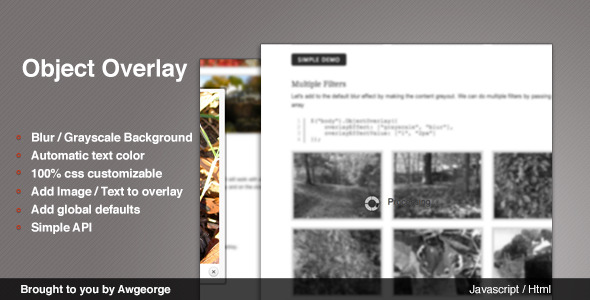
This is the feature that distinguishes the plugin from a plain opacity layer. Using CSS3 filters, the plugin can blur the underlying element or strip its colour entirely, which pushes the overlay content forward without needing a heavy dark scrim. Blur and grayscale are both listed in the vendor’s tag set, and both are applied to the element itself rather than to a screenshot or a duplicated node.
Browser detection with a colour fallback
CSS filters are only reliably supported in WebKit-based browsers according to the vendor. Rather than leaving non-supporting browsers with a broken or invisible effect, the plugin detects the capability and falls back to a solid coloured overlay of the developer’s choosing. That fallback is the difference between a feature and a bug, and it is the strongest engineering decision in the product.
Designed for AJAX and modal contexts
The vendor positions the plugin for AJAX applications first, and for lightboxes second. In a lightbox scenario the overlay fades the background so attention moves to the modal window. In an AJAX scenario it communicates that work is in progress. Both are legitimate, and both are cases where a full-page blocking loader would be too blunt.
Where This Plugin Fits and Where It Does Not
The clearest fit is a single-page or heavily AJAX-driven interface built on jQuery, where individual regions refresh independently. A dashboard with sortable tables, an admin panel with inline editing, a checkout form that validates against a server, or a filterable product grid all benefit from a per-element processing state. The blur and grayscale effects are particularly well suited to image-heavy interfaces, where desaturating a thumbnail communicates “unavailable” faster than any icon.
A second fit is any project that already has a defined visual language and needs the loading state to obey it. Because the overlay and its text are developer-styled, there is no default theme to override. Agencies building client sites with a strict style guide will find that more useful than a pre-designed loader with limited theming options.
The plugin is the wrong choice for a few situations. Projects not using jQuery should not add the library solely for this. Applications that need queued notifications, progress percentages, or cancellation controls need a state-management layer, not an overlay. And any site whose primary audience is on browsers without CSS filter support will only ever see the flat colour fallback, which removes the plugin’s main differentiator and leaves a very ordinary dimming layer behind.
Strengths and Limitations of jQuery Object Overlay
Strengths
- Element-level targeting allows partial page locking, which most loading indicators cannot do.
- Blur and grayscale filters give a visual treatment that is difficult to replicate with plain CSS opacity alone.
- Automatic capability detection with a coloured fallback means the plugin degrades instead of breaking.
- Overlay appearance and text are fully developer-controlled, so it integrates with existing design systems.
- The file footprint is small and the API surface is narrow, which keeps integration time low.
- At $4 the financial risk of evaluating it is negligible.
Limitations
- CSS filters are limited to WebKit browsers per the vendor, so the blur and grayscale effects are not universal. Firefox and other engines receive the flat colour fallback.
- There is no disclosed sales count or rating on the listing, so there is no independent evidence of how the plugin behaves in production sites.
- No documentation details are provided in the listing, including whether callbacks, timeouts, or a manual dismiss method exist. Buyers should assume the API is minimal until they inspect the files.
- The plugin depends on jQuery. On a modern codebase that has moved to vanilla JavaScript or a component framework, that dependency is a real cost.
- It is a visual layer only. It does not track request state, retry failed calls, or prevent duplicate submissions on its own.
- Because filters are applied to the element, heavy blur on large or complex DOM subtrees can affect rendering performance on low-powered devices.
How It Compares to Other Overlay and Loading-State Options
The general category here splits into three groups: full-page loading masks, framework-integrated loading states, and small single-purpose plugins like this one.
Full-page masks are simpler to reason about and usually ship with a spinner, but they block the entire interface. For a long-running background request, that is an unnecessarily hostile experience. jQuery Object Overlay wins on precision because it can lock one region while leaving navigation and other controls usable.
Framework-integrated loading states, such as those bundled with component libraries, offer better lifecycle handling and often come with request management built in. They are the stronger choice for large applications, but they require adopting the framework and its conventions. A jQuery-based site cannot use them without a rewrite.
Generic jQuery overlay plugins are the closest alternative. Many offer more configuration options, animation types, or built-in spinners. What separates this plugin is the filter-based treatment of the underlying element and the explicit fallback path. Where a competing plugin might offer twenty options and a default look, this one offers a small set of choices and expects the developer to supply the styling. That is a trade-off between convenience and control, and it favours teams with existing CSS.
On capability, the plugin is narrow but complete for its stated purpose. On fit, it is a strong match for jQuery-era interfaces and a poor match for anything modern or framework-driven. The absence of a visible user base is the main unknown; buyers are effectively evaluating the code on its own merits rather than on community validation.
Frequently Asked Questions
Does jQuery Object Overlay work in Firefox and Safari?
It works in all browsers, but the blur and grayscale effects only render in WebKit-based browsers according to the vendor. In other engines the plugin detects the missing filter support and substitutes the coloured overlay specified by the developer. The overlay itself, its text, and the element targeting all function normally everywhere, so only the visual treatment differs.
Can the overlay be applied to more than one element at a time?
Yes, since the plugin targets elements rather than the document. Each call applies an overlay to the element it references, so several regions can display processing states simultaneously. The vendor does not state whether the plugin tracks these instances internally, so developers should manage dismissal for each element themselves rather than assuming a single global reset.
Is jQuery Object Overlay suitable for a non-jQuery website?
Not really. The plugin is built on jQuery, so using it on a site that does not already load the library means adding jQuery purely for a visual overlay. That is a poor trade on a modern vanilla JavaScript or framework-based codebase. The plugin makes most sense where jQuery is already a dependency for other reasons.
Does the plugin show progress percentages or handle failed requests?
No. It is a visual layer only and does not track request state, report progress, or respond to errors. Developers must wire it to their own AJAX success and failure handlers and dismiss the overlay manually. For percentage-based progress or retry logic, a dedicated request-management library is required instead.
Verdict on jQuery Object Overlay
This plugin is worth buying for developers maintaining jQuery-based applications who need an element-level processing indicator with a distinctive visual treatment. The blur and grayscale filters, combined with a sensible fallback for browsers that lack filter support, give it a clear reason to exist beyond the many generic overlay scripts already available. At $4 the cost of trying it is trivial, and the narrow API means integration should take minutes rather than hours.
It is not the right purchase for teams working outside jQuery, for applications that need progress reporting or error handling, or for projects where the audience is predominantly on non-WebKit browsers and the filter effects would never appear. The undisclosed sales count means there is no community track record to lean on, so anyone evaluating jQuery Object Overlay javascript should inspect the source before committing it to a production build.