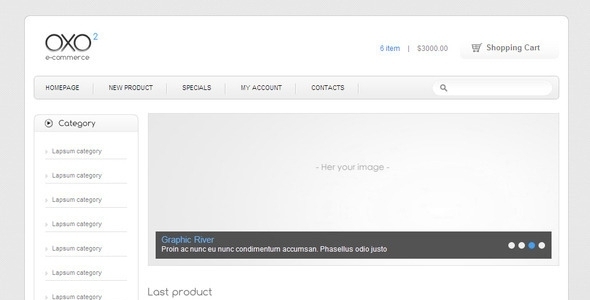
OXO e-commerce is a static HTML and PSD template package for online retail sites, sold on ThemeForest by the developer aldema. It ships with five coded HTML pages and five layered Photoshop files covering a homepage, category listing, product detail, shopping cart and a utility page, and it is priced at $14. Anyone evaluating OXO e-commerce retail templates today should understand one thing before anything else: the last vendor update was in April 2012, so this is a design asset rather than a maintained storefront platform.
The distinction matters because the listing sits in a category where buyers often assume they are getting a working shop. OXO is not that. It is a front-end kit — markup, styles, jQuery behaviour and source artwork — intended to be wired into a back end the buyer supplies. That framing shapes everything below.
What the OXO e-commerce retail package actually contains
The deliverable is split into two halves that serve different stages of a project. The HTML half gives a developer a starting point for a storefront front end without designing from zero. The PSD half gives a designer the layered source files to reshape that front end before a line of code is written.
Coded pages and their practical use
- index.html — a storefront landing page with the usual merchandising slots: hero area, featured products, promotional blocks. Useful as a structural skeleton for a homepage that a developer then binds to real product data.
- shopping-cart.html — a cart summary layout with line items, quantities and totals. The markup presents the table structure; the arithmetic, session handling and checkout logic are not included.
- category.html — a grid or list view for a product category or sub-category, which is the page most retail templates live or die on because it carries the browsing experience.
- product.html — a single-item detail page with gallery, description and add-to-cart affordances.
- utility.html — the catch-all page for shipping notes, returns policy, contact details and similar static content.
Five pages is a lean set. A production store normally needs account pages, order history, search results, a checkout flow and error states. None of those are present, so the template covers the browsing and cart-preview portion of a store and leaves the transactional tail to the integrator.
Layered PSD source files
The Photoshop side mirrors the HTML: a homepage composition, a category page, a product page, a cart page and a high-resolution logo file. The vendor states that layers are grouped logically, which is the difference between a PSD a designer can edit in an afternoon and one that has to be rebuilt. For agencies that need to bend the visual language toward a client’s brand before development starts, the PSD set is arguably the more valuable half of the purchase.
Front-end behaviour and typography
The listing tags the template with AJAX and jQuery, so some interactive behaviour is present in the markup — typically cart quantity updates or category filtering without a full page reload. The vendor does not document which interactions are wired up, so a buyer should treat the AJAX claim as something to verify in the demo rather than a specification.
Typography is Comfortaa, a rounded geometric display face, paired with Arial for body text. Comfortaa is a distinctive choice: it reads friendly and consumer-facing, and it dates the design to a particular era of web typography. Substituting a different typeface is straightforward in the CSS, but the layout’s spacing was tuned around Comfortaa’s metrics, so swapping it wholesale will need attention to line heights and button padding.
Where OXO e-commerce retail templates fit, and where they do not
The strongest fit is a developer or small studio building a bespoke storefront on a custom or headless back end who wants a neutral, clean front end to start from. Because OXO is plain HTML, CSS and jQuery with no framework lock-in, it can be dropped into almost any server-side stack — a PHP application, a Node service, a static site generator with a commerce API behind it. That portability is the real argument for a template like this over a platform-specific theme.
It also suits designers who want to present a retail concept quickly. The PSD files let a freelancer mock up a storefront for a pitch or a client review without committing to a build, and the matching HTML means the approved design already has a coded counterpart.
A third reasonable use is as a learning or reference asset. At $14, a junior developer can read through a complete, cleanly structured retail front end — how a product grid is marked up, how a cart table is laid out — for less than the cost of a lunch.
The wrong choice is any project that needs a functioning shop out of the box. If the requirement is a store that takes payments, manages inventory, handles tax and shipping rules, and connects to a payment gateway, OXO supplies none of that and was never intended to. A hosted platform or a full e-commerce theme for WordPress, Shopify or a comparable system will get there faster and with support behind it. A second poor fit is any project with modern accessibility, responsive or performance requirements written into the brief: the template predates the widespread adoption of responsive layout, and the vendor does not state that a mobile breakpoint is included.
Strengths and limitations of OXO e-commerce retail
Strengths
- Genuinely low cost of entry. At $14 the template is cheaper than an hour of most freelancers’ time, which makes it low-risk as a starting point or a reference.
- Matching design and code. Having PSDs and HTML that correspond page-for-page removes the usual translation gap between a mockup and a build.
- No framework dependency. Plain HTML, CSS and jQuery means the template can be integrated into any back end rather than only the platform it was built for.
- Proven demand. 466 sales on ThemeForest indicate the template found a real audience rather than sitting unsold.
- Logical layer organisation. The vendor states PSD layers are grouped, which materially reduces the time a designer spends preparing files for editing.
Limitations
- Abandoned since April 2012. The last vendor update is more than a decade old. No browser-compatibility fixes, no security patches to any bundled script, no modern CSS. Anything relying on jQuery from that period should be audited before use.
- No responsive layout stated. The vendor does not claim a mobile or tablet breakpoint. Buyers should assume the layout is fixed-width desktop unless the demo proves otherwise.
- No back-end or checkout logic. The cart page is a presentation layer only. Payment processing, order management and inventory are entirely the buyer’s responsibility.
- Incomplete page set. Account, search, checkout and error pages are absent, so the template covers perhaps a third of a production storefront’s screens.
- Undocumented interactivity. The AJAX and jQuery tags are not backed by a feature list, so the extent of the dynamic behaviour is unclear from the listing alone.
- Dated visual language. Comfortaa plus a 2012-era grid reads as a period piece. It can be modernised, but that work should be budgeted.
- Rating concerns raised by the vendor. The listing itself references a negative rating and asks buyers to make contact before judging. That is a transparency signal worth noting, though it also suggests past buyers hit problems.
How OXO compares with the wider template category
Retail templates broadly fall into three groups: platform themes tied to a specific commerce system, full application starters that bundle a back end, and static front-end kits like this one. OXO sits firmly in the third group, and judging it against the first two is a category error — it will lose every comparison on checkout functionality, payment integrations and ongoing support because it never claimed to compete there.
Against other static front-end kits, the comparison is more useful. The differentiators are the presence of matching layered PSDs, the absence of framework lock-in, and the price. A buyer weighing OXO against a newer static template is really weighing a $14 head start against the cost of modernising a decade-old layout. For a project with a designer attached, that trade is often worth it. For a project without one, a newer template with responsive markup built in is likely the cheaper path once the modernisation hours are counted.
Frequently Asked Questions
Is OXO e-commerce a complete shopping cart script?
No. OXO is a front-end template only. It provides HTML pages and PSD artwork for a storefront’s browsing and cart-preview screens, but it contains no server-side code, no database, no payment gateway integration and no order management. A developer must supply the entire commerce back end separately.
Does OXO work with WordPress, WooCommerce or Shopify?
Not directly. OXO is plain HTML, CSS and jQuery, so it is not a WordPress theme, a WooCommerce theme or a Shopify theme, and it cannot be installed into any of those systems as-is. Its markup could be converted into a theme by a developer, but that conversion is a project in itself rather than a configuration step.
Is the OXO template responsive on mobile devices?
The vendor does not state that a responsive layout is included, and the last update predates the point at which responsive design became standard. Buyers should assume a fixed-width desktop layout and budget for adding media queries, fluid grids and touch-friendly navigation if mobile traffic matters to the project.
Why does OXO only cost $14?
The price reflects what is being sold: a small set of static pages and source artwork, not a maintained product. There is no support commitment, no update roadmap and no back-end functionality bundled in. The low price is appropriate for a design starting point and misleading if read as the cost of a working store.
Verdict on OXO e-commerce retail
OXO e-commerce retail is worth buying for developers and designers who need a clean, framework-free storefront front end with matching PSD source files, and who are comfortable building or integrating the commerce logic themselves. At $14 with 466 sales behind it, the risk is minimal and the starting point is legitimate. It is not worth buying for anyone expecting a functioning shop, a supported theme or a mobile-ready layout — the 2012 last-update date, the missing checkout and account pages, and the absence of any stated responsive support rule it out for those briefs. The sensible way to treat OXO is as a design asset to be modernised, not a product to be deployed. Buyers who price in the modernisation work will find it reasonable value; those who do not will be disappointed.