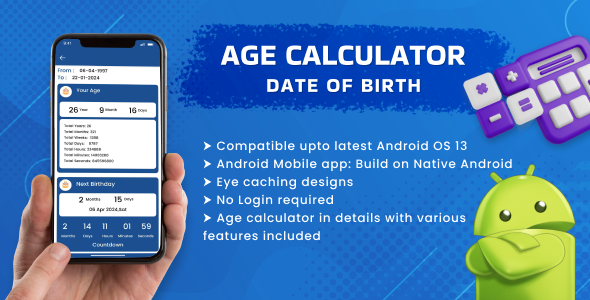
The Age Calculator Android App with Birthday Countdown & Reminders is a native Android utility built in Android Studio that bundles date arithmetic, milestone tracking and a small event diary into a single mobile application. It calculates exact age in years, months and days, counts down to upcoming birthdays, compares two people’s ages, checks leap years and working days between dates, and stores family birthdays with reminders. It is aimed at Android developers and resellers who want a ready-made utility app to publish under their own brand, rather than at end users buying from Google Play.
That distinction matters more than the feature list suggests. This is a source-code product sold on ThemeForest for $19, and its value depends on how much of the finished app a buyer can realistically reuse. The vendor, HJSQUARE Tech, does not disclose a sales figure on the listing, so there is no track record to weigh.
What the Age Calculator Android App Actually Does
The core function is the age calculator itself, which returns a result in years, months and days rather than a single rounded number. That precision is the difference between a toy and a tool: parents tracking a newborn’s development, applicants checking eligibility cut-offs, and anyone comparing two dates for legal or administrative reasons all need the granular output.
Around that core sit several related utilities that share the same date-handling logic:
- Birthday countdown timer — surfaces the number of days remaining until a saved birthday, which turns the app into something opened repeatedly rather than once.
- Baby age tracker — reports an infant’s age in weeks and months, the format paediatric appointments and milestone checklists typically use.
- Age difference comparison — places two people’s ages side by side, a feature the vendor frames around couples but which works equally for siblings or generational comparisons.
- Working days between dates — excludes weekends from a date range, useful for leave planning, notice periods and delivery estimates.
- Leap year checker — a small validation tool that supports the accuracy of the date calculations above.
A second cluster covers reminders and record-keeping. Family birthdays can be stored with notification reminders, and a contact event diary holds entries alongside phone numbers, so the app doubles as a lightweight personal CRM for anniversaries and recurring dates. There is also a greetings text creator for composing birthday messages, and vendor tags reference a daily horoscope module, though the feature list in the listing does not describe it in detail.
The interface is described as a clean, single-style Android UI with interactive elements and consistent navigation between tools. The vendor does not state which Android versions or API levels are targeted, whether the project uses Kotlin or Java, or whether it ships with AdMob or any monetisation layer — all of which a developer would normally want confirmed before purchase.
Where This App Fits, and Where It Does Not
The most obvious fit is a developer or small studio wanting a complete, publishable utility app without building date logic from scratch. Age and date calculators are unglamorous but durable categories: they attract steady search traffic, need no backend, and carry no ongoing content costs. A buyer who can rebrand the UI, adjust the colour scheme and ship to Google Play has a low-overhead product with a plausible path to ad revenue.
A second fit is the learning and template market. Developers studying Android date handling, notification scheduling or local database patterns can read a working implementation more quickly than assembling one from documentation. At $19 the code is cheaper than the hours it would take to reproduce.
A third, narrower fit is agencies or freelancers delivering a small branded app to a client — a gym, a paediatric clinic, a wedding planner — where a birthday and anniversary reminder tool is a plausible giveaway or companion app.
It is the wrong choice for anyone wanting a consumer app to use personally. There is no indication of a maintained Google Play listing, no user reviews to check, and no evidence of ongoing updates. Buyers expecting a polished, supported product with customer service beyond an email address should look at established Play Store apps instead. It is also a poor fit for teams needing a cross-platform codebase, since this is Android-only, and for anyone requiring accessibility compliance or localisation, neither of which the listing mentions.
Strengths and Limitations of the Age Calculator Android App
Strengths
- Genuinely broad feature set for the price. Age calculation, countdowns, working-day maths, reminders and a contact diary in one package is more than most $19 utility templates deliver.
- No backend dependency. Everything runs locally, which keeps hosting costs at zero and sidesteps privacy questions around storing birthdays and phone numbers on a server.
- Clear commercial use case. Date utilities monetise well through interstitial and banner ads because sessions are short and repeatable.
- Readable scope. The feature list is specific enough that a developer can estimate customisation effort before buying, rather than discovering hidden complexity later.
- Direct vendor contact. A published support email address is a modest but real signal that questions will reach a human.
Limitations
- No stated tech stack or SDK targets. The listing does not say whether the project is Kotlin or Java, which Android API level it compiles against, or which Gradle and library versions it depends on — details that determine whether it opens cleanly in a current Android Studio install.
- No sales history or ratings. With no disclosed sales, there is no independent evidence of code quality or buyer satisfaction.
- Feature list and tags diverge. The horoscope module appears in the tags but is not described in the features, leaving its completeness unclear.
- No documentation or update policy mentioned. Nothing in the listing addresses setup instructions, changelog frequency or compatibility with future Android releases.
- Design depth is unverified. “Simple and clean” is a claim, not a specification; there are no details on theming, dark mode or Material Design version.
How It Compares With Other Android Utility Templates
The general category here is the single-purpose Android utility template: calculator apps, unit converters, QR scanners, tip calculators and date tools sold as source code on marketplaces. Most of these compete on visual polish and documentation rather than raw feature count, and many ship with AdMob already wired in, Firebase analytics, onboarding screens and a written setup guide.
On capability breadth, this Age Calculator Android App with Birthday Countdown & Reminders sits above the typical single-function template. Where a basic age calculator does one calculation and stops, this one adds countdowns, reminders and a contact diary, which gives it more reasons to be reopened and therefore more ad impressions per install. That is a meaningful commercial advantage for a buyer thinking about revenue rather than novelty.
On the supporting infrastructure that usually justifies a template purchase, it appears thinner. Competing templates frequently advertise their architecture, their ad integration and their documentation as headline features; this listing leads with the feature list instead. Buyers who weight a smooth setup experience over breadth of functionality may find the category’s more documentation-heavy options a safer bet, while buyers who want the widest possible feature surface for a small outlay will find this competitive.
Compared with building from scratch, the trade-off is straightforward: a fraction of the development time in exchange for inheriting someone else’s code structure and design decisions, with limited information about either.
Frequently Asked Questions
What is the Age Calculator Android App with Birthday Countdown & Reminders?
It is an Android application source-code package that calculates age in years, months and days and adds birthday countdowns, reminders, working-day calculations and a contact event diary. Sold on ThemeForest for $19, it is intended for developers who want to publish or rebrand a ready-made utility app rather than for end users.
Do I need coding experience to use this app template?
Yes, some Android development experience is effectively required. The package is a source-code project opened in Android Studio, so rebranding, changing colours, updating package names and preparing a Play Store release all involve editing the project directly. The vendor does not state whether written setup documentation is included.
Does the app work offline and store personal data locally?
Nothing in the listing describes server components, so the app appears to run entirely offline with birthdays, contacts and reminders stored on the device. That is good for privacy and hosting costs, but the vendor does not confirm the storage method, so backup and data-portability behaviour cannot be verified before purchase.
Can the app be monetised with ads or published under my own brand?
Publishing under a new brand is the normal use case for a ThemeForest source-code purchase, and the app’s repeat-visit nature suits advertising. However, the listing does not mention AdMob, in-app purchases or any built-in monetisation, so ad integration would likely need to be added by the buyer.
Verdict: Who Should Buy the Age Calculator Android App with Birthday Countdown & Reminders
This is a sensible purchase for an Android developer or small studio that wants a feature-rich date utility to rebrand and publish quickly, and who is comfortable inspecting the code before committing to a release. The breadth of tools — age calculation, countdowns, working days, reminders and a contact diary — gives it more commercial legs than a single-function calculator template at a comparable price.
It is not the right buy for anyone wanting a finished consumer app, for teams needing documented setup and guaranteed updates, or for developers who require confirmation of the tech stack, SDK targets and monetisation setup before spending money. The absence of disclosed sales, ratings and technical specifications means the purchase carries real uncertainty.
Weighing it up, the $19 asking price is low enough that the risk is bounded, and the feature set is concrete enough to justify a look for the right kind of buyer. Those who need certainty about what they are getting should ask HJSQUARE Tech directly before purchasing.